Top Game Server Hosting Solutions for an Enhanced Gaming Experience
Discover the best game server hosting solutions to elevate your gaming experience. Read on to find the perfect fit for enhanced performance and reliability.

Shahrukh Sial is a Gaming Content Strategist at Sparked Host. He identifies his own strategic outlines through deep research to cover game guides, tips, and updates that help players improve their skills and enjoy a better gaming experience.
What Features Should I Look For When Comparing Game Server Hosting Providers?
Choosing a game server hosting provider is the most critical technical decision a community leader, mod developer, or competitive gaming group can make.
A poorly optimized host introduces high latency, frequent processing delays (low tick rates), and sudden database corruption that can destroy months of survival world progression.
The commercial server hosting market is flooded with providers utilizing aggressive marketing terminology to conceal outdated, oversaturated hardware infrastructure behind deceptively low prices.
To maximize organic search performance and ensure real-world player retention, this guide analyzes the absolute core architectural features, network infrastructures, panel capabilities, and pricing mechanisms you must evaluate when comparing game server hosts in 2026.
CPU Performance and Hardware Specifications
Multiplayer game servers are heavily dependent on immediate, synchronous mathematical processing. Unlike video rendering or data modeling applications that scale across dozens of slow processing cores, game engines process events sequentially within a single primary execution loop.
Single-Thread Performance Metrics
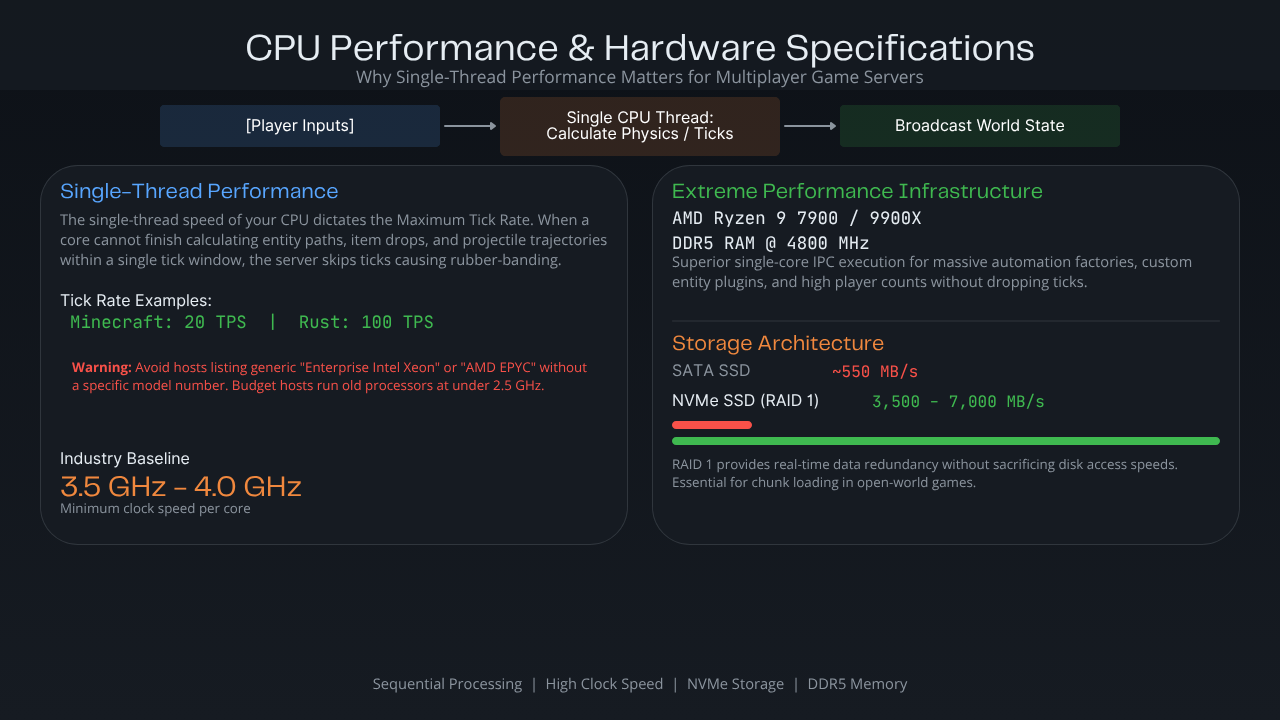
The single-thread performance of a Central Processing Unit (CPU) dictates your server's Maximum Tick Rate (such as 20 Ticks Per Second in Minecraft or 100 Ticks Per Second in Rust).
When a CPU cannot finish calculating all entity paths, item drops, and projectile trajectories within a single millisecond window, the server skips ticks, causing players to experience severe rubber-banding.
When comparing hosts, avoid any provider that lists generic "Enterprise Intel Xeon" or "AMD EPYC" processors without providing a specific model number.
Many budget hosts run dense clusters of virtual machines on old, high-core web-hosting processors that operate at low clock speeds (under 2.5 GHz).
For high-tick gaming performance, look for hosts utilizing desktop-grade or specialized server processors with high base clock frequencies, similar to those advertised for Enshrouded hosting on enterprise hardware.
-
The Industry Baseline: Minimum clock speeds of 3.5 GHz to 4.0 GHz per core.
-
Extreme Performance Infrastructure: AMD Ryzen 9 7900 or Ryzen 9 9900X processors running on DDR5 RAM architectures at 4800 MHz. These chips provide superior single-core instruction-per-clock (IPC) execution, allowing servers to handle massive automation factories, custom entity plugins, and high player counts without dropping ticks.
Storage Architecture: NVMe vs. SATA SSDs
Game servers constantly read and write world chunk data as players move across large open-world maps. If the storage drive lacks sufficient read/write speed, the entire server experience will stall whenever a player flies across a map border or triggers an exploration script, which is especially noticeable in automation-heavy worlds like Satisfactory server hosting environments.
-
SATA SSDs: Limited to speeds around 550 MB/s. While acceptable for tiny vanilla instances, they quickly choke under heavily modded environments.
-
NVMe SSDs in RAID 1 Configurations: Provide read/write speeds exceeding 3,500 MB/s to 7,000 MB/s. Running storage arrays in a redundant RAID 1 array ensures that data is copied across dual drives in real-time, providing hardware failure protection without sacrificing any disk access speeds, crucial for fast-paced factory simulations like Factorio hosting servers.
Data Center Locations and Network Latency
A high-performance processor is entirely useless if your player traffic travels along a poorly routed, congested network path. Network latency, measured as ping, is the time it takes for a data packet to travel from a player's machine to the host machine and back.
Geographic Distribution Constraints
When selecting a host, you must evaluate where the data center infrastructure physically sits relative to your community.
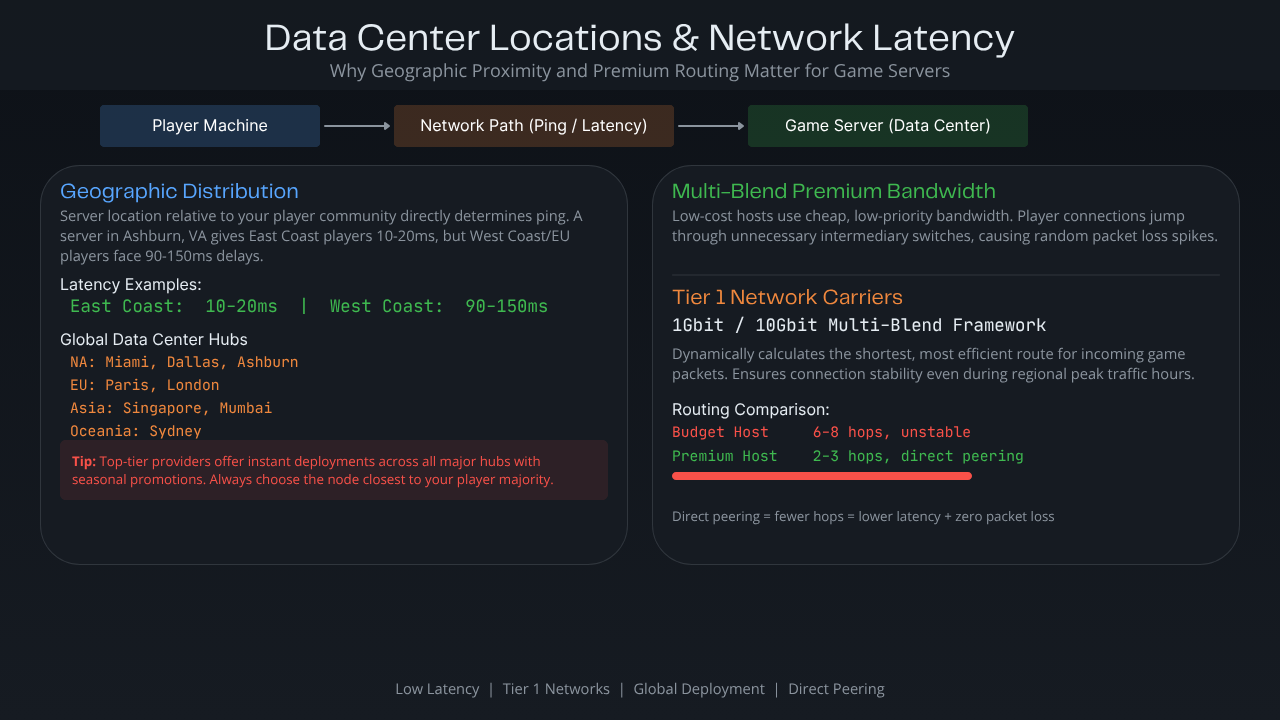
A server located in Ashburn, Virginia, will provide a flawless 10ms to 20ms ping for East Coast players, but West Coast or European players may face 90ms to 150ms delays, which disrupts real-time competitive interactions in latency-sensitive titles like Space Engineers hosting clusters.
Top-tier providers offer instant deployments across major global hubs, including North America (Miami, Dallas, Ashburn), Europe (Paris, London), Asia (Singapore, Mumbai), and Oceania (Sydney), often with seasonal promotions such as a winter sale on game hosting.
Multi-Blend Premium Bandwidth Routing
Low-cost server hosts save money by utilizing cheap, low-priority internet bandwidth. This results in bad data routing, meaning a player's connection might jump through multiple unnecessary intermediary network switches before reaching the server, inducing random spikes in packet loss.
Ensure your provider utilizes Tier 1 network carriers with direct peering arrangements. High-performance gaming networks use a 1Gbit/10Gbit multi-blend bandwidth framework.
This specialized architecture dynamically calculates the shortest, most efficient route for incoming game packets, ensuring connection stability even during regional peak internet traffic hours.
Server Scalability and Slot Limits
Your server hosting environment should adapt cleanly as your community expands from a small five-person friend group into a massive public community network, whether you are running compact Astroneer hosting plans or large public shards.
Player Slot Constraints vs. Resource Allocation
The server hosting market is divided into two operational pricing styles:
-
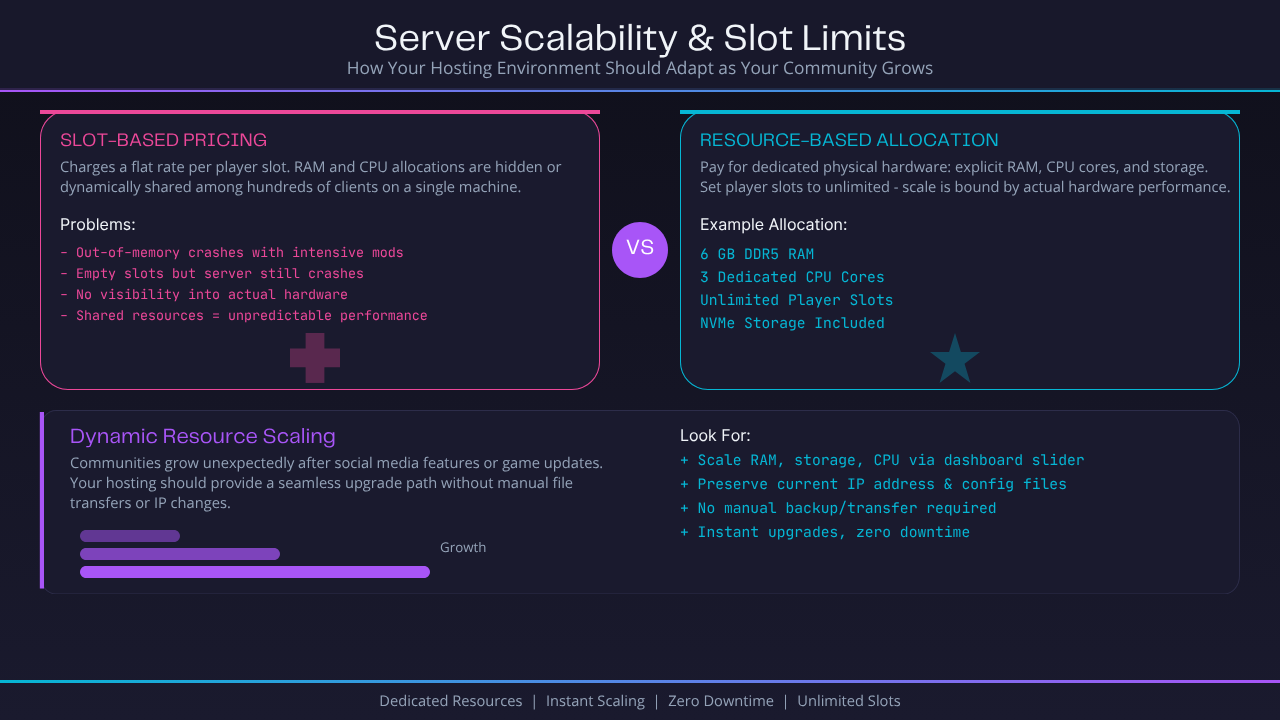
Slot-Based Formatting: The host charges you a flat rate based entirely on the number of players allowed to connect simultaneously. Under this model, the underlying RAM and CPU allocations are frequently hidden or dynamically shared among hundreds of clients on a single machine. If your community populates a slot-based server with intensive mods, the instance will crash due to out-of-memory errors despite having plenty of empty player slots left.
-
Resource-Based Allocations: You pay strictly for dedicated physical hardware allocations, such as 6 GB of DDR5 RAM and 3 explicit CPU processing cores. Under this setup, you are free to set your player slots to unlimited. The server's scale is bound strictly by actual hardware performance boundaries rather than an arbitrary artificial paywall.
Dynamic Resource Scaling
Communities often grow unexpectedly following social media features or game updates. Flexible budget Minecraft server hosting or other scalable plans should provide a seamless upgrade path that doesn't force you to back up your files, delete your current server instance, and transfer data manually to a new machine.
Look for control panels that allow you to scale up your allocation of RAM, storage, or processing threads instantly via a unified dashboard slider, preserving your current IP address and configuration files perfectly, which is especially helpful for growing Core Keeper hosting servers.
Control Panel Usability and Configuration Options
The control panel serves as your central command deck. A locked-down, confusing layout turns basic operations like altering a configuration file into an hours-long troubleshooting chore.
Modern Panel Architectures vs. Legacy Interfaces
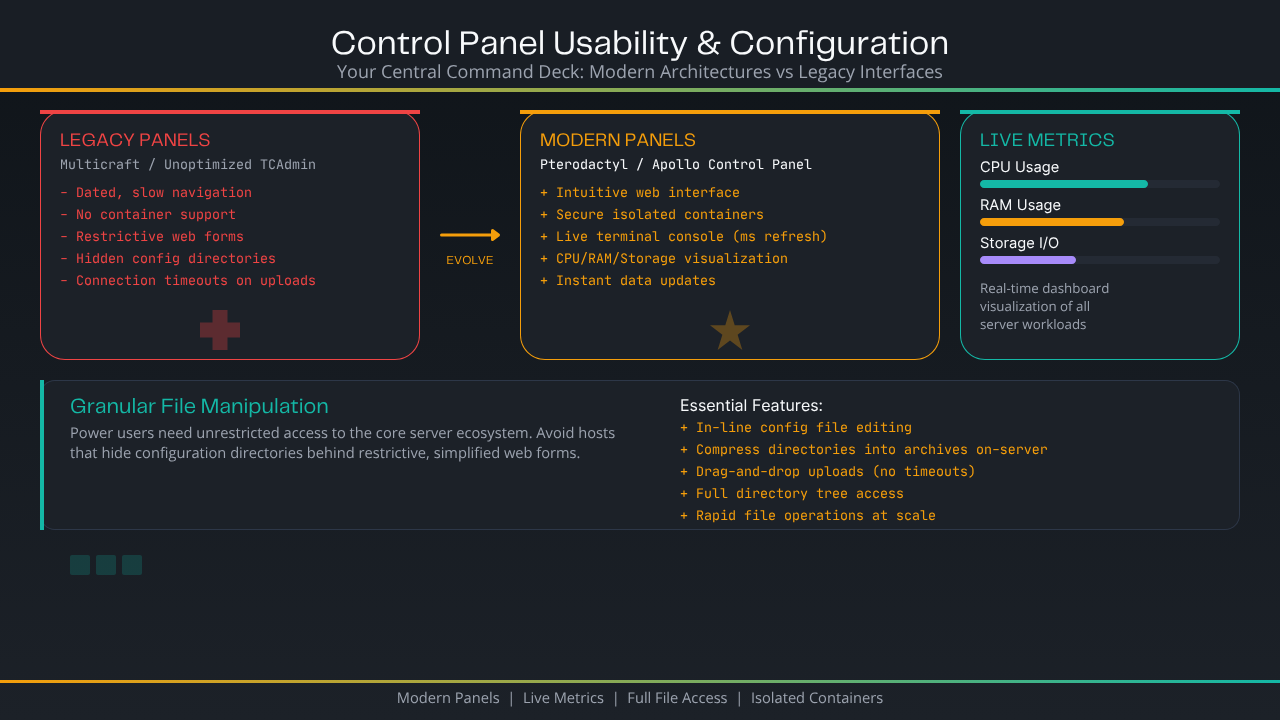
Legacy control panels like Multicraft or unoptimized TCAdmin setups feel dated, slow down navigation, and lack native support for advanced modern container systems.
High-end modern options use clean web frameworks like Pterodactyl or completely proprietary evolutions like the Sparked Host Apollo Control Panel.
A modern gaming control panel should deliver an intuitive web interface built on top of secure, isolated server virtualization containers.
This allows your dashboard to refresh data instantly, update live terminal console feeds down to the millisecond, and provide clean visualization graphics for CPU, RAM, and storage read/write workloads.
Granular File Manipulation Environments
Avoid hosts that hide your configuration directories behind restrictive, simplified web forms. Power users need unrestricted access to the core server ecosystem.
Your dashboard should feature a fast, built-in file manager capable of modifying configuration files in-line, compressing massive directories into archives directly on the server, and handling rapid drag-and-drop file uploads without throwing connection timeouts.
Mod, Plugin, and Steam Workshop Integration
Modern multiplayer games rely heavily on community-created modifications to stay fresh and engaging. Manually configuring these file additions can become incredibly tedious without deep platform integrations built directly into your hosting control panel.
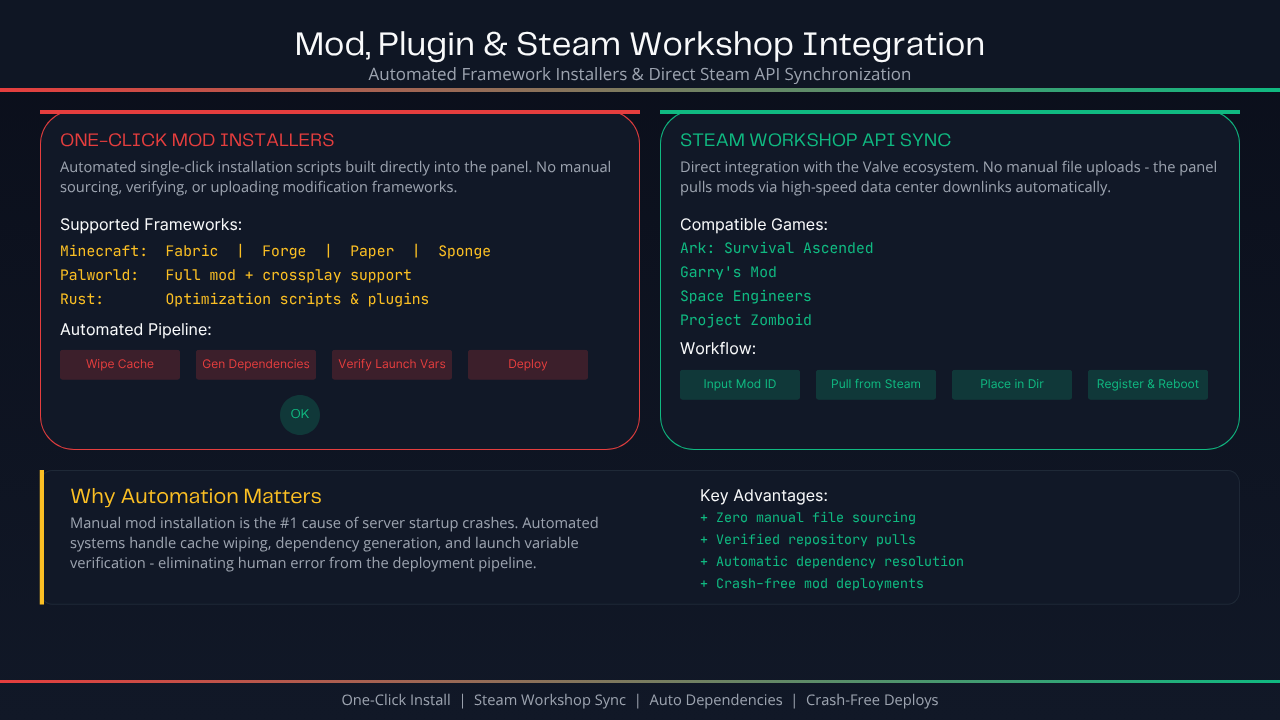
One-Click Automated Framework Mod Installers
Manually sourcing, verifying, and uploading modification frameworks via external networks is a primary cause of server startup crashes. A leading host simplifies this process by integrating automated, single-click installation scripts directly within the panel interface, especially for complex sandbox titles like Palworld server hosting with full mod and crossplay support.
Whether you are looking to run a heavily modded Minecraft instance utilizing Fabric, Forge, Paper, or Sponge on budget Minecraft hosting plans, or you are looking to install complex optimization scripts on a Palworld or Rust environment, the panel should pull the necessary engine binaries instantly from verified repositories.
This system handles the complex task of wiping old system caches, generating accurate library dependencies, and verifying launch variables automatically.
Direct Steam Workshop API Synchronization
For games that host their modifications directly within the Valve ecosystem (such as Ark: Survival Ascended, Garry's Mod, Space Engineers, or Project Zomboid), manual file uploads are incredibly inefficient.
Advanced control panels handle this by offering an integrated Steam Workshop search bar or ID submission field.
You simply input the unique numerical mod ID, and the hosting system leverages its high-speed data center downlinks to pull the files from Steam, place them into the correct directories, and register them within the game’s core launch parameters during the next reboot sequence.
Automated Backups and Data Redundancy
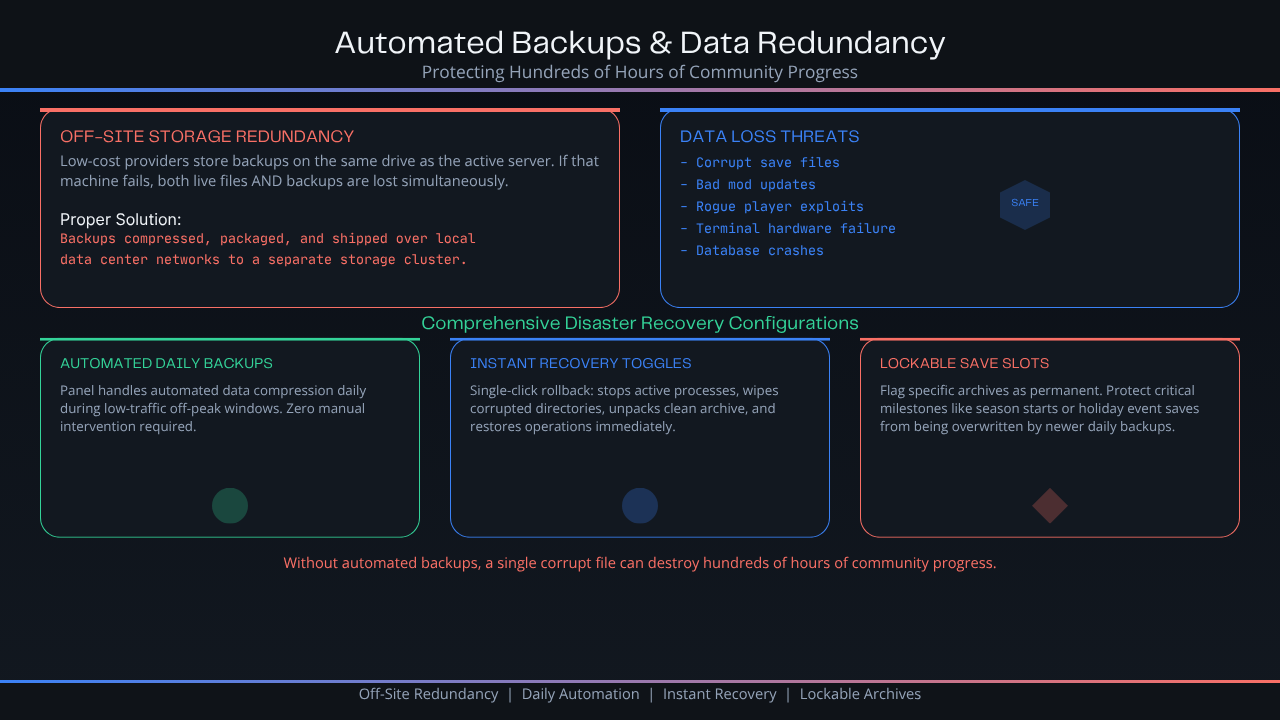
A single corrupt save file, bad mod update, or rogue player exploit can instantly delete hundreds of hours of collective community map building. If your host lacks automated backup tools, your data is constantly at risk.
True Off-Site Storage Redundancy
Many low-cost hosting providers save money by storing server backups on the same drive array as the active server instance.
If that specific machine experiences a terminal hardware failure or database crash, both your live server files and your backup archives perish simultaneously.
Always verify that your chosen provider utilizes off-site data isolation protocols. This means your world backups are compressed, packaged, and instantly shipped over local data center networks to a completely separate, independent storage cluster.
Comprehensive Disaster Recovery Configurations
-
Automated Daily Backups: The panel should handle automated data compression tasks daily during low-traffic off-peak windows without requiring any manual intervention.
-
Instant Recovery Toggles: Rolling your world back to a previous point should take a single click. The panel must automate stopping the active processes, wiping the corrupted directories, unpacking the clean archive, and restoring operations immediately.
-
Lockable Save Slots: Look for backup managers that let you flag specific historical archives as permanent. This prevents critical milestones, like a fresh season start or a major holiday event save, from being overwritten by newer daily automatic backups.
Included DDoS Protection and Network Security
Game servers are frequent targets for malicious Distributed Denial of Service (DDoS) attacks.
These attacks flood your server's network port with millions of fake data packets, overwhelming the host infrastructure and causing connection timeouts for real players.
Real-Time Terabit-Scale Traffic Mitigation
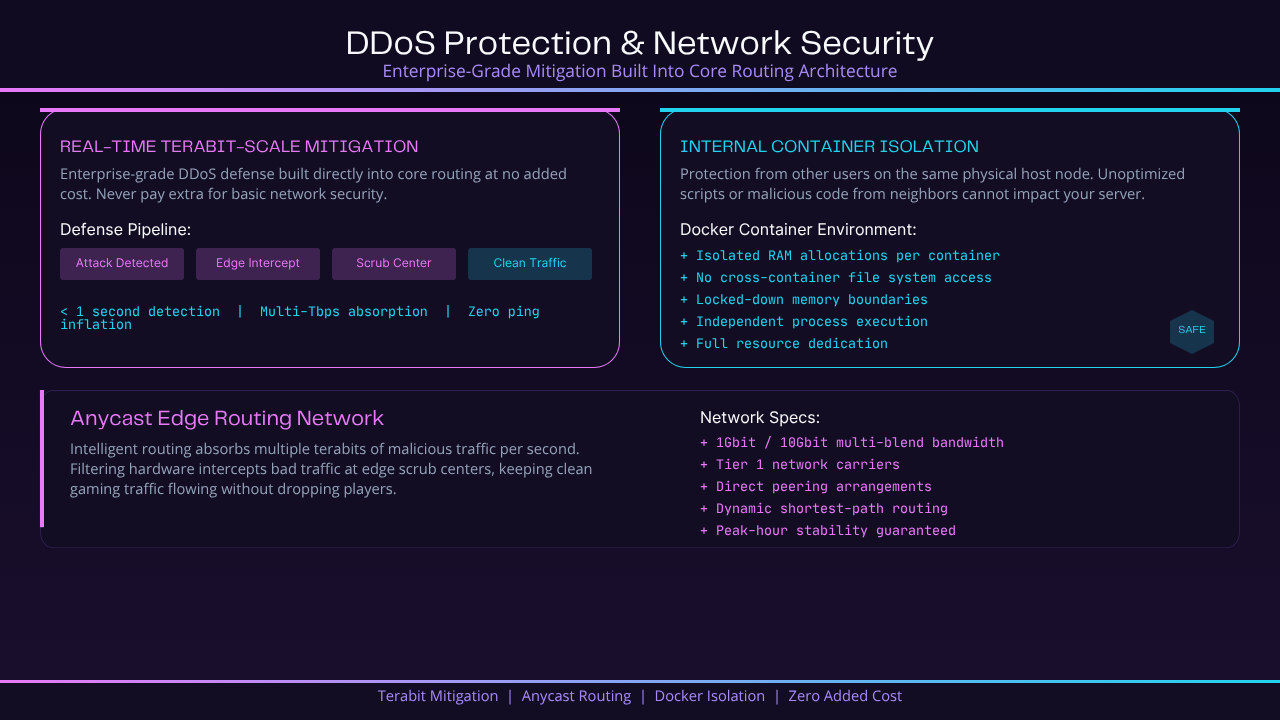
You should never pay extra for basic network security. High-quality game server hosts build enterprise-grade DDoS mitigation for game servers directly into their core routing architecture at no added expense.
Modern gaming defense frameworks utilize intelligent Anycast edge routing networks capable of absorbing multiple terabits of malicious traffic per second.
When an attack occurs, the filtering hardware intercepts the bad traffic at an edge scrub center within one second, scrubbing out the attack vectors while keeping your clean gaming traffic flowing without dropping your actual players or inflating their in-game ping.
Internal System Container Isolation
Beyond external network threats, your server must be completely protected from other users sharing the same physical host node.
If another client on your machine runs an unoptimized script that leaks system memory or executes malicious code, it shouldn't impact your server.
Modern hosts enforce this protection by running every server inside an isolated Docker container environment, completely locking down RAM allocations and preventing cross-container file system vulnerabilities across their broader game hosting platform.
24/7 Customer Support and Response Times
When a critical database error occurs during a weekend community event, you cannot afford to wait days for a standard help desk email ticket response. Efficient customer support is an essential component of operational server uptime.
True Around-the-Clock Technical Coverage
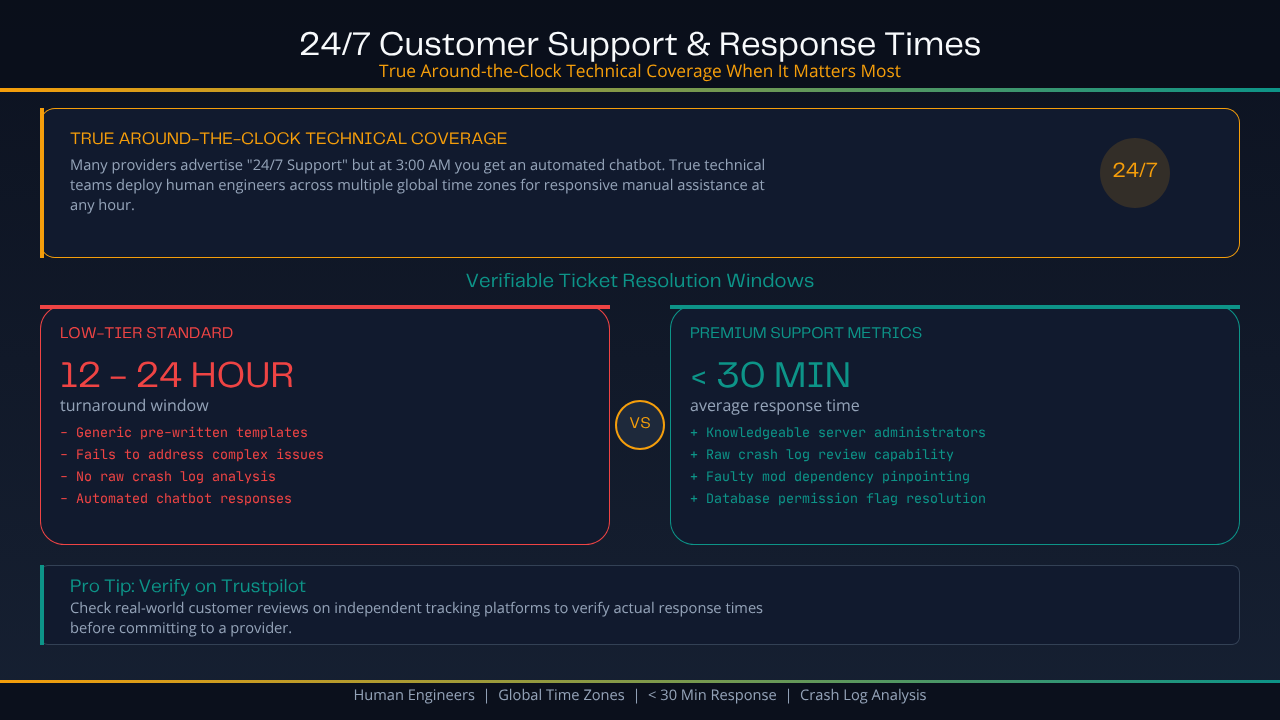
Many providers advertise "24/7 Support," but when you open a ticket at 3:00 AM, you are greeted by an automated chatbot or a message stating that the actual system technicians are away until regular business hours.
True technical hosting teams deploy human support engineers across multiple global time zones, ensuring that complex ticket inquiries receive responsive, manual assistance at any time of day.
Verifiable Ticket Resolution Windows
When assessing a host's support network, look at real-world customer reviews across independent tracking platforms like Trustpilot to see their actual response times.
-
Low-Tier Standard: 12 to 24-hour turnaround windows, often utilizing generic, pre-written message templates that fail to address complex configuration issues.
-
Premium Support Metrics: Average response times of under 30 minutes. Support teams should consist of knowledgeable server administrators capable of reviewing raw crash logs, pinpointing faulty mod dependencies, and resolving database permission flags directly on your behalf.
Advanced Hosting Features for Power Users
If you are an experienced developer, content creator, or optimization specialist, standard default hosting limitations can get in the way of advanced server customization.
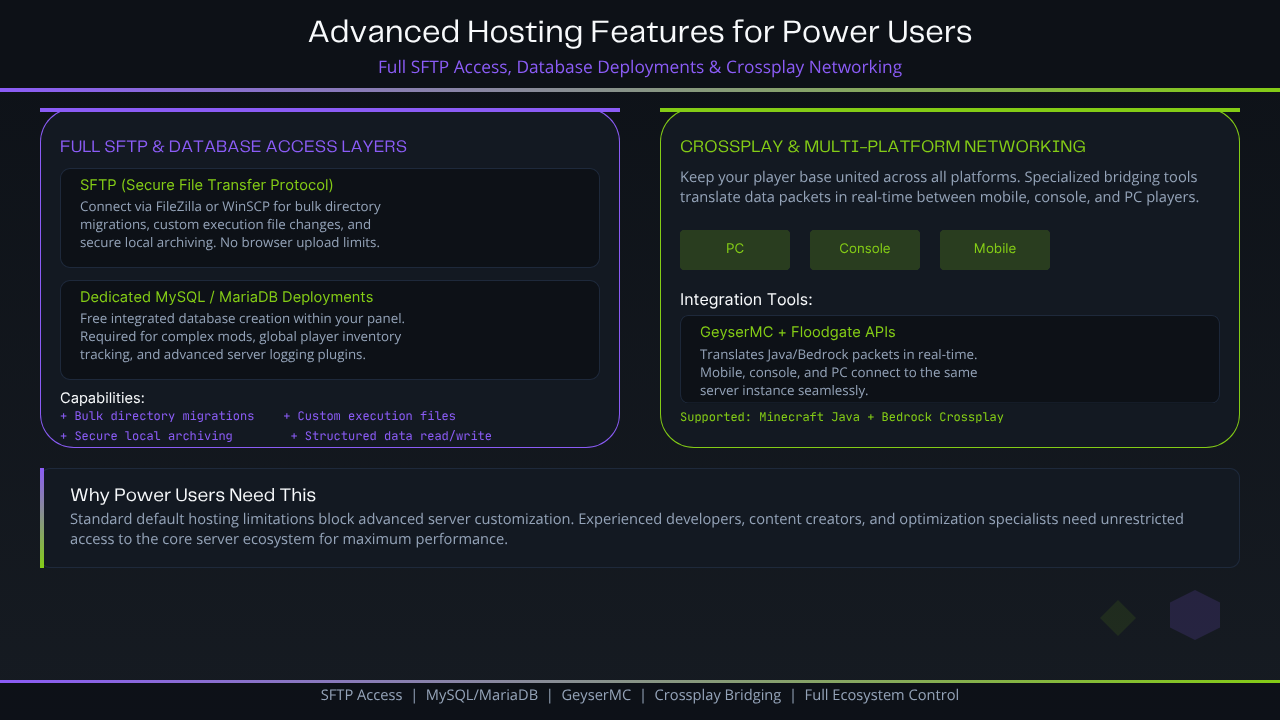
Full SFTP and Database Access Layers
-
Secure File Transfer Protocol (SFTP): You should never be restricted to a basic web browser upload tool. Full SFTP access allows you to connect via external desktop applications like FileZilla or WinSCP, enabling fast bulk directory migrations, custom execution file changes, and secure local archiving.
-
Dedicated Database Deployments (MySQL/MariaDB): Complex mod setups, global player inventory tracking networks, and advanced server logging plugins for titles like Minecraft server hosting require a real database to function efficiently. Your host must offer free, integrated database creation directly within your panel to ensure swift, structured data read/write performance.
Crossplay and Multi-Platform Networking Extensions
As gaming ecosystems evolve, keeping your player base divided by platform limits community growth. For games that support cross-platform play (like Minecraft Java and Bedrock crossplay delivered through specialized Minecraft Bedrock server hosting), your host's network layer must accommodate specialized bridging tools.
Advanced control panels feature integrated network translation toggles like the GeyserMC and Floodgate APIs. This allows mobile, console, and PC players to connect to the same server instance smoothly by translating data packets in real-time.
Game Server Hosting Costs and Value Comparison
Navigating server hosting plans requires a careful eye for hidden fees and misleading resource structures designed to increase your monthly bill.
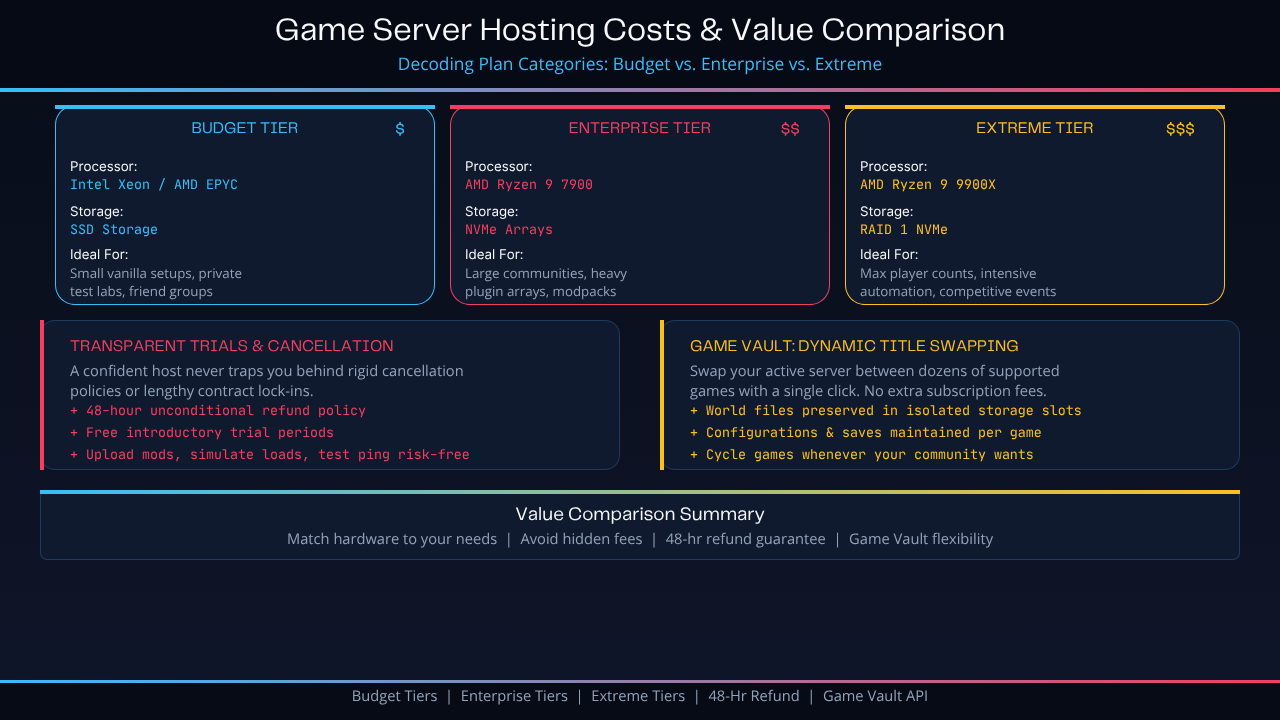
Decoding Plan Categories: Budget vs. Enterprise vs. Extreme
A transparent hosting provider categorizes their plans based on explicit hardware capabilities, allowing you to select an option that matches both your performance needs and your budget:
| Hosting Tier | Processor Hardware | Storage Configuration | Ideal Use Case Scenario |
|---|---|---|---|
| Budget Tiers | Intel Xeon / AMD EPYC (Stable Base Clocks) | Solid State Drives (SSD) | Small vanilla setups, private test labs, and friend groups |
| Enterprise Tiers | AMD Ryzen 9 7900 (High IPC Architecture) | Ultra-Fast NVMe Storage Arrays | Large communities, heavy plugin arrays, and modpacks |
| Extreme Tiers | AMD Ryzen 9 9900X (Top Single-Core Speed) | RAID 1 NVMe Top-Tier SSDs | Max player counts, intensive automation, competitive events |
Transparent Trials and Honest Cancellation Windows
A host that is truly confident in their infrastructure will never trap you behind rigid, convoluted cancellation policies or lengthy, unannounced contract lock-ins.
Look for providers that offer a clear 48-hour unconditional refund policy alongside free introductory trial periods in select instances.
This gives you ample time to upload your exact mod files, simulate real player loads, run comprehensive ping tests from various locations, and review panel metrics entirely risk-free before making a long-term commitment to long-lived sandboxes like Soulmask hosting worlds.
The Game Vault Concept: Dynamic Title Swapping
For multi-gaming groups or content creators, purchasing an entirely separate monthly server plan every time you want to switch from playing Minecraft to hosting a temporary Valheim hosting server or Rust world is a massive waste of money.
To solve this issue, look for advanced, flexible plan features like the Sparked Host Game Vault API. Available on select server tiers, this feature allows you to seamlessly swap your active server instance between dozens of supported game titles with a single click.
Your world files, configurations, and save databases for each game are preserved in isolated storage slots, allowing you to cycle through different games whenever your community wants a change of pace, without paying a single cent in extra subscription fees.
Summary Performance Checklist
"Raw hardware benchmarks only tell half the story," emphasizes systems administrator Marcus Vance.
"An exceptional game host must deliver a flawless balance of single-thread processing speed, smart data routing, transparent resource access, and responsive human support teams."
Before making your final choice, make sure you double-check how easily your server can scale up or down as your player base grows.