The Best Game Server Hosting Options for Seamless Gaming Experience
Discover the top game server hosting options to enhance your gaming experience. Find the perfect fit for seamless play and reliability. Read more!

Shahrukh Sial is a Gaming Content Strategist at Sparked Host. He identifies his own strategic outlines through deep research to cover game guides, tips, and updates that help players improve their skills and enjoy a better gaming experience.
Best Game Server Hosting for Large Communities: What to Look For
A game server that runs flawlessly for a small group of friends can quickly lag when 50, 100, or 200 players join at the same time. Choosing the right game server hosting is critical for large communities. Lag spikes, rubber-banding, slow chunk loading, and sudden crashes often appear just as a community begins to grow.
This guide covers how to choose the best game server hosting for large communities, focusing on performance, scalability, and reliability. It is intended for community founders, gaming network administrators, and modpack developers who want to ensure a smooth multiplayer experience as their player base grows.
Game server hosting refers to running online multiplayer video games 24/7 on remote servers, either by renting from providers or self-hosting.
Choosing a reliable game server hosting provider becomes critical when your community starts scaling beyond 50 players to save money, reduce technical headaches, and protect long-term scalability.
When managing a large multiplayer network, standard marketing labels like "unlimited player slots" or "unmetered RAM" do not tell the full story. True stability depends on how the provider handles hardware allocation, storage speeds, and network routing under heavy load.
Who This Guide Is For
This guide is designed for community founders, gaming network administrators, and modpack developers who are scaling an existing player base beyond 50 concurrent users and need to transition from basic shared slots to high-performance, production-grade infrastructure.
5 Signs You Have Outgrown Your Current Hosting Plan
Many server owners wait for a total system crash before upgrading. However, your hardware usually signals that it is failing long before the server goes offline.
Many server administrators notice these warning signs when a server begins reaching its limits:
-
Server TPS Drops During Peak Hours: Games like Minecraft rely on a steady 20 Ticks Per Second (TPS), while competitive shooters like Counter-Strike 2 demand 64-tick or 128-tick consistency. If your server console repeatedly throws "Can't keep up!" warnings during busy evening hours, your processor is struggling to keep pace with the game logic.
-
In-Game Rubber-Banding with Low Ping: When players repeatedly teleport backward, even though their network ping looks low, the issue is mechanical server lag. This usually indicates that the server is struggling to handle the volume of updates and calculations, creating severe bottlenecks.
-
Severe Stuttering During Automated Backups: If your game world freezes for several seconds every time an automated save cycle triggers, your host's storage system is experiencing a data bottleneck. This usually happens when hosts rely on slow mechanical hard drives or low-grade solid-state drives.
-
Slow Chunk Generation and Map Loading: When players moving quickly across a map encounter invisible walls or unrendered voids, the server's storage and processing cores cannot stream world data fast enough to match player movement.
-
CPU Usage Stays Above 80%: Reviewing your server's control panel dashboard during peak activity may reveal that your assigned CPU usage hovers continuously near maximum capacity. This is a direct sign that your server instance has fully exhausted its allocated computing power.
Real-World Scaling: How Game Engines Behave Under Load
Different game engines put stress on server resources in unique ways. Throwing more RAM at a server will not fix a bottleneck if the game engine is actually waiting on CPU calculations or disk read/write speeds.
Minecraft (Logic & Entity Bottlenecks)
A casual server with 10 players runs smoothly on almost any basic budget plan. However, a public survival multiplayer (SMP) or faction network with over 100 concurrent players faces massive computational stress. Every active player loads a surrounding grid of world chunks.
When players build complex automated redstone farms or generate large numbers of entities simultaneously, the entire game engine struggles. Because the core logic runs almost entirely on a single processing thread, deploying specialized enterprise Minecraft hosting equipped with high single-core clock speeds is essential for large-scale communities to maintain performance.
Rust (Entity Density & Disk Access Bottlenecks)
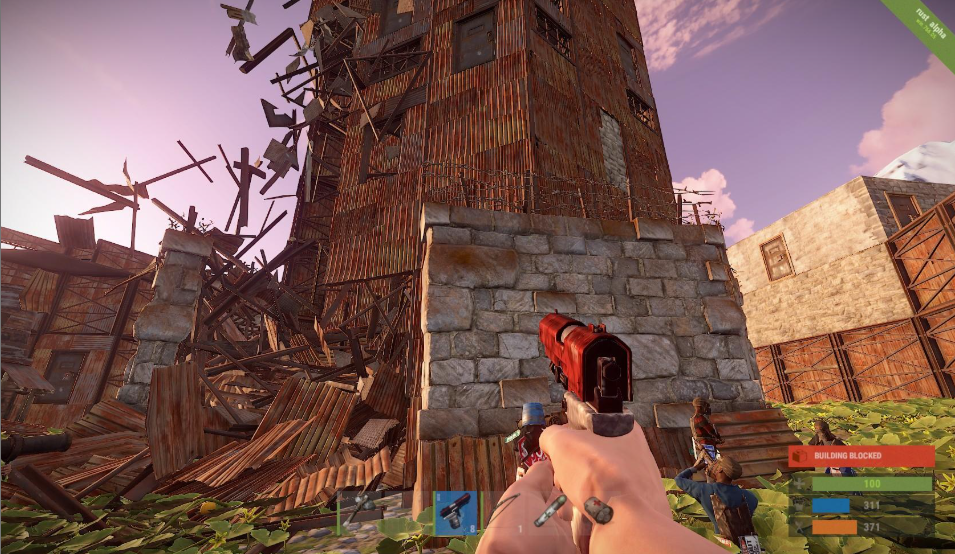
Rust hosting environments with 150+ player capacities are limited by total entity counts. Over a few weeks of a server wipe cycle, players construct bases consisting of millions of individual building blocks, deployables, and storage boxes, making extreme Rust hosting with robust hardware and tooling increasingly important.
The server must track the health, stability, and security of every item in real time. When a massive raiding party detonates explosives on a base, the server must calculate thousands of structural physics updates in a fraction of a second. Furthermore, saving this massive database to the disk every few minutes will stall the server unless the host utilizes high-performance storage arrays.
Palworld & ARK: Survival Ascended (Memory State Bottlenecks)
Large Palworld and ARK: Survival Ascended servers use huge amounts of RAM because they track wild creatures, base-building structures, player inventories, and active production lines across a massive physical map, so choosing the right hardware and locations plus dedicated Palworld server hosting and specialized ARK: Survival Ascended server hosting is crucial.
These game engines frequently suffer from memory leaks, meaning the server's RAM usage climbs steadily over time. While large Palworld and ARK: Survival Ascended communities need far more, most game servers generally start in the 4-8GB RAM range before these games push requirements higher.
Hosting a stable, large-scale community for these games requires massive allocations of high-speed DDR5 RAM combined with automated, scheduled server restarts to flush out leaked memory before it causes a system crash.
Counter-Strike 2 (Network Precision & Jitter Bottlenecks)
Competitive tactical shooters do not have to worry about complex base building or massive open-world terrain generation. Instead, their bottleneck is absolute network precision. On a 64 or 128-tick Counter-Strike 2 server with 30+ players engaged in fast-paced gunfights, the server must process player positioning, projectile trajectories, and hit registration instantly, which is why many communities rely on specialized Counter-Strike 2 server hosting.
A single packet of data arriving late causes micro-stuttering that disrupts competitive play. For these games, the priority is minimizing network latency and jitter while ensuring direct routing paths between the player base and the host datacenter.
Satisfactory & Factorio (Automation & Factory Scale Bottlenecks)
Automation and factory-building simulation games like Satisfactory and Factorio introduce a completely different type of hardware stress, and they benefit from flexible Satisfactory server hosting, specialized Factorio server hosting, and broader game hosting plans that can scale CPU performance as factories expand. Rather than dealing with high player counts, these servers face scaling issues from the complexity of the world itself.
As a community builds massive, interconnected assembly lines with tens of thousands of moving parts, conveyor belts, and item transport paths, the server must calculate the state of every single item simultaneously. This creates an extreme single-thread CPU bottleneck where raw processor clock speed determines whether the game runs smoothly or drops frames.
Player Capacity Blueprint: Shared vs. VPS vs. Dedicated Servers
Selecting the right server type requires aligning your active player count with the appropriate tier of hardware isolation and guaranteed resource allocation. Game server hosting can be achieved either by renting from a provider or through self hosting, but from there the key comparison is usually between shared, VPS, and dedicated rented tiers.
Comparing Hosting Tiers at a Glance
| Feature | Shared Hosting | VPS Hosting | Dedicated Servers |
|---|---|---|---|
| Player Capacity | 10 – 50 players | 50 – 150 players | 150 – 500+ players |
| Hardware Environment | Shared hardware node | Isolated virtual slice | 100% exclusive bare-metal |
| Performance Stability | Vulnerable to neighbors | Highly stable isolation | Absolute peak performance |
| Uptime Reliability | Standard baseline | High priority | Maximum enterprise level |
Shared Game Hosting (10 – 50 Players)
Your game server shares the physical resources of a large machine node with several other customers. A central control panel allocates specific slices of memory to your instance. Control panels allow easy server management without technical knowledge.
- The Reality: Shared hosting is highly affordable and easy to manage, but it is vulnerable to performance interference if a neighboring customer on the same machine node suddenly encounters a massive traffic surge or an unoptimized script.
Premium Virtual Private Servers (VPS) (50 – 150 Players)
Virtualization software splits a physical machine into completely isolated virtual environments, similar to how modern dedicated server hosting platforms segment resources for demanding multiplayer workloads. Upgrading to isolated premium VPS hosting ensures your server receives dedicated, un-throttled access to specific CPU cores and memory channels that cannot be accessed by other users.
- The Reality: A premium VPS provides excellent stability and root-level configuration flexibility, protecting your community from neighboring server spikes while keeping monthly operational costs manageable.
Bare-Metal Dedicated Servers (150 – 500+ Players)
Leasing an entire physical server cabinet inside a datacenter through premium dedicated servers means every single chip, memory module, storage lane, and network port belongs exclusively to your network. Some communities look at running a server from a home PC instead, but self-hosting requires technical expertise and a reliable home internet connection.
- The Reality: Dedicated infrastructure offers the highest level of performance, raw computing frequency, and complete network control. It is the better fit when owners want datacenter-grade reliability rather than managing that burden themselves, and it remains the standard for large-scale communities where server downtime or performance drops directly impact community retention and revenue.
What Makes a Good Game Server Hosting Provider?
When evaluating choices, community owners must compare a provider’s key features, not just flashy marketing terms. A reliable provider should consistently deliver optimal performance under peak loads while offering transparent resource metrics, clear price information, and high uptime, so users understand what they are paying for and avoid unexpected costs; 99.9% uptime is the common standard to look for.
Game-specific hosting often includes an easy-to-use control panel and modding support. Game-specific hosting should also include an easy-to-use control panel, mod support, and 24/7 support for fast troubleshooting during live gameplay.
Key Evaluation Criteria: Including DDoS Protection
-
High-Clock Hardware Profiles: The provider should offer modern, high-frequency desktop processor architectures rather than low-clock enterprise chips.
-
Isolated Environments: The hosting environment must ensure that neighboring user accounts cannot encroach upon your allocated computing power.
-
Strategic Global Networks: Datacenter locations should align with core user demographics to minimize connection paths and reduce latency.
-
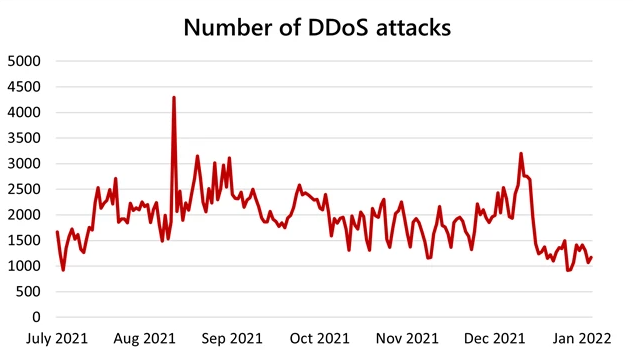
Proactive Attack Mitigation: Network edges must feature high-capacity traffic scrubbing to maintain stable uptime.
How to Choose the Right Game Server Hosting Provider
To streamline your selection process, use this decision framework when vetting potential infrastructure hosts:
-
CPU Performance: Ensure the hardware specifications list high-frequency individual core rates (above 4.0 GHz) rather than dense clusters of low-frequency enterprise processing threads.
-
NVMe Storage: Confirm the service agreement utilizes high-IOPS Enterprise NVMe storage arrays rather than older SATA-based solid-state alternatives.
-
DDoS Protection: Check that the host includes robust, game-aware network filtering layers to prevent malicious disruption to player connections, ideally using specialized anti-DDoS game protection that can mitigate large attacks without adding latency.
-
Location: Select datacenter hubs situated geographically close to the center of your active player base to optimize routing paths.
-
Scalability: Evaluate how seamlessly the system scales resource capacity when transition requests from shared infrastructure to virtualized or dedicated servers are executed.
Some providers also include a free subdomain for a custom IP address, which can simplify first-time setup and make it easier to share access with players.
Hardware Reference Sheet: Real Specs for Large Player Counts
To eliminate the guesswork when shopping for server infrastructure, the reference guide below outlines the exact hardware combinations required to host large player bases across major multiplayer games and can be paired with Sparked Host's published hardware specifications for real-world planning.
| Game Title | Active Player Target | Recommended Processor Tier | Required Memory Allocation | Storage Infrastructure |
|---|---|---|---|---|
| Minecraft (Modded/SMP) | 50 – 120+ Players | AMD Ryzen 9 (7900X / 9900X class) | 16GB – 32GB DDR5 | Enterprise NVMe PCIe 4.0 |
| Rust (High Pop) | 100 – 250+ Players | AMD Ryzen 9 (7950X / 9950X class) | 32GB – 64GB DDR5 | Gen 4/5 NVMe (High IOPS) |
| Palworld / ARK | 32 – 64+ Players | Intel Core i9 (13th/14th Gen class) | 32GB – 64GB DDR5 | Enterprise NVMe SSD |
| Counter-Strike 2 | 32+ (High Tick Rate) | AMD Ryzen 7 (7800X3D class) | 8GB – 16GB DDR5 | Standard NVMe SSD |
| Enshrouded / Valheim | 30 – 60+ Players | Intel Xeon E / AMD Ryzen 7 class | 16GB – 32GB DDR5 | Enterprise NVMe SSD |
Why Single-Thread CPU and Storage IOPS Matter
If you want your server to rank at the top of community masterlists, you need to understand the two technical factors that dictate large-scale server health: Single-Thread Processing Power and Storage IOPS.
Why Core Count can be Deceiving
When browsing dedicated server options, you will frequently see cheap plans advertising "24 Cores / 48 Threads" using Intel Xeon or AMD EPYC processors. For a web hosting company or a cloud database provider, this is an excellent deal. For a game server manager, it can be a performance limitation.
Multiplayer game engines process their core loops sequentially. This means Step A must finish calculating before Step B can begin. If your processor has 48 cores but each individual core runs at a low clock speed of 2.5 GHz, the game engine will bottleneck. Ticks will drop, and your players will experience rubber-banding.
Many heavily modded servers reach CPU limits long before exhausting available RAM. Instead, look for processors with high single-thread performance and boost clocks exceeding 4.5 GHz, such as the AMD Ryzen 9 series. This ensures that the server can calculate millions of world updates within the tiny split-second window required for smooth gameplay.
The Importance of NVMe Storage IOPS
Input/Output Operations Per Second (IOPS) measures exactly how many individual data files a storage drive can read or write in a single second.
-
Mechanical Hard Drives (HDDs): Max out at around 75 to 200 IOPS. They are completely unusable for modern game hosting.
-
Standard Solid-State Drives (SATA SSDs): Achieve around 50,000 to 90,000 IOPS. They work well for small servers but buckle under massive world sizes.
-
Enterprise NVMe SSDs (PCIe 4.0/5.0): Can deliver hundreds of thousands to well over a million IOPS depending on the drive and workload.
For a large server, enterprise NVMe storage is critical, which is why comparing high-performance hosting plans with NVMe and RAID options is so important before committing to a provider. When 100 players are moving across a map, triggering custom plugins, logging in and out, and saving player data simultaneously, the server needs massive IOPS headroom to prevent data read/write queues from stalling the game loop.
3 Common Mistakes Server Owners Make When Scaling
As communities expand, standard administration practices that worked for small setups can inadvertently create technical bottlenecks. Avoiding these three pitfalls keeps performance stable:
-
Over-allocating RAM Beyond Game Engine Efficiency: Allocating 64GB of RAM to a server that only requires 16GB can cause massive performance drops. When game engines like Minecraft accumulate enormous heaps of memory, the Java Garbage Collection process takes longer to clear the data, causing noticeable multi-second world freezes.
-
Neglecting Database Maintenance for Plugins and Mods: Every customized mod, log system, or player tracking tool writes data to a database. If these tables are left unindexed or uncleaned over several weeks, the storage read/write demand escalates rapidly, leading to major tick drops during routine world updates, sometimes forcing emergency hardware upgrades or opportunistic use of dedicated server sales to keep costs under control.
-
Relying Solely on In-Game Backup Tools: Running compressed backup scripts directly on the main game processor during active player hours shifts critical CPU cycles away from world calculation. Backups are not something you can set and forget. Relying on host-level, off-site snapshot features preserves server performance and guarantees clean data recovery points. Automated internal backups should be retained for at least 7 days so restoration points remain available after unnoticed corruption or admin mistakes.
Choosing a Strategic Server Location
Physical distance between your players and the server node remains the most important factor controlling connection latency (ping). No amount of software optimization can overcome the physical speed limitations of data traveling through fiber-optic cables over thousands of miles.
When setting up a large public server for games like Valheim or Enshrouded using specialized Valheim hosting, or scaling a Bedrock realm onto enterprise Bedrock hosting, follow these three location rules:
-
Find the Geographic Median: Do not pick a server location based simply on where you live. Analyze where the core of your target player community is located. If your player base is evenly distributed across the United States, selecting a central hosting hub like Chicago or Dallas balances connection times perfectly, ensuring neither East Coast nor West Coast players face a severe latency disadvantage.
-
Audit Routing Paths Pre-Purchase: Reputable hosting providers offer public test IP addresses or performance check pages for their datacenter locations. Before launching a server, have your administrative team run a diagnostic traceroute (tracert or mtr) to check the path stability and ensure packets do not take unoptimized routes through slow public gateways.
-
Verify Game-Aware DDoS Scrubbing: Large public servers are targets for malicious network attacks. Ensure your chosen host uses premium edge-filtering networks (such as Path.net or Corero). These setups automatically detect and scrub volumetric DDoS attacks at the network edge, protecting your server from going offline without accidentally filtering out valid, real-time player data.
Budget Planning: Understanding True Scaling Costs
Managing a large community requires building a sustainable financial model, especially if you are also running supporting sites on separate web hosting infrastructure or testing new deployments through free hosting trials. As your player base grows, hosting expenses change from a minor monthly cost to a major operational budget item.
Baseline Pricing Expectations
-
Shared Enterprise Slots: Range from $10.00 to $40.00 per month. This provides an affordable starting point for communities testing out new modpacks or building up their initial player core.
-
Isolated Premium VPS: Ranges from $40.00 to $120.00 per month. This offers dedicated resource slices tailored for growing communities that require stable performance and deep custom configuration choices.
-
Bare-Metal Dedicated Hardware: Ranges from $120.00 to $350.00+ per month. This represents the ultimate tier of performance for commercial gaming networks, massive public servers, and multi-server networks requiring maximum uptime consistency.
Watch Out for Hidden Infrastructure Fees
When calculating your community's long-term operational budget, remember to account for these common add-on costs:
-
Hardware Tier Upgrades: Some providers charge extra monthly fees to host your server on modern, high-speed Ryzen 9 processors instead of outdated server hardware.
-
Premium DDoS Protection Tiers: Basic baseline network filtering is usually included for free, but advanced, game-specific edge defense profiles can sometimes carry an extra premium fee.
-
Automated Off-Site Backups: Protecting your world save data is vital. Verify whether automated off-site backup storage space is included in your base subscription plan or locked behind a separate data retention fee.
Final Thoughts
Large gaming communities need more than just raw player slots. They require fast single-core processors, reliable high-IOPS storage, low-latency network routing, and room to grow. By matching your game's specific engine requirements with the right hosting tier, whether that is a high-performance shared slot, an isolated VPS, or a full dedicated machine powered by scalable game hosting or robust dedicated server hosting, you can prevent lag, improve player retention, and prepare your server for long-term growth.
Choosing an established game server hosting provider ensures your foundational hardware keeps pace with community demand.
Scale Your Community with Sparked Host
Sparked Host provides a scalable hosting setup built for growing communities, allowing you to upgrade from game servers to VPS or dedicated infrastructure as demand increases, all backed by carefully selected hardware and locations optimized for latency and performance. Built on modern AMD Ryzen hardware and NVMe storage, it is designed for stable performance under load. Our advanced, built-in network security layers ensure your game server stays online even during intense traffic surges.
Protect your player retention and keep your server tick rate perfectly stable. Explore Sparked Host's Enterprise and Dedicated Game Server solutions today to give your community the smooth, lag-free experience it deserves.