How To Make A Shield In Minecraft
Learn how to craft a shield in Minecraft with this simple step-by-step guide. Discover materials needed, crafting recipes, and expert tips to block attacks.

Shahrukh Sial is a Gaming Content Strategist at Sparked Host. He identifies his own strategic outlines through deep research to cover game guides, tips, and updates that help players improve their skills and enjoy a better gaming experience.
Minecraft Shield Guide
Minecraft shields play a significant role in the game's combat system, especially in survival mode where melee attacks, critical attacks, and direct projectile damage from hostile mobs can be fatal. This article explains the crafting, enchanting, repairing, and the blocking mechanic features of the shield on Java Edition and Bedrock Edition.
How To Make A Shield In Minecraft
Getting a shield is rather straightforward and involves only a few items. For crafting, you will need:
-
1 Iron Ingot (obtained by smelting iron ore)
-
6 Wooden Planks
A shield can be crafted using six wooden planks and one iron ingot. Any combination of the six planks is fine, as they can be oak, birch, spruce, or any type of plank. Wooden planks can be made easily by putting logs from trees into a crafting table, which will convert them into wooden planks.
In addition, you will need one iron ingot, which is gotten by smelting iron ore in a furnace. The iron ore is usually located underground and can be mined using a stone pickaxe or a better one.
To Make A Shield In Minecraft:
-
Place 1 wood in the top left, 1 wood in the top right, and 1 iron in the top middle row.
-
Place 3 wood on the entire middle row.
-
Place 1 wood in the bottom middle row.
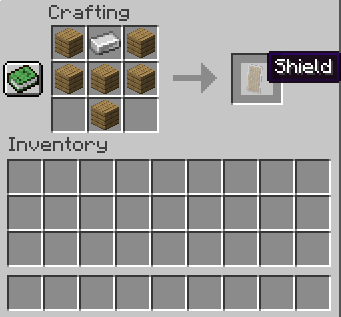
Placing these items results in the creation of the base wooden shield, often referred to as the default shield or normal shield.
After being created, put it to your offhand slot item so that you can start defending.
How to Block With Shield In Minecraft
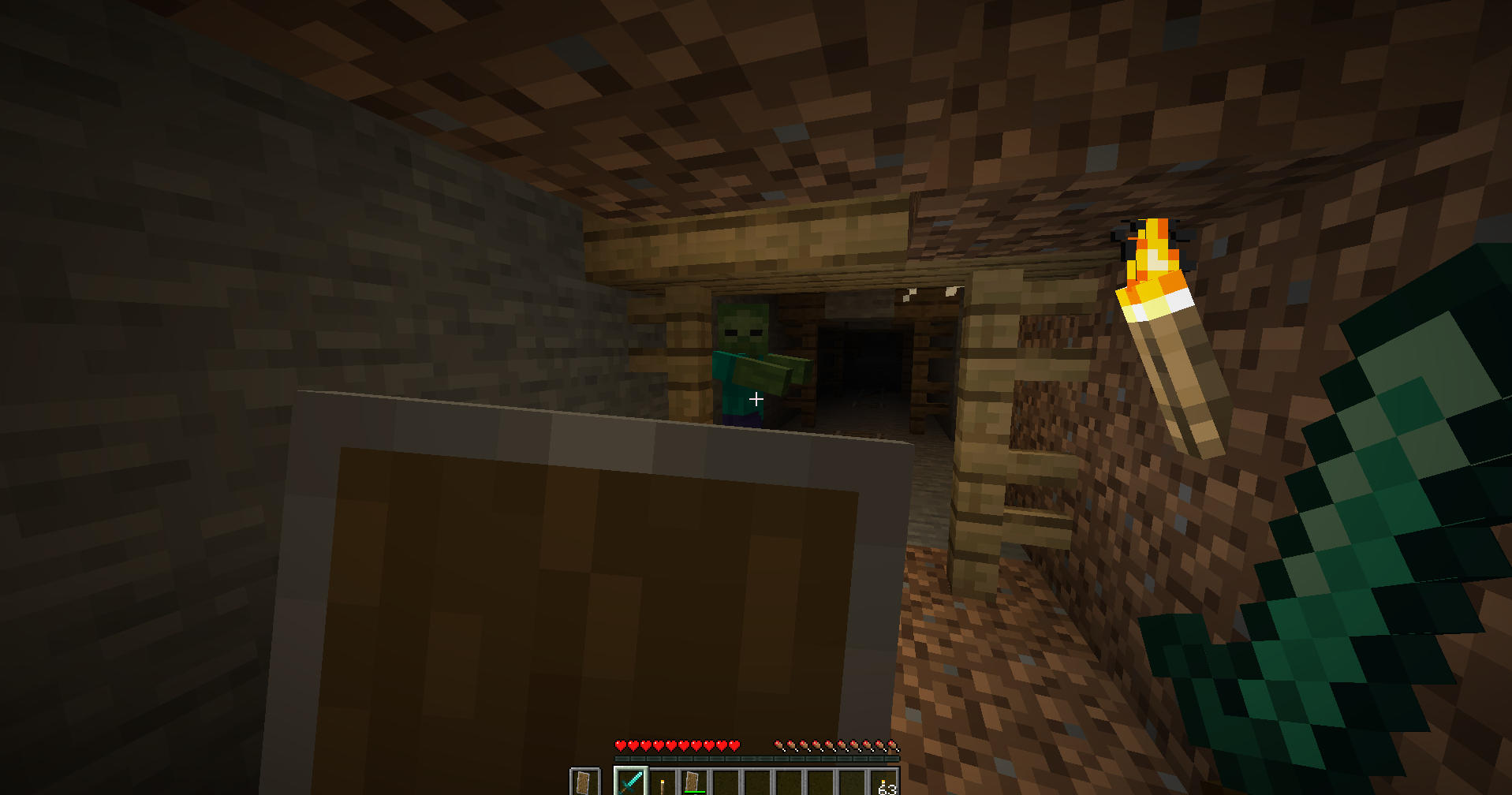
When placed correctly, the shield activates immediately when the player right-clicks (Java Edition) or crouches (Bedrock Edition).
-
Melee combat attacks that are blocked
-
Most projectiles that are blocked and have status effects do not affect the person who blocked.
-
Ram attacks from Ravagers
-
Fall damage if timed correctly
-
Axe wielding mobs (though they can disable shields for a brief time)
Shields block incoming attacks from the direction they face, so you need to be positioned in front of your opponent to absorb damage. When used effectively, shields can deflect projectiles like arrows by altering their trajectory, offering both protection and control.
In combat, shields are highly effective—not only do they block enemy strikes and flying objects, but they also help players maintain their position by preventing knockback during clashes. Shields can block all front-facing attacks. In addition, blocking a projectile like an arrow causes it to redirect when using a shield.
How To Repair a Minecraft Shield
Each time a shield blocks an attack, its durability decreases based on the strength of the attack it deflects.
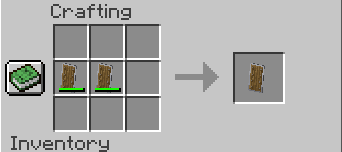
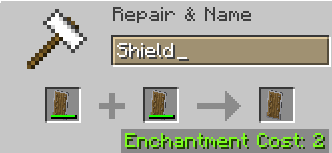
To repair a damaged shield, players can combine it with another shield or wooden planks using a crafting table or anvil. This process restores a portion of the shield's total durability, and when merging two shields, their remaining durability is combined.
For more efficient repairs, enchant the shield with Mending, which allows it to restore durability over time using experience orbs.
Using any type of wooden plank restores about 25% of the shield’s maximum durability, making it a quick and cost-effective repair method.
Disabling Shields
During combat, it's possible to temporarily disable an enemy's shield:
-
Java Edition: Striking a shield with an axe has a chance to disable it for 5 seconds. Sprinting while attacking with an axe increases the likelihood of success.
-
Bedrock Edition: Axe attacks can also disable shields, making axes a powerful and strategic choice in PvP encounters.
Custom Shields
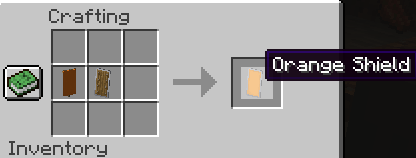
Once you have a shield, you can customize it with various patterns just by adding a banner. Custom shields offer a great way to show off your style in PvP or exploration!
To make a custom shield, place one shield and one banner in the crafting grid. The banner’s design will be transferred onto the shield, allowing you to personalize it with a wide variety of patterns and colors.
-
Creating Designs: Use a loom to craft unique banner patterns with dyes. These banners can then serve as the design base for custom shields.
-
Example: Dye a banner green and add a creeper face pattern—then apply it to a shield for a themed look.
-
Limitations: Once a pattern is applied to a shield, it cannot be removed or changed. Shields also cannot be dyed directly or washed in a cauldron.
-
Resolution Note: Shield patterns are rendered at half the resolution of banners, so intricate designs may appear simplified or partially visible.
Note: In Java Edition, shields with patterns can also be obtained using the same commands as banners, with 'banner' replaced by 'shield'.
When Were Shields Added To Minecraft?
In the Minecraft 1.9 update called the Combat update that came out in the month of February 2016, shields were introduced.
-
Blocking with both hands
-
Attacking cooldowns
-
Utilizing off-hand items
Shields utilized the space that previously was occupied by the sword-blocking action which was taken out in the same update.
Can You Enchant Shields In Minecraft?
Yes, a shield use can still be enchanted, but done only through the use of anvils or enchanted books.
Enchantments for Shields:
-
Unbreaking: Change existing durability
-
Mending: Repairs the shield with experience
-
Curse of Vanishing: Shield is lost upon death
By using command blocks in custom maps, you can also give some shields status effects.
Combat Details & Shield Mechanics
-
Shields replace the old sword-blocking system introduced in the Combat Test.
-
They grant partial knockback protection, but no longer knockback attackers entirely.
-
The shielded player remains in place but receives better knockback resistance.
-
Attacks are attack rounded to calculate block success.
-
Bees continuously attack and can bypass shields if swarming.
-
A blaze rapidly drains durability due to continuous contact damage.
Shield in PvP and PvE
Whether fighting mobs or players, shields help block damage from:
-
Tipped arrows, skeletons
-
Axe wielding mobs (though they may disable shields briefly)
-
Melee attacks from zombies, pillagers, etc.
-
Explosions like creepers or TNT
Equip while wearing diamond armor for maximum defense.
Shields While in Survival Mode
When it comes to Survival Mode, shields are simply a must-have:
-
Protection: Shield use to stop melee attacks, block projectiles, and explosions.
-
Durability: The durability of shields is 336. You can repair them by using an anvil and additional shields or planks.
-
Combat Strategy: Apply shields to safely get closer to hostile mobs or as a defense against unexpected attacks.
Shields in Java Edition
When it comes to Java Edition, there are some special features that make shields unique:
-
Customization: You can decorate your shields with banners to make them look just the way you imagine.
-
Combat Mechanics: Shields are capable of stopping a wide variety of attacks, including arrows, tridents, and melee strikes.
-
PvP Dynamics: Shield mechanics comprehension is the quintessence of one's skill in the world of battle for the top place.
Some Extra Shield Tips
-
Using your offhand (left arm) is crucial for effective shield control.
-
Timing is everything—activating the shield just before an attack lands provides the most reliable block. Be aware that sprinting or switching items can trigger a brief warm-up delay, making you vulnerable for a moment.
-
For maximum effectiveness, only one shield should be equipped. Extra shields in your inventory won’t provide any added protection unless actively used.
Conclusion
Shields are an essential tool in any Minecraft survival journey. From crafting and customizing to blocking and repairing, mastering the shield gives you a major advantage in both PvE and PvP combat.
Whether you're decked out in diamond armor or just starting out with wooden tools, always keep a shield equipped—it’s your first line of defense and key to long-term survival.
Looking for more Minecraft tips and guides? Stay tuned—more are on the way!