Will the Minecraft Chaos Cubed Update Break Your Server?
Discover the key features and updates in the Minecraft Chaos Cubed Update. Get the insights you need to enhance your gameplay—read the full guide now!

Shahrukh Sial is a Gaming Content Strategist at Sparked Host. He identifies his own strategic outlines through deep research to cover game guides, tips, and updates that help players improve their skills and enjoy a better gaming experience.
Chaos Cubed is one of the most anticipated Minecraft updates of 2026, bringing the sulfur caves biome, colorful new blocks like sulfur and cinnabar, and the unique Sulfur Cube mob. While these features promise exciting gameplay, they also introduce risks for server owners.
Updating your Minecraft server without preparation can lead to downtime, plugin failures, or even world corruption. This extended guide explores the risks in detail and provides a step‑by‑step plan to ensure your server survives the Chaos Cubed transition.
This blog is clearly for Minecraft server owners and administrators, especially those running public, modded, or plugin‑heavy servers who need to prepare before updating to Chaos Cubed (Java 26.2 / Bedrock 26.30).
Why Minecraft Chaos Cubed Matters
Minecraft updates are more than cosmetic changes. Each major release alters the game’s mechanics, world generation, and server software. Chaos Cubed (Java 26.2 / Bedrock 26.30) is no exception.
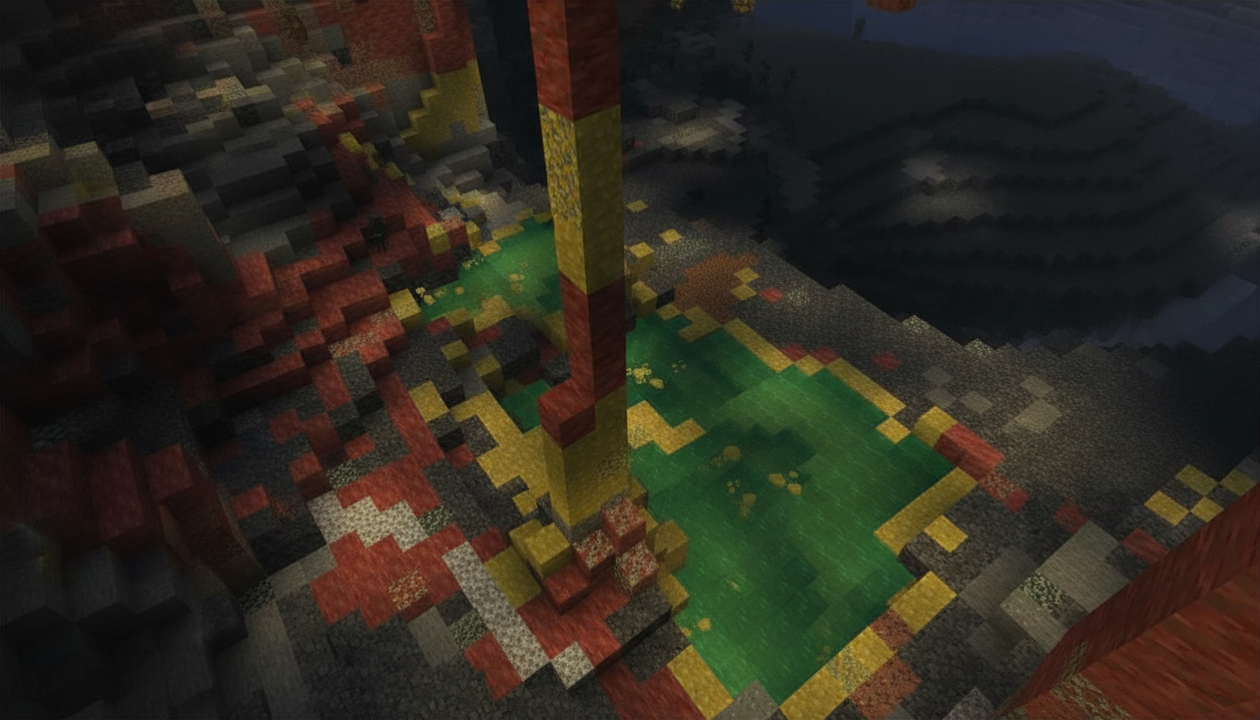
The sulfur caves biome adds geysers, sulfur springs, and hanging sulfur spikes, while the Sulfur Cube mob introduces unpredictable physics.
These changes affect gameplay and server stability, especially for communities running plugins, mods, or Minecraft datapacks.
Key Risks of Updating
Plugin and Mod Incompatibility
Plugins and mods are the backbone of many multiplayer servers, especially those running on modded Minecraft server hosting. Chaos Cubed’s entity and physics changes can break protection plugins, anti‑cheats, and redstone automation mods.
Even datapacks that rely on predictable block behavior may fail.
Server Startup Failures
Incompatible server jars or mismatched Java versions can prevent servers from starting, especially when you rely on powerful dedicated servers for Minecraft hosting. Logs may loop with errors, leaving admins scrambling to troubleshoot.
World Corruption
Opening a production world directly in 26.2 without backups risks irreversible changes, particularly for large communities hosted on enterprise Minecraft hosting plans. Once a world is saved in the new format, rolling back is rarely possible.
Best Practices to Avoid Breakage
-
Backup Your Server: Create a full backup of your world and server data. Store it safely, either locally or through your hosting panel. This is your safety net against corruption.
-
Test on a Staging Server: Set up a pre‑production server using a copy of your world. Validate plugins, mods, datapacks, and redstone builds under Chaos Cubed mechanics. Staging tests reveal issues before they affect players.
-
Validate Plugins and Mods: Confirm compatibility for server software like Paper, Purpur, or Spigot. Check critical plugins such as permissions, economy, and region protection. Test edge cases, like feeding TNT to a Sulfur Cube, which triggers explosive behavior, and whether plugins handle attempts to transport it with a bucket.
-
Monitor RAM and Performance: Chaos Cubed’s new physics may increase server load. Allocate 20–30% more RAM during launch week or consider upgrading to extreme Minecraft hosting hardware. Monitor performance as players explore sulfur caves and new biomes.
-
Wait for Stable Builds: Public or heavily modded servers should delay updating until plugin developers and server software maintainers release stable builds. Vanilla servers can usually update immediately, especially on reliable enterprise Bedrock hosting plans.
How Minecraft Chaos Cubed Affects Gameplay
Players exploring sulfur caves will encounter geysers that shoot water upward, sulfur springs that release noxious gas, the new music disc Bounce, and mobs with unusual mechanics, all of which need stable Minecraft Bedrock server hosting environments when running Chaos Cubed. The Sulfur Cube absorbs blocks and copies their properties, disrupting farms and redstone contraptions.
Communities relying on complex systems may need to adapt gameplay until plugins and mods catch up.
Optional Considerations
Chunk Generation for New Biomes
Sulfur caves generate only in unexplored chunks. No full map reset is required unless you want new biomes near spawn, though some communities may use the opportunity to migrate to extreme Minecraft hosting plans for better performance.
Partial Reset
Some servers may choose partial resets to showcase new content, similar to how other game hosting environments for multiplayer worlds handle major updates. This deletes player builds, so it should be a community decision.
Server Owner Tips for Chaos Cubed
-
Communicate update plans with players before making changes and consider enabling robust anti DDoS game protection for your network.
-
For coordinated testing in bedrock edition, use the parties feature to support the update’s cooperative multiplayer focus: create a group from the social drawer in the game's menu, have new parties for up to 14 friends, choose Invite Only or Open, and move together between different worlds.
-
Check systems status and schedule downtime during off‑peak hours to minimize disruption.
-
Use Discord or forums to announce staging tests and gather feedback, much like organizing private server hosting sessions for coordinated playtests.
-
Encourage exploration of new chunks instead of resetting maps.
-
Ask players to report hazards like sulfur springs or geysers.
Frequently Asked Questions
What is the release date for Chaos Cubed (Java 26.2)?
Chaos Cubed releases on June 16, 2026, across all platforms.
Should servers update on release day?
Vanilla servers can usually update immediately. Plugin‑heavy servers should wait until stable builds are available.
Will Chaos Cubed break plugins and mods?
Yes, at least temporarily. Validate each plugin and mod on a staging server before updating production.
Do new biomes require a map reset?
No. They generate in unexplored areas, so resets are optional.
What is the Sulfur Cube mob?
It is a passive mob found in sulfur caves that absorbs blocks and copies their properties, creating unique physics challenges.
How do sulfur caves generate in Chaos Cubed?
They appear in unexplored underground chunks. Players may also find sulfur springs above ground as a warning sign.
Can sulfur springs harm players?
Yes. Sulfur springs release gas that causes nausea, adding a hazard to exploration.
What is the difference between Chaos Cubed Java 26.2 and Bedrock 26.30?
Both versions release on the same day. Java uses the 26.2 format, while Bedrock uses 26.30. Features are aligned, but server management tools differ.
Final Features Checklist Before the Chaos Cubed Update
-
Backup your world.
-
Test Chaos Cubed on a staging server.
-
Validate plugins, mods, and datapacks.
-
Update your server version through Sparked Host.
-
Plan RAM and monitor performance.
Conclusion
Chaos Cubed is one of the most impactful Minecraft updates in years. The excitement of new biomes and mobs should not overshadow the importance of preparation. Backups, staging tests, plugin validation, and resource planning are the steps that separate smooth updates from server disasters.
With Sparked Host’s hosting tools and global infrastructure, server owners can upgrade confidently, knowing their communities will be ready to explore sulfur caves without interruption.
Preparation ensures that Chaos Cubed becomes a milestone for your server, not a setback.