Mastering How to Whisper in Minecraft: A Step-by-Step Guide
Learn how to whisper in Minecraft with this step-by-step guide. Enhance your gameplay experience and communicate discreetly—read more to master this skill!

Shahrukh Sial is a Gaming Content Strategist at Sparked Host. He identifies his own strategic outlines through deep research to cover game guides, tips, and updates that help players improve their skills and enjoy a better gaming experience.
Whispering in Minecraft is a powerful tool that allows players to send private messages to specific individuals within a multiplayer server, keeping the conversation hidden from the rest of the chat. This feature is crucial for strategic coordination in PvP games, sharing secrets, or simply having personal conversations without spamming public chat.
Whispering also serves as a catalyst for fostering connections and building relationships among players, as it enables private conversations that deepen social bonds and encourage meaningful interactions.
How to Whisper in Minecraft Java Edition
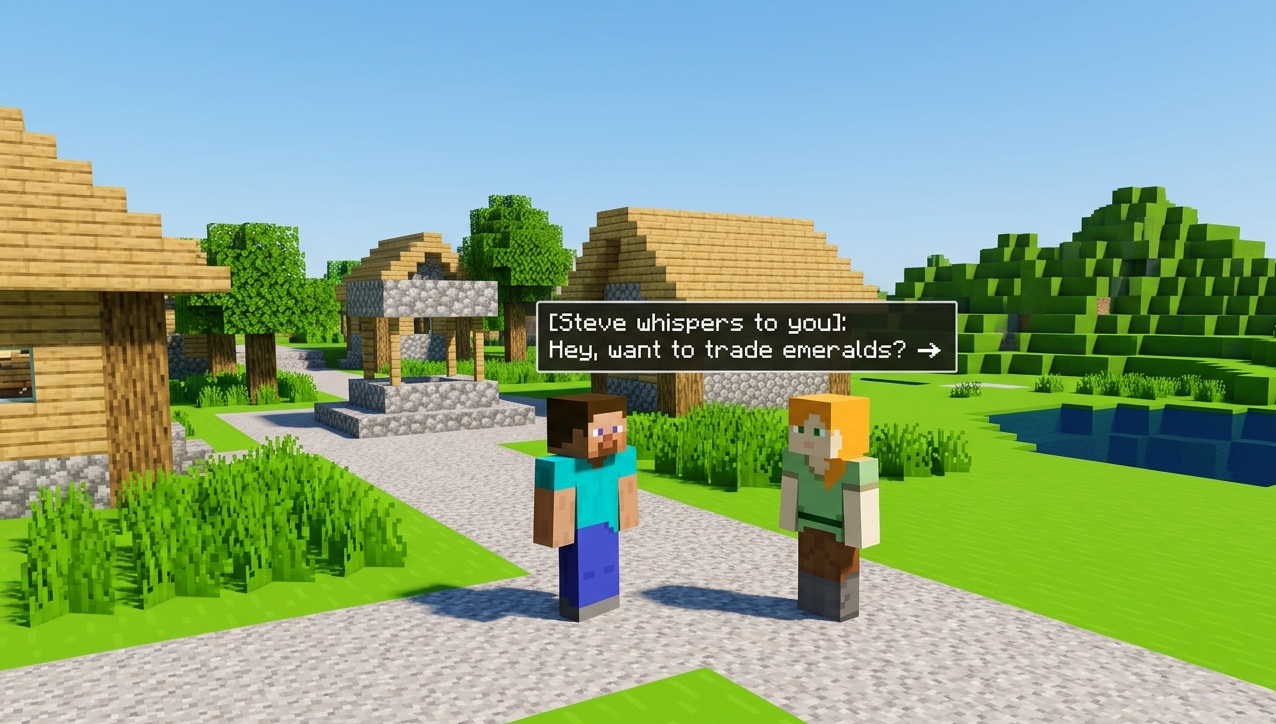
-
Open Chat: Press T to open the chat window. On some platforms, you may need to use the chat button or a specific key to access the chat interface.
-
Type Command: The basic syntax for whispering is /w <recipient's username>
. The command requires the recipient's username as an argument, which specifies the target of your whisper. The player's username is used to direct the message to the intended recipient.
- Example: /w Notch Hello!
When you send a whisper, the recipient will see the message in the format: [Sender] whispers to you: [Message].
- Press Enter: Send the command.
Whispering in Minecraft Bedrock and Pocket Edition
The process is similar but uses a slightly different command:
-
Open Chat: Tap the chat icon or press T if playing on PC. On consoles or mobile devices, use the chat button to open the chat interface.
-
Type Command: Use chat commands like /msg, making sure to include the recipient's username to send messages privately. The format is /msg <recipient's username>
.
- Example: /msg Notch Hey!
Chat commands are used to send messages directly to other players in Bedrock and Pocket Edition.
- Send Command: Tap Enter.
Using Target Selectors (@p, @r, @a)
-
@p: Sends the message to the closest player.
-
@r: Randomly selects a player online.
-
@a: Sends to all players (essentially broadcasting, useful for announcements).
You can also use a specific player's username to target a specific player for private messages, allowing for more customization and privacy.
Example: /w @p Meet at spawn!
Note: Only you and the specific player can see the whisper, but server administrators may have the ability to view all private messages through server logs.
Alternative Commands: /msg and /tell
-
Both work similarly across editions: To send a private message, use the command followed by the player's username and your message.
-
Java/Pocket Edition: /tell <player's username>
-
Bedrock Edition also accepts /msg <player's username>
Enabling Cheats for Commands
To use commands like whispering, cheats must be enabled on your server:
- Open Server Settings > Game Settings > Allow Cheats = ON
Or in single-player worlds:
- Create New World > More Options > Allow Cheats = ON
Benefits of Private Messaging in Multiplayer
-
Strategic Coordination: Keep enemy teams unaware of your plans during PvP matches. Whispers allow teams to assign roles and share sensitive information, such as enemy movements and resource locations, which enhances strategic planning and execution.
-
Roleplay Immersion: Enhance storytelling by keeping certain interactions private between characters.
-
Reduces Spam: Keeps main chat clean and focused on general discussions.
The privacy afforded by whispers in Minecraft empowers players to engage in covert collaborations, exchanging vital information that could sway the tides of battle. This ability to plan ambushes and assign roles without alerting opponents is a key strategic advantage, often making the difference between defeat and success in competitive gameplay. Whispering is fundamental stuff for the Minecraft multiplayer experience, elevating teamwork and communication to new levels.
Always remember to follow server rules when using private messaging features, as some servers may have specific guidelines or restrictions regarding private communication to maintain a respectful and secure environment.
Remember, while whispers are private from other players, server administrators can still see them through logs if necessary.
Troubleshooting Whisper Issues
Whispering in Minecraft is the primary way to maintain private coordination, allowing players to share secrets or coordinates without alerting the entire server. By using commands like /msg or /tell, players can keep their tactical discussions hidden from opponents, which is a major advantage in competitive games. This direct line of communication helps reduce the noise in public chat, ensuring that important messages reach only the intended recipient while keeping the general experience clean for everyone else.
While the system is generally reliable, communication can break down if a player makes a small typo in a username or tries to message someone who has logged off. To keep conversations flowing smoothly, players should use the /r command to reply instantly to the last whisper they received. Understanding these troubleshooting steps and shortcuts ensures that private messaging remains a tool for efficiency and strategy rather than a source of frustration during fast-paced gameplay.
Core Troubleshooting and Features
-
Verification: Always double-check the spelling of a player's name if a message fails to send.
-
Online Status: Ensure the recipient is currently connected to the server, as you cannot whisper to offline players.
-
The Reply Shortcut: Use /r to quickly respond to the last person who messaged you without re-typing their name.
-
Ignore Command: Stop unwanted whispers by using /ignore [playername] to block messages from specific users.
-
Permissions Check: Make sure "Allow Cheats" is enabled in single-player or that you have the correct permissions on a multiplayer server.
FAQs
How do you whisper to someone in Minecraft?
Use the /tell, /msg, or /w command followed by the player's name and your message (e.g., /w Alex Hello!).
What is the difference between /tell, /msg, and /w?
There is no functional difference; they are "aliases" for the same command and work exactly the same way to send private messages.
Can other players see my whispered messages?
No, whispers are private and only visible to the sender and the specified recipient.
Can you whisper to multiple players at once?
Standard whispering is designed for one-on-one conversations, though you can use target selectors like @a to whisper to everyone or @p for the nearest player.
Do you need to be near someone to whisper to them?
No, you can whisper to any online player regardless of where they are in the game world.
Can I whisper to myself?
Yes, by using the @s target selector (e.g., /tell @s Remember to mine iron), which can be helpful for taking quick notes.
Do commands work on all versions of Minecraft?
Whispering works on Java Edition (PC/Mac) and Bedrock Edition (Consoles, Mobile, Windows 10). It is generally not supported on older legacy consoles like Xbox 360 or PS3.
Why isn't my whisper command working?
You may need to have "Cheats Enabled" in your world settings, or you might not have the correct permissions (Operator status) on a multiplayer server