How To Make Fireworks In Minecraft
Learn how to make fireworks in Minecraft! Craft colorful rockets for Elytra flight or dazzling shows using gunpowder, paper, and dyes with custom explosion effects.

Shahrukh Sial is a Gaming Content Strategist at Sparked Host. He identifies his own strategic outlines through deep research to cover game guides, tips, and updates that help players improve their skills and enjoy a better gaming experience.
Let's talk about one of the most exciting and colorful items in all of Minecraft: fireworks. Whether you want to celebrate a new build, create a spectacular light show, or just have some fun, Minecraft fireworks are a great way to do it.
The process of creating decorative explosions is a simple one, and it is a fundamental part of the game. This guide will teach you everything you need to know about how to make fireworks in Minecraft, from gathering the ingredients to launching your very own firework rocket. This knowledge is a key part of the Minecraft tutorial.
When Were Fireworks Added To Minecraft?
Fireworks were added to Minecraft in the 1.4.6 update, known as the Pretty Scary Update, back in December 2012. Before this update, the closest thing to a firework was a very simple explosion from a dispenser. The developers wanted to give players a way to celebrate in the game, and so real fireworks were a natural fit. Since then, the firework rocket has been a staple in the game for celebrations and a wide variety of other uses. The minecraft pc team panel announced these features to the community. The addition of firework rockets was a major game-changer.
Crafting Basic Fireworks In Minecraft
The first step to making any firework is to craft a basic firework rocket. A basic firework rocket does not have a colorful explosion. It is just for the flight. The firework rocket recipe is very simple: it requires paper and at least one gunpowder.
The amount of gunpowder you use will determine the flight duration of the firework rocket. The firework rocket can have a flight duration of one, two, or three, depending on how much gunpowder you use. You can craft a basic firework rocket in your inventory or on a crafting table. The recipe is one paper and one to three gunpowder, in a vertical line. You can craft a firework rocket with a flight duration of one, two, or three.
Level 1 (1 Gunpowder)
To craft a Level 1 firework rocket, you just need one gunpowder and one paper. The paper goes in the bottom slot, and the gunpowder goes in the middle slot.
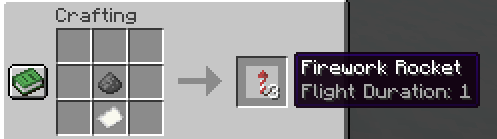
This will give you a firework rocket with a flight duration of one. This is the simplest firework rocket you can make.
Level 2 (2 Gunpowder)
To make a Level 2 firework rocket, you will need two gunpowder charges and one paper. The paper goes in the bottom slot, and the two gunpowder blocks go in the two slots above it.
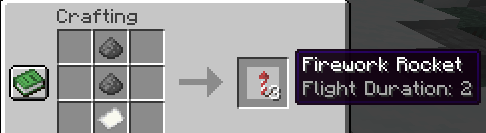
This will give you a firework rocket with a flight duration of two. This is the most common firework rocket used with elytra because it gives you a good speed boost.
Level 3 (3 Gunpowder)
To craft a Level 3 firework rocket, you will need three gunpowder and one paper. This will give you a firework rocket with the highest flight duration of three.
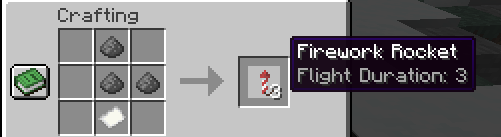
The higher flight duration makes this firework rocket go much higher and faster. It is a great firework rocket to have.
Making A Firework Star
To get a colorful explosion from your firework rocket, you first need to craft a firework star. A firework star is an item that determines the color, shape, and effects of the explosion. The recipe is very simple. To craft a firework star, you need at least one gunpowder and one dye. You can use a variety of dyes to create different colors. You can put up to eight dyes in the recipe to create a colorful explosion based on the colors you used.
Crafting Colored Fireworks
To craft a firework star, place one gunpowder in the center of the crafting grid, and then place any dye around it. For example, if you place a red dye, you will get a red firework star.
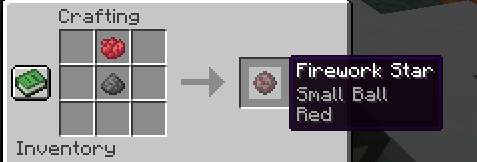
You can use multiple dyes to make a multi-colored firework star. Once you have crafted your firework star, you can use it in your firework rocket recipe to create an explosive firework rocket.
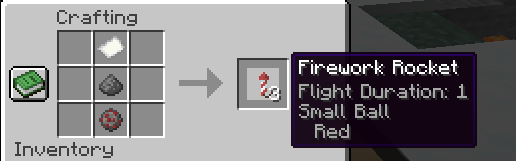
An additional firework star can also be added.
Increasing The Duration Of Fireworks
This heading is a bit of a mistake. This should be about adding effects. To add effects to your firework star, you can use a few different items. Glowstone dust will add a twinkle effect to the explosion. A diamond will add a trail effect. You can use both in the same firework star recipe. You can find glowstone dust in the Nether, and you can find diamonds deep underground. A large firework rocket is created when you add effects. The non-large firework rocket does not have effects.
Making Stronger Fireworks
The strength of a firework is determined by the firework star that is in it. The more gunpowder you use in the firework star, the bigger the explosion. A small ball firework is crafted with just one gunpowder and one dye. If you add more lava, which is not an ingredient but an example, you can make the explosion bigger. If you want a bigger explosion, you can add up to seven gunpowder charges to the firework star recipe. This will make a large firework rocket.
Making Creeper Face Shaped Fireworks
This is a fun and popular firework. To make a creeper face-shaped firework, you will need to add a mob head to the firework star recipe. Place a creeper head in the crafting grid along with your gunpowder and dye.
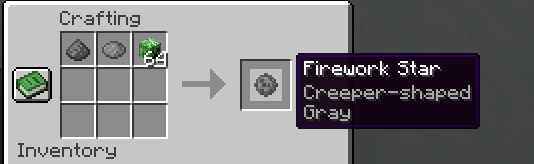
This will give your firework star the creeper face shape. When this firework star is used in a firework rocket, the firework explodes in the shape of a creeper face.
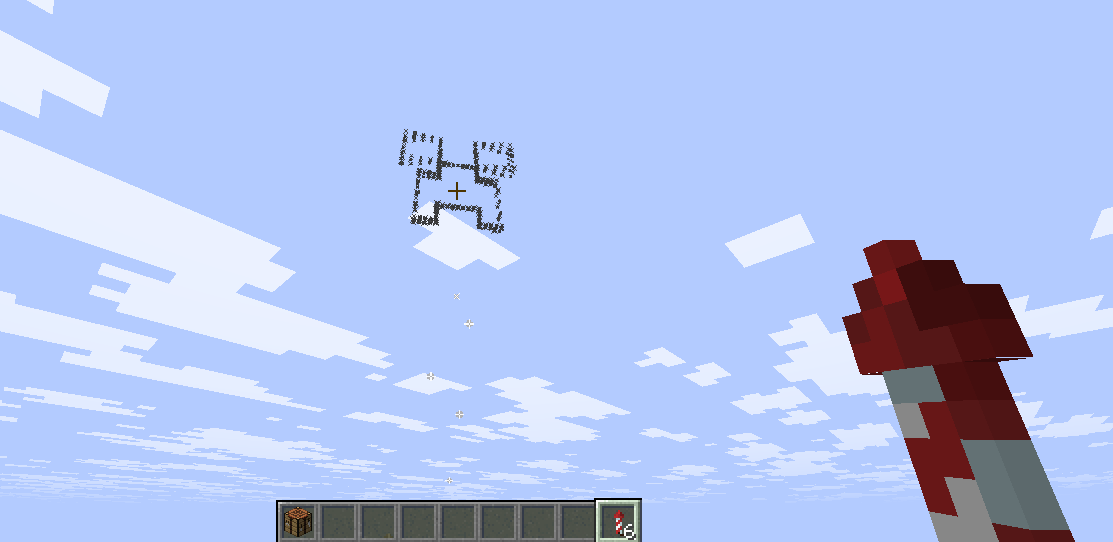
This is a very cool thing to see. A non-large firework rocket can also have this effect.
Making Heart-Shaped Fireworks
It is a common mistake to think you can make a heart-shaped firework. The game does not have a crafting recipe or a way to create this shape. The closest you can get is to create a star-shaped firework by adding a gold nugget to the recipe.
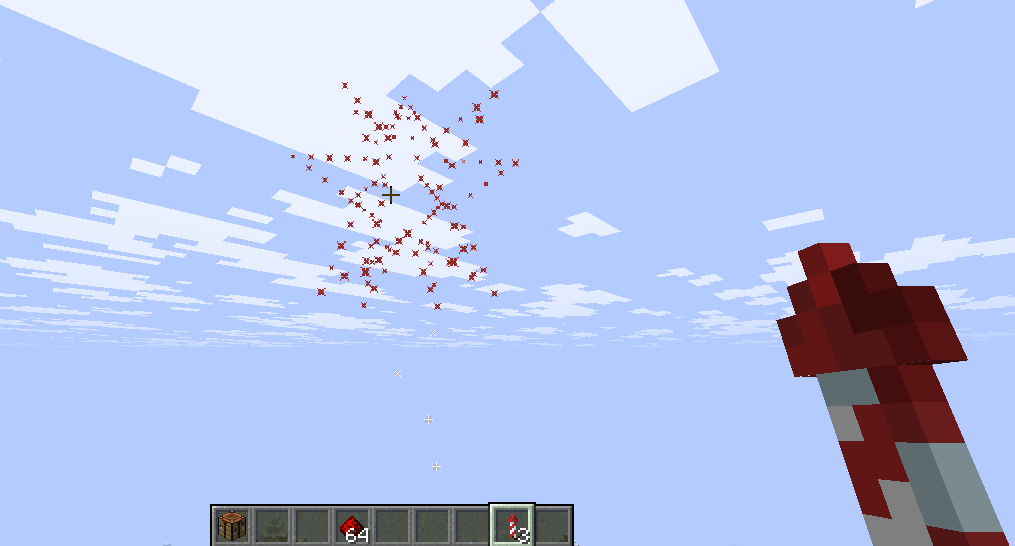
The star-shaped firework looks a bit like a star. You can also get other shapes, but a heart is not one.
Increasing Firework Flight Duration
The flight duration of a firework rocket is determined by how much gunpowder you use in the recipe. As mentioned before, you can use one, two, or three gunpowder to get a flight duration of one, two, or three. The higher flight duration will make the firework rocket fly higher and for a longer period of time. You can also add firework star to the firework rocket recipe. The additional firework stars result in a bigger explosion. This will not affect the flight duration, but it will make the firework rocket have more effects.
How To Set Off Fireworks In Minecraft
There are a few ways to set off Minecraft fireworks. The most common way is to simply hold the firework rocket in your hand and right-click on the ground. The firework rocket will launch into the air. You can also use a dispenser to launch fireworks. When a dispenser gets a redstone signal, it will fire the firework rocket.
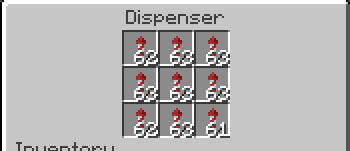
This is a great way to make automatic fireworks shows. A dispenser shoots the firework rocket in a straight line. You can also start fireworks with a crossbow. A wooden pressure plate or a stone pressure plate can activate a dispenser.
Using Fireworks With Elytra
One of the most popular uses for a firework rocket is with an Elytra. When you are flying with Elytra, you can hold a firework rocket in your hand and right-click to get a speed boost. The speed boost depends on the flight duration of the firework rocket.
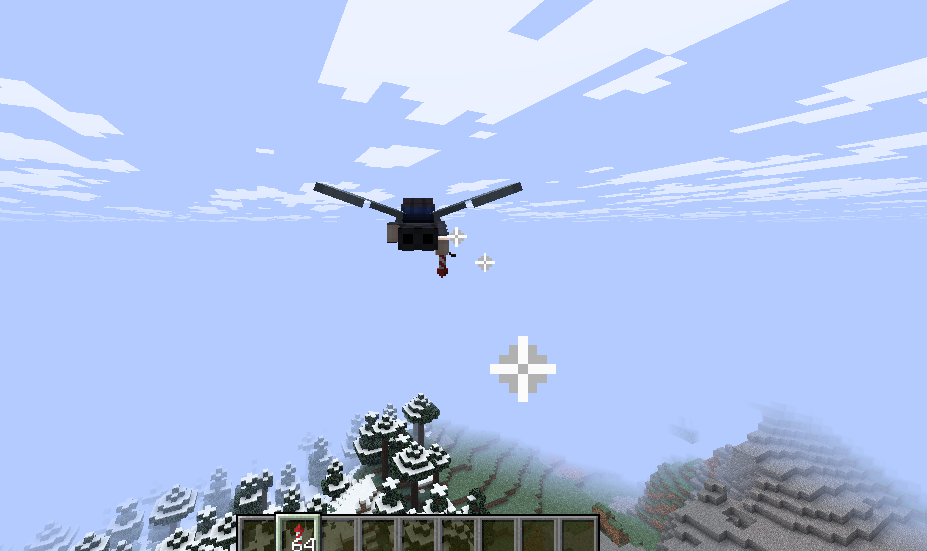
This is a great way to travel long distances in a short amount of time. The firework rocket will give you a vertical and horizontal speed boost, and the firework's direction combines with your current flight. The fireworks fly very fast. The rocket instantly gives you a boost, with virtually no terminal velocity. Launching fireworks with Elytra is a fast and fun way to travel. A firework passing through the air is a beautiful sight.
Using Fireworks With A Crossbow
You can also use a firework rocket with a crossbow. To do this, you just need to hold the firework rocket in your off-hand and the crossbow in your main hand. When you right-click, the crossbow fires the firework rocket. The firework rocket shot from a crossbow will fly much faster than a normally launched one. This is a great way to attack enemies from a distance. The firework rocket will fly in a straight line until it hits a solid surface block or a mob, and then it will explode. A dispenser similarly fires a firework rocket.
Can Fireworks Hurt Players?
Yes, a firework rocket can hurt players. If a firework rocket has a firework star that gives it an explosion effect, it will deal damage to anything it hits. The firework rocket deals damage just like a creeper explosion, but it is much smaller. The explosion effects from a firework rocket can destroy armor stands and destroy end crystals. The friendly creatures sound category is what you will hear when the firework explodes. Other fireworks can have the same effect. The firework rocket will also deal damage to a player or mob if it hits them directly. The explosion will hurt them and launch them back. The non-large firework rocket can also deal damage.
Conclusion
Minecraft fireworks are a great way to add color and excitement to your game. The process of making fireworks in Minecraft is a simple one, and it is a fundamental part of the game. You will need to craft a firework star and a firework rocket. You can use them with elytra for a speed boost, or with a crossbow to attack enemies.
The firework rocket is a very useful item that has a lot of uses in the game. With this knowledge, you can go out and create some amazing fireworks shows. A firework rocket is a great thing to have in your inventory. The firework rocket is a great thing to have in the game.