How to Make a Water Breathing Potion in Minecraft: Step-by-Step Recipe
Learn how to craft the best water breathing potion in Minecraft with our simple guide. Dive into your underwater adventures—read the article now!

Shahrukh Sial is a Gaming Content Strategist at Sparked Host. He identifies his own strategic outlines through deep research to cover game guides, tips, and updates that help players improve their skills and enjoy a better gaming experience.
Exploring the ocean floor in Minecraft is one of the most exciting parts of the game. However, the constant threat of oxygen depletion makes it difficult to stay underwater for long periods. If you want to avoid drowning and see clearly beneath the waves, you need to learn how to brew a Water Breathing potion in Minecraft.
This guide will walk you through every detail of the brewing process, from gathering your first blaze rod to perfecting an 8-minute version of the brew.
Water Breathing Potion Ingredients List
Before you can start your brewing session at a crafting tabl
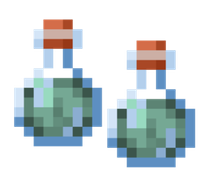
e or brewing stand, you must collect several specific items. To craft a Potion of Water Breathing, you need the following:
-
Pufferfish: This is the key ingredient that provides the water breathing effect.
-
Nether Wart: Essential for creating the base awkward potion.
-
Blaze Powder: You must craft blaze powder from a blaze rod to fuel your brewing stand.
-
Water Bottles: You need three glass bottles filled with water to start.
-
Redstone Dust: Used if you want to extend the duration of the potion.
-
Gunpowder (Optional): Needed if you want to make a splash potion of water breathing.
-
Dragon's Breath (Optional): Needed to create a lingering potion of water.
Quick Recipe: The Brewing Stand Flowchart
If you are in a hurry, follow this simple flow within the brewing menu:
-
Fuel: Place Blaze Powder in the top-left fuel slot.
-
Base: Water Bottle + Nether Wart = Awkward Potion.
-
Effect: Awkward Potion + Pufferfish = Potion of Water Breathing (3:00).
-
Extension: Potion of Water Breathing + Redstone = Potion of Water Breathing (8:00).
How to Brew Water Breathing Potions in Minecraft
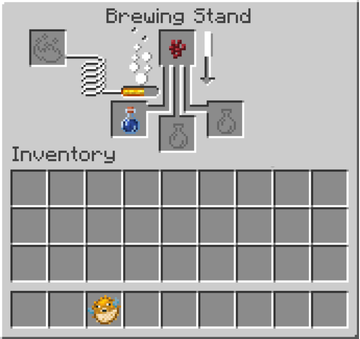
Brewing is a precise science in Minecraft. To begin, you need a brewing stand. You can craft one using one blaze rod and three cobblestones or blackstones. Once you have your stand, open the brewing menu by right-clicking it.
Step 1: Making the Awkward Potion
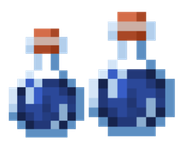
The awkward potion is the foundation for almost all associated potions in the game. It does not have any status effects on its own, but it is required to hold the power of the pufferfish later.
-
Place your water bottles in the three bottom slots of the brewing stand.
-
Add a piece of Nether Wart to the top box (the ingredient slot).
-
Ensure you have added blaze powder to the fuel slot in the upper-left corner to activate the brewing stand.
-
Wait for the progress bar to finish. You now have three awkward potions.
Step 2: Adding the Pufferfish
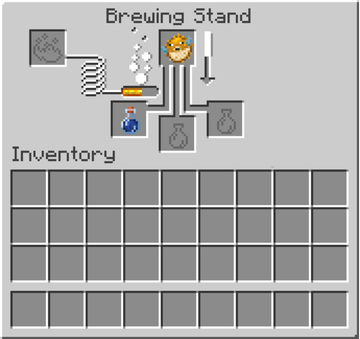
Now that you have your base, it is time to grant water breathing effect capabilities to your drink.
-
Keep your awkward potions in the bottom three slots.
-
Place a Pufferfish into the top slot of the brewing menu.
-
Once the brewing process is complete, the bottles will transform into a Potion of Water Breathing.
This basic version allows you to breathe underwater for three minutes. It instantly replenishes your oxygen bar and provides enhanced underwater vision, preventing drowning damage while you work.
Step 3: How to Make the 8-Minute Water Breathing Potion
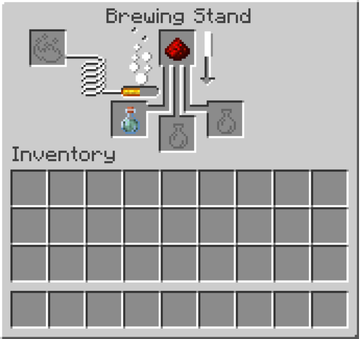
Three minutes is often not enough time for a major project on the ocean floor. To increase the potency length, you should add redstone.
-
Place your 3-minute water breathing potions back into the bottom of the brewing stand.
-
Add Redstone Dust to the top row.
-
After the brew finishes, you will have an 8-minute version of the potion. This is the maximum potency length for this specific potion effect.
Where to Find Pufferfish: The Key Ingredient
Finding a pufferfish is the hardest part of the recipe. You can catch them by fishing in any body of water, but they are most common in warm, lukewarm, or deep lukewarm ocean biomes. Alternatively, you can find them swimming as mobs in these same warm oceans. If you see one, you can catch it in a bucket of water or kill it to get the item drop. Pufferfish are aquatic mobs, so they are easy to spot by their unique effect sprite and texture.
Minecraft Command: How to Give Yourself a Water Breathing Potion
If you are playing in Creative Mode or have cheats enabled, you can use a command to get the potion instantly. This is helpful for testing builds or if you just do not want to go through the brewing process.
Java Edition:
/give @p potion{Potion:"minecraft:water_breathing"}
Bedrock Edition:
/give @p potion 1 19
You can also use the /effect command to apply the water breathing status effect directly to your character without a bottle:
/effect give @s water_breathing 600 1 (This gives 10 minutes of the effect).
Potion of Water Breathing in Bedrock Edition vs. Java Edition
The potion works almost identically across both versions of the game, including the same effect IDs and data values. However, there is one interesting detail in Bedrock Edition: the water breathing effect prevents aquatic mobs (like dolphins or fish) from taking suffocation damage when they are stuck on a vertical surface or dry land. In both versions, the effect icon texture will appear in the top right of your screen to show how much time is left before your oxygen depletion begins again.
When to Use Water Breathing: Ocean Monuments and Shipwrecks
This potion is essential for regular gameplay if you plan on visiting deep-sea structures.
-
Ocean Monuments: Raiding these structures to fight Guardians requires long periods underwater.
-
Shipwrecks and Ruins: Finding buried treasure and nautilus shells is much easier when you do not have to surface every thirty seconds.
-
Underwater Building: If you are placing glass blocks or building a base on the ocean floor, this potion ensures you do not take suffocation damage while working.
Water Breathing Potion vs. Respiration Enchantment
You might wonder if you need a potion if you already have a turtle shell helmet or a helmet with the Respiration enchantment.
-
Turtle Shell: Wearing a turtle shell helmet provides an extra 10 seconds of underwater breath.
-
Respiration: This enchantment slows down the rate of oxygen depletion, granting an extra 15 seconds of breath per level (up to Respiration III).
-
Conduit Power: A Conduit provides a similar effect to water breathing indefinitely, but it only works within a specific range of the device.
While these are great for short trips, the Water Breathing potion is superior for long-term projects because it completely stops the oxygen bar from dropping, whereas enchantments only make the bar last longer.