How To Make Scaffolding In Minecraft
Craft scaffolding in Minecraft with ease! Learn the simple recipe, required materials, and best uses for building smarter and faster.

Shahrukh Sial is a Gaming Content Strategist at Sparked Host. He identifies his own strategic outlines through deep research to cover game guides, tips, and updates that help players improve their skills and enjoy a better gaming experience.
Have you ever been building something tall in Minecraft and wished it was easier to get up and down? That's where scaffolding comes in. It's a super helpful tool for building. This guide will show you how to make scaffolding in Minecraft and how to use it for all your building projects.
What Is Scaffolding?
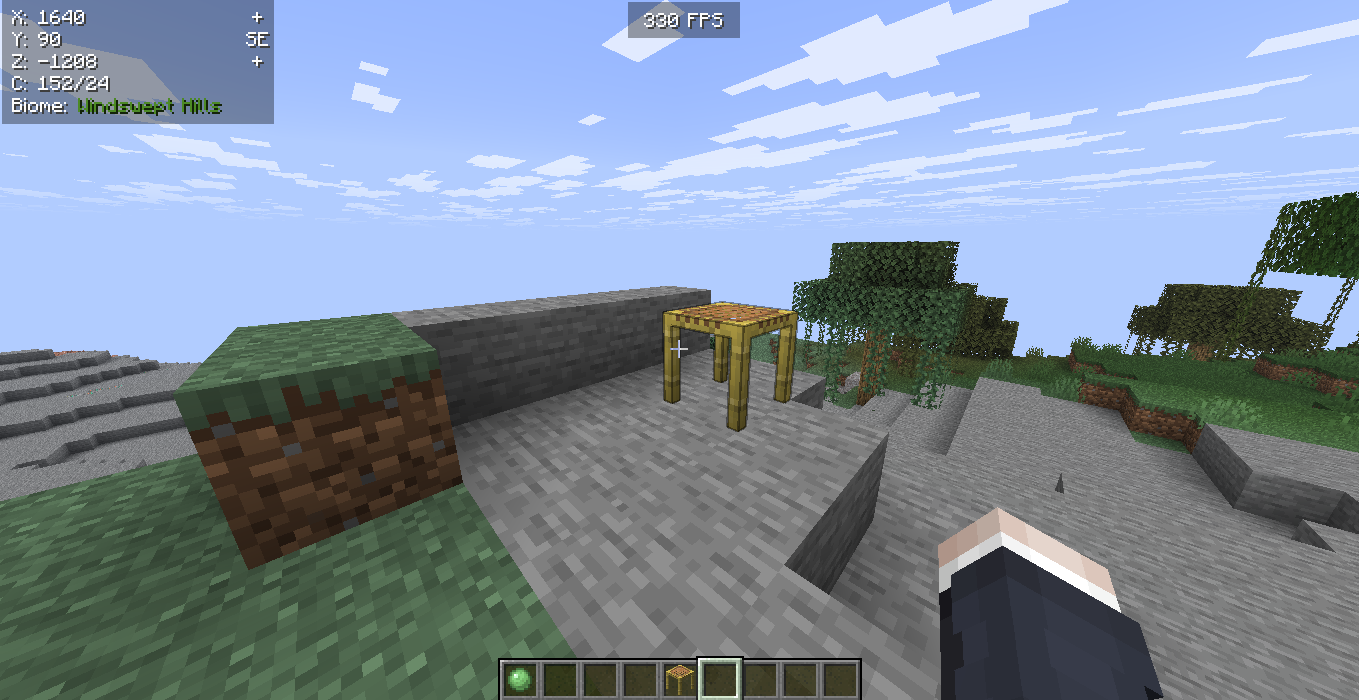
In Minecraft, scaffolding is a special block you can climb. It's like a temporary structures ladder that's very easy to put down and pick up.
You use scaffolding blocks to reach high places or get down safely. It helps Steve building tall things. It's made from bamboo and string.
When you place scaffolding blocks, they can go next to each other or on top of other solid block. It's broken easily by just removing the bottom scaffolding block.
When Was Scaffolding Added To Minecraft?
Scaffolding was added scaffolding to Minecraft in a big update called "Village and Pillage", which was version 1.14. This update came out in 2019.
How To Craft Scaffolding In Minecraft
To craft scaffolding in Minecraft:
-
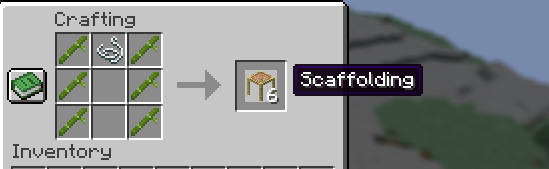
Open your crafting table. You'll see a 3x3 grid.
-
To make scaffolding, put 6 bamboo and 1 string in a specific pattern:
-
Fill the first and last column with bamboo.
-
Put the string in the top spot of the middle column.
-
-
When you do this, you will make 6 scaffolding blocks. This is how to make scaffolding in Minecraft. The pattern must be exact. This scaffolding is ready to use.
Using Scaffolding In Minecraft
Scaffolding is a great block for building temporary towers and moving up and down quickly. It's made from bamboo and string. When you place scaffolding blocks, you can climb them like a ladder. You can also place more scaffolding blocks on top to build higher.
Placing and Using Scaffolding Blocks:
-
You can put scaffolding blocks on any solid block.
-
To climb scaffolding, hold down your right mouse button to go up smoothly. Or, click once to go up one block at a time. This is what it's like climbing scaffolding.
-
To go down, sneak (usually by holding Shift on Java Edition) while holding the right mouse button over scaffolding. Or, right-click on the scaffolding block below you.
-
Scaffolding can reach up to six blocks from its base. If you place it further, it will become a falling block. This falling block is represented as a falling block entity. If the scaffolding structure is not adequately supported, it can fall. This is different from vanilla falling blocks.
-
You can easily remove scaffolding by right-clicking it with an empty hand or a sword. This is called breaking scaffolding.
-
If you break the bottom scaffolding block of a tower, all the scaffolding blocks above it will also break. This makes taking down a scaffolding structure very quick. This is useful if you have floating scaffolding.
-
While sneaking, you can place scaffolding on the side of another block, just like placing other blocks. You can even place scaffolding inside other blocks if there's space.
-
When placing scaffolding, you can hold down the place button to quickly stack many scaffolding blocks on top of each other. This is like building at building height.
-
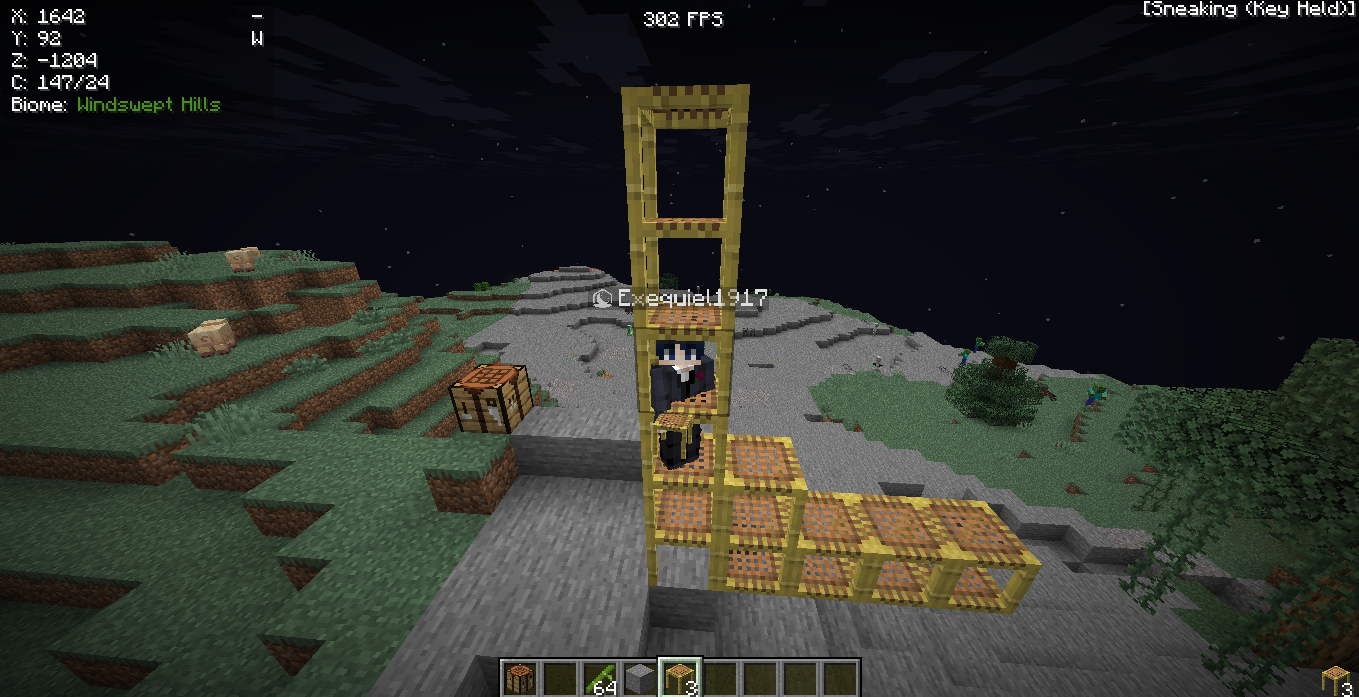
You can also place scaffolding on the sides of other scaffolding blocks. This lets you build out and up. You can even center scaffolding horizontally for wider platforms.
-
Scaffolding can be used as a source of furnace fuel.
Scaffolding Tips and Tricks:
-
Scaffolding is ideal for temporary towers or accessing difficult-to-reach spots.
-
It's excellent for making climbing walls for your big building projects.
-
Scaffolding can be moved by pistons, which helps you quickly disassemble it.
-
Scaffolding can be filled with water. Additionally, mobs can spawn on or inside scaffolding, so be cautious. Very small mobs can even spawn inside or on scaffolding. It won't spawn mobs in some versions anymore.
-
The scaffolding texture looks natural.
-
It is a climbable semi solid block.
-
The game has collision detection for scaffolding.
-
Scaffolding has maximum hit points for durability.
Placing Scaffolding Sideways
To place scaffolding blocks sideways in Minecraft, you need to be crouching (sneaking) when you put them:
-
Crouch: Press your sneak button (usually Shift on PC for Java Edition).
-
Aim: Point your cursor at the side of a scaffolding block where you want to put the new scaffolding piece.
-
Place: Click to place the scaffolding blocks sideways.
-
Extend: You can keep placing scaffolding blocks sideways from there. However, remember that scaffolding requires support and will fall if it extends too far (typically six blocks from its supporting scaffolding structure higher), becoming a falling block. This falling block entity can even hurt entities if it falls on them. It behaves like a broken block if not supported.
Important Notes:
-
Scaffolding placed sideways is held up by the scaffolding block it's attached to.
-
If you are not crouching, placing scaffolding on top of another scaffolding block will make it go straight up instead of sideways.
-
This matches how scaffolding places in Java Edition.
-
This also helps when matching java edition behavior on Bedrock Edition.
Placing Scaffolding Up
To place scaffolding upwards in Minecraft, hold a scaffolding block and right-click on the side of another scaffolding block. This will stack the new scaffolding piece on top, letting you build a tall tower of scaffolding. This is how you build to the world limit or even the world height limit. You can also make it go to the side by crouching and placing scaffolding alongside the existing pieces. This enables you to build the highest scaffolding.
Placing Scaffolding Down
To place scaffolding downwards from an edge, stand right at the edge. Look down and place two scaffolding blocks. The second one should hang over the edge. Then, you can crouch and place scaffolding blocks downwards to move down. You can also place a trapdoor at the bottom of another trapdoor or pour water to help you get down. You can replace vines with scaffolding.
How To Climb Down Scaffolding
To climb down scaffolding in Minecraft, stand on the scaffolding and press your sneak button. Your character will then go down through the scaffolding blocks. This uses flight controls in some ways.
Conclusion
Scaffolding is a fantastic tool in Minecraft for building, it makes reaching high places easy and safe. By knowing how to make scaffolding in Minecraft and how to use it to go up, down, or sideways, you can build much faster.