How to Make a Picture Frame in Minecraft
This item, officially known as an item frame in minecraft, allows you to display your favorite treasures on your walls. It is a simple tool that turns any basic room into a gallery for your rare items and maps.

Shahrukh Sial is a Gaming Content Strategist at Sparked Host. He identifies his own strategic outlines through deep research to cover game guides, tips, and updates that help players improve their skills and enjoy a better gaming experience.
Minecraft is a world where you can build anything you imagine, but it is the small details that make a house feel like a home. One of the best ways to decorate is by using a frame.
This item, officially known as an item frame in minecraft, allows you to display your favorite treasures on your walls. It is a simple tool that turns any basic room into a gallery for your rare items and maps.
You will find that learning how to make a picture frame in minecraft is very easy and rewarding. Once you master this craft, you can start creating all sorts of amazing automated systems in your home. Let us explore the steps required to gather materials and assemble your very first decorative display piece.
What is a Picture Frame (Item Frame) in Minecraft
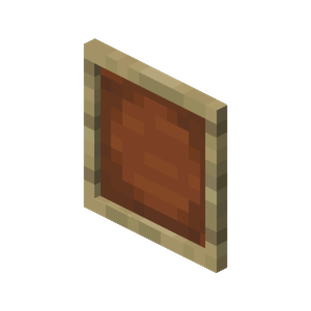
An item frame in minecraft is a unique item frame entity that displays whatever item or block you place inside it. It acts as a non solid blocks attachment that you can stick onto the side of a solid block.
These frames are perfect for decoration or organization because they show the item form of whatever you are holding. Whether it is a sword or a clock, the displayed item will stay visible for everyone to see.
It is important to understand that in the game code, this is often treated as an entity rather than a standard block. This means it has entity data that allows it to hold specific information about the item inside.
Because it functions as an entity, you can rotate the item within it or even use commands to make the frame border invisible. This flexibility is what makes it a favorite for advanced builders and map makers.
How to Craft a Picture Frame
Crafting this item is a simple task that requires basic materials you can find early in your survival journey. You do not need any rare minerals or expensive gems to start decorating your base with a beautiful frame.
You only need a few sticks and a single piece of leather to begin the process at your crafting table. This makes it one of the most accessible decorative items for players who are just starting a new game.
Gathering leather is usually the most time-consuming part, as it requires finding cows or other animals in the wild. Once you have a small farm started, you will have an infinite supply of leather for your projects.
Sticks are easily made from any type of wood planks you have on hand. With these two resources combined, you can mass-produce frames to organize every single chest in your massive storage room or warehouse.
Crafting Recipe for Picture Frame
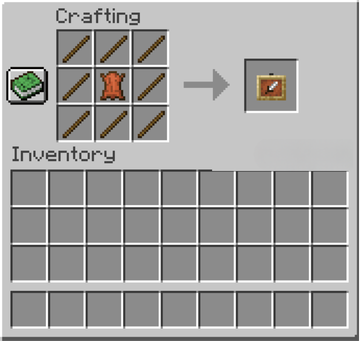
To make a standard frame in minecraft, you need 8 sticks and 1 piece of leather. Open your crafting table and place the leather in the center square. Fill all the remaining eight squares with sticks. This recipe will produce one item frame block for your inventory. If you want a glow item frame, you can combine a regular frame with a glow ink sac.
How to Make a Picture Frame in Minecraft PC
In the Java Edition, you follow the same 3x3 crafting grid pattern mentioned above. You can also find them in the creative mode inventory under the decorations tab. PC players have the advantage of being able to place multiple item frames in the same block space if they are on different faces of the block. This allows for very compact and detailed builds in corners or on pillars.
How to Make a Picture Frame in Minecraft PE / Pocket Edition
For the Bedrock Edition on mobile, you simply use the crafting menu to select the frame. Ensure you have gathered leather from cows or horses and sticks from wooden planks. The interface makes it easy to tap the recipe and quickly add several item frames to your hotbar for building. It is a very streamlined process designed for touch screens and mobile play.
How to Make a Picture Frame on Console (Xbox, PlayStation)
Console players can craft a frame by navigating to the decorations section of their crafting interface. The requirements are identical across all versions of the game. Once crafted, you can place them on the sides, tops, or bottoms of most blocks to begin your item frame texture decorating. This makes it easy for players using controllers to quickly decorate their homes.
How to Use Picture Frames in Minecraft
Using your new frames is as simple as placing them on a wall and choosing an item to show off. You can use almost any block or tool, and the frame will hold it securely until the item frame breaks.
Once an item is inside, you can even change its rotation value to make it look exactly how you want. This is very useful for creating directional signs or adding a bit of character to your weapon displays.
If you are using a glow item frame, the item inside will appear to glow even in total darkness. This is a fantastic way to light up a dark hallway or make a specific item stand out in a museum.
You can also remove items by simply hitting the frame once. The item will drop on the floor, and the frame remains on the wall, ready for you to place something else inside it immediately.
How to Put Items in Picture Frames
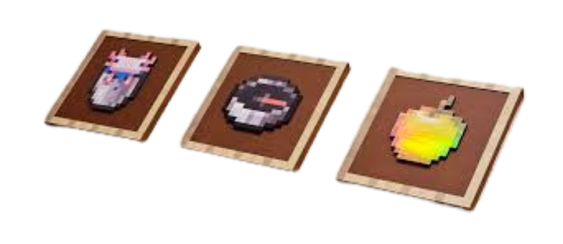
To place an item, first mount the empty frame on a wall. While holding the item you want to display, right-click or use the action button on the item frame block. The item will now appear inside the frame border. If you want to rotate it, just right-click the displayed item again, and it will turn 45 degrees with each click.
How to Put Pictures in Item Frames
While you cannot upload real photos, you can use maps to create pictures. If you place a map in a frame, it expands to cover the full block. By placing several adjacent maps together, you can create a giant custom image. This is how players create massive "world maps" that cover entire walls in their base command centers.
How to Make Custom Picture Frames
You can make a glow item frame to ensure your items are always visible in the dark. This glow item frame entity keeps the displayed item illuminated even if the light level is zero. It is perfect for spooky basements or neon-themed builds. To craft this, just put a regular frame and a glow ink sac anywhere in your crafting grid.
How to Make a Big Picture Frame
To create a large display, you should place multiple item frames on a large wall in a grid. By placing a different part of a map in each one block space, you can build a massive "picture" that spans several blocks. This technique is often used by professional builders to create custom textures or murals that are not available in the base game.
How to Make Picture Frame Art in Minecraft
Players often use the item frame texture to create art by placing different colored blocks or items inside. For example, placing a compass or a clock will now display real-time information. You can also use banners to add patterns to your walls. Some players even use firework stars or dyes to create a "palette" of colors for their decorative walls.
Picture Frame Builds and Redstone Uses
Beyond just looking good, these items have functional uses in complex machines. A frame outputs a redstone signal when a comparator is placed behind the support block it is attached to, which is great for secret builds.
The signal strength changes based on the rotated item inside the frame. This means you can use a frame as a secret dial to trigger doors or hidden mechanisms by simply turning the item inside it.
This mechanic is one of the most clever ways to hide a base entrance. Instead of a messy lever or button, a simple tool in a frame acts as the key that only you know how to operate correctly.
Imagine a library where rotating a specific book in a frame causes the bookshelves to slide away. This is the level of immersion that item frames bring to the technical side of the game in 2026.
How to Make a Picture Frame Door
You can use a frame as a handle for a door. While it does not physically pull the door, placing one on a door can help you label which room is which. It is a great way to organize a large hallway of rooms. For example, you can put a bed in a frame on the door of your bedroom or a furnace on the door to your forge.
How to Make a Secret Door with Picture Frames
To make a secret entrance, place a frame on a block and put a comparator behind that block. When you rotate the displayed item to a specific position, the redstone signal will trigger a piston to open a hidden path. This is a classic "hidden dial" puzzle that adds a lot of mystery and fun to any survival base or adventure map.
How to Make a Piston Door with Picture Frames
By connecting the frame to a piston circuit, you can create a high-tech entrance. Rotating the item in the frame acts like a key. Once the item hits the correct rotation value, the pistons will retract and let you through. This setup is highly secure because there are eight different rotation positions, making it hard for intruders to guess the combination.
Advanced Picture Frame Mechanics
There are some technical details that make these items even more interesting for expert builders. For example, an item frame entity can be manipulated with entity data commands to become invisible or to hold items in unique ways.
In the latest updates, the glow item frame has become a favorite because it highlights items in low light. This does not actually raise the light level of the room, but the item data ensures the item itself stays bright.
Another advanced trick is placing frames on the floor or ceiling. This allows you to create custom rugs with maps or decorative tiles on your roof. You can even place pressure plates or buttons over the same block in some editions.
If you are a map maker, you can use the id tag and slot tag within the entity data to create custom shops. Players can see the item they are buying clearly displayed in the frame before they make a purchase from an NPC.
How to Get Custom Item Frame Pictures
On a Sparked Host server, you can use plugins or map art to get custom images. You can use external tools to turn an image into a minecraft map. Once you have the map, just put it in the frame to see your photo. This is a popular feature for communities that want to share real-life photos or custom artwork within their virtual worlds.
How to Use Item Frames for Maps and Paintings
When you put a map in a frame, a green cursor will show your current location on that map. If you are using the Java Edition, you can place frames on the same block to create seamless map rooms that cover every corner. This green pointer is essential for navigation and helps you keep track of where you are in relation to your base.
What Do Different Color Picture Frames Mean in Minecraft
While frames do not come in different wood colors like doors, the items inside them define their purpose. For instance, players often use food to label kitchen chests or ores for mining crates. The birch planks texture underneath is a standard look. Many players use a specific "color code" for their items to make their storage rooms much easier to navigate at a glance.
Popular Items to Display in Frames
If you are looking for inspiration on what to put in your frames, here is a list of the most popular choices:
-
Clocks and Compasses: These will continue to work while inside the frame, helping you keep track of time and direction.
-
Tools and Weapons: Showing off an enchanted netherite sword is a great way to display your power and progress in the game.
-
Rare Mob Drops: Items like the Nether Star or Dragon Breath look amazing when placed in a glow item frame.
-
Maps: As mentioned, these are the best way to create custom wall art and keep track of your explored territory.
-
Armor Pieces: You can put a helmet or chestplate in a frame to label your armor sets or just for decoration.
Creative Decoration Tips
Here are some creative ways to use frames in your next build:
-
Table Settings: Place a frame on a horizontal surface (like a table) and put a food item inside to make it look like a plate of food.
-
Tool Racks: Place multiple frames in a row above a crafting table and put your most-used tools inside for a realistic workshop feel.
-
Garden Markers: Use frames on fences to show what kind of crops are growing in each section of your farm.
-
Key Holders: Place a frame by your front door and keep a spare key (or a named item) inside for emergency base access.
-
Path Markers: Use arrows in frames to point the way toward important landmarks or nearby villages.
Conclusion: Best Uses for Picture Frames in Minecraft
In conclusion, the frame is a versatile and essential tool for any minecraft player. It allows you to organize your storage, display your greatest achievements, and even build secret redstone entrances to your hidden bunkers.
Whether you are using a standard frame in minecraft or the newer glow item frame, you have endless ways to decorate. From simple chest labels to massive 3x3 map walls, these items make your world feel much more detailed.
Take some time to gather sticks and leather so you can start your own gallery today. As you get more advanced, try using them with comparators to see what kind of secret machines you can create in your base.
The world of Minecraft is built on your creativity, and item frames are the perfect tool to showcase that imagination. So go ahead, craft a few dozen frames, and start turning your base into a masterpiece that tells the story of your adventures.
With the right Minecraft hosting server from Sparked Host and a little bit of design effort, your base will become a landmark that other players will love to visit and explore.