How To Make A Bed In Minecraft
Learn how to make a bed in Minecraft with our step-by-step guide. Find out what materials you need, crafting recipes, and tips for setting spawn points

Shahrukh Sial is a Gaming Content Strategist at Sparked Host. He identifies his own strategic outlines through deep research to cover game guides, tips, and updates that help players improve their skills and enjoy a better gaming experience.
Have you ever found yourself in the dark, hearing the unsettling sounds of monsters just outside your shelter? Every new Minecraft player faces this moment, waiting anxiously for the sun to rise. But what if I told you there's a simple item that lets you skip the night and set a new safe home base? That item, is the bed.
The bed is a vital tool that not only helps you avoid hostile mobs, but also allows you to designate a new spawn point, so you'll always return to a safe location after death. This article will walk you through everything you need to know about crafting and using a bed, making sure you have all the facts and commands you need.
When Were Beds Added To Minecraft?
Beds were introduced to Minecraft in the Beta 1.3 update on February 22, 2011. The original default bed color was a vibrant red, and for many players, seeing a red bed naturally generates a feeling of nostalgia.
Over the years, the game has evolved, and now you can craft beds in a wide variety of hues. Minecraft now has colored beds as a core feature, allowing you to choose from 16 different colors to match your style.
How To Make A Bed In Minecraft
Crafting a bed is one of the first and most important things you'll do in a new world. To make a bed in Minecraft, you need 3 wool and 3 wooden planks. The wool used can be of any color, and the wooden planks can be made from any type of wood, such as oak, spruce, birch, jungle, acacia, or dark oak. The new oak planks texture adds a fresh look to the final product. The oak planks texture itself has been updated over the years, and a bed will use it.
The recipe to craft a bed in Minecraft is:
-
3 wooden planks in the bottom row.
-
3 wool on top of the wooden planks in the middle row.
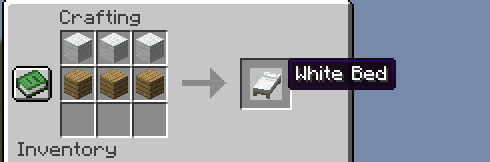
Once you have your bed, you need to place it. A bed is a solid block that must be placed on a solid block and requires a two block tall space to function. This is because beds require solid blocks for placement. The bed texture will appear once you place it.
In modern Minecraft, the actual bed will be a single, solid object, though some older versions had a bug where the bed texture shifting downward would occur. A bed can also be placed on a slab one block up, provided there's a solid block underneath. This is how you can place beds on higher elevations with ease.
Remember: To place beds, you need both a solid block underneath and a two block tall space above.
How To Change Bed Color In Minecraft
Minecraft offers two simple ways to customize the color of your bed, which is great for personalizing your base:
Dyeing A Bed in Minecraft
To dye a bed in Minecraft, you need to have a bed already crafted and a dye of your choice. Players can dye beds using colored dyes to change their color.
For example, to get a blue bed, you'll need one bed and one blue dye. Similarly, you can get a purple bed by combining a bed with purple dye.
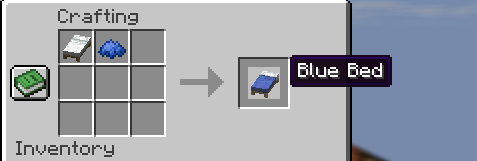
This method is perfect for changing a bed you've already made. You can get a pink bed, a green bed, or a brown bed this way, as well as an orange bed or a magenta bed. The same color dye will always yield the same color bed.
Crafting The Bed With Colored Wool
The easiest way to get a specific color from the start is to use colored wool during the initial crafting process. The color of the bed depends on the color of the wool used.
For a green bed, use three pieces of green wool. For yellow beds, use three pieces of yellow wool. If you use brown wool, you'll get a brown bed, and with lime beds, you'll use lime wool. The wool can be of any color, as long as all three pieces are the same color to get a single-colored bed.
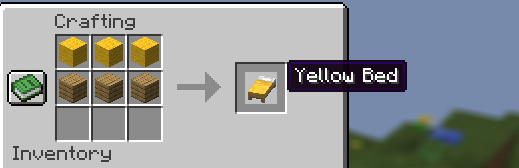
Colored Beds in Minecraft
The ability to create colored beds is a key feature that makes personalizing your home fun. You can easily get a pink bed, a green bed, an orange bed, or a magenta bed to match your base. You can get yellow beds, lime beds, and brown beds to fit a variety of styles.
The same color wool or dye will always produce a bed of the same color. This feature is what makes village beds often display different colors. The game has a wide array of bed colors, allowing for endless customization.
How To Teleport To A Bed
The most important function of a bed is to set your spawn point. When you right-click on an empty bed at night, your player falls asleep.
The sleeping animation slowly lowers your character into the bed, and after about 5 seconds, the night will pass.
The message 'Respawn point set' is displayed when the spawn point is successfully changed. This spawn point is a vital part of the game.
Your bed has a unique Bed ID, the Bed ID is a unique identifier. If the Bed ID is no longer present, your spawn point is lost. If you have a saved spawn point and you die, you will be brought back to that location. If your bed is obstructed or removed, you will respawn at the default world spawning location.
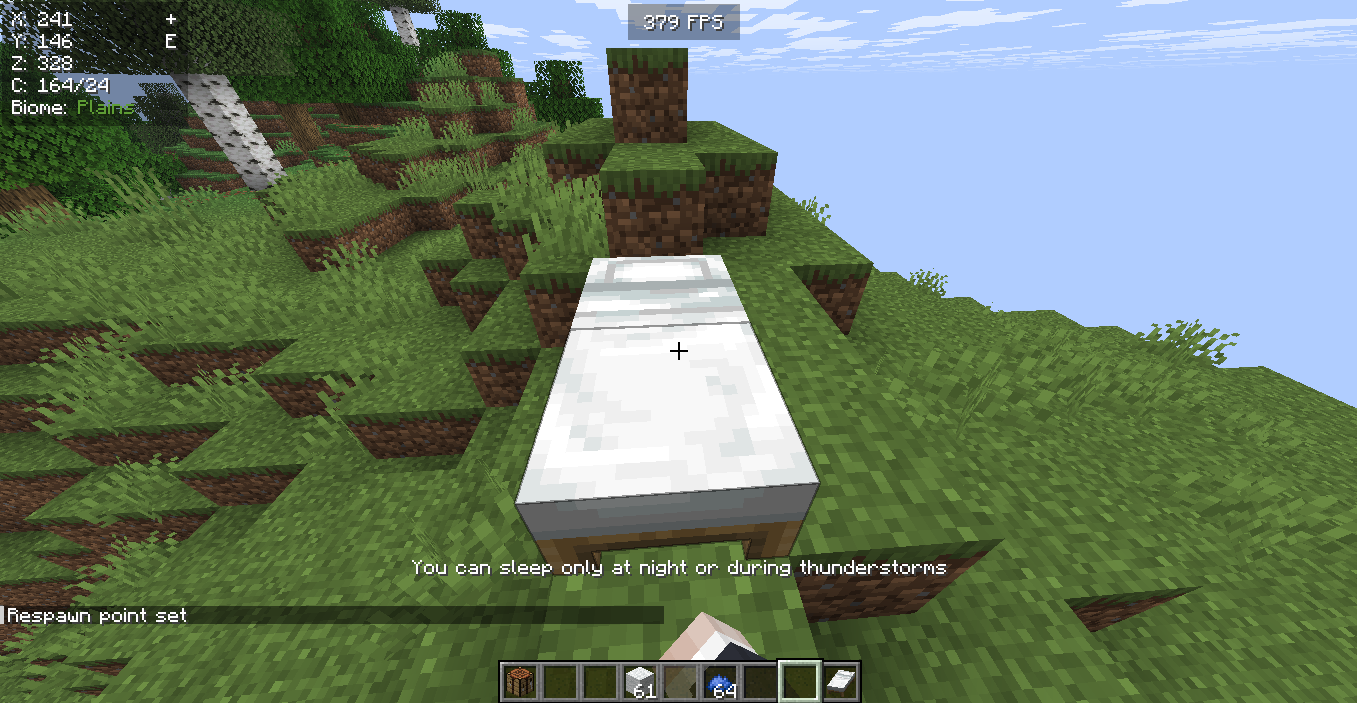
It is important to remember that a bed acts as a spawn point only in the Overworld. If you try to sleep in the Nether or the End, the bed explodes, causing a massive explosion.
The reason beds explode in the Nether and End is because time does not pass in those dimensions, so the bed cannot function properly. This bed explosion will not set your spawn point and is something you should avoid.
There is a command to teleport to your bed, but it is only available with cheats enabled. The command is:
/tp @p <x> <y> <z>
where
Spawn Point in Minecraft
A bed lets a player reset their spawn point to within a few blocks of the bed in the Overworld. A player sleeps in a bed for 101 in-game ticks, or 5.05 seconds, before the time skips to the next day. Sleeping changes the time of day to sunrise and resets the weather cycle, changing the weather to clear conditions.
If a monster is within 8 blocks of the bed horizontally and 5 blocks vertically, the player cannot sleep, and a message like "You may not rest now, there are monsters nearby" will appear. To skip the night in multiplayer, all players in the Overworld must be in bed at the same time. The bed occupied message appears when another player is in the bed. Villagers can sleep normally in any dimension.
When a bed is occupied by a villager, it is considered one of the villager occupied beds. Baby villagers will bounce on the bed when they are not in a villager occupied beds, though the bouncing up velocity is a simple animation. Beds also do not have to be in a house, as long as there is a floor space and the bed has a two block tall area around it to function.
Block Data in Minecraft
For players who use commands or mods, it can be useful to understand the bed's block data. Each block in Minecraft has a specific numerical ID and associated data that stores information about its state.
The block's numeral id for a bed is a technical detail, but the more important thing is the block entity data. This data is where the game stores information about the bed's color, its orientation, and whether it's occupied.
You can find your spawn point coordinates by looking at the bed's block entity data using the /data get block command. This can be useful for advanced players who are trying to find their spawn point or debug issues.
Conclusion
A bed is a crucial piece of equipment in Minecraft. It lets you skip night sleeping, sets a safe spawn point, and allows you to personalize your space with a wide array of colored beds.
Just remember to use a solid block for placement and only use it in the Overworld to avoid a dangerous bed explosion.
Either you choose a classic white or yellow beds or go for a vibrant blue or purple beds, claiming a spawn point with a bed is a fundamental step toward survival. Enjoy your new bed, and remember to always sleep safe.