How to Craft an Enchanting Table in Minecraft
Master the art of enchanting in Minecraft with our step-by-step guide to crafting a powerful enchanting table. Dive in and enhance your gameplay today!

How to Craft an Enchanting Table in Minecraft
Enchanting in Minecraft adds that extra edge to your gameplay. Whether you’re mining, building, or battling mobs, enchantments can improve your tools, armor, and weapons. This Minecraft Enchanting Table Guide is designed specifically for beginners who want to understand how enchantments work, what they are, and how to use them.
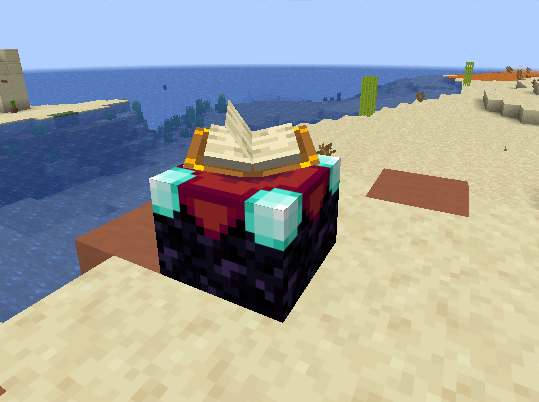
The enchanting table is your gateway to giving ordinary objects some serious upgrades. It lets you add magical effects called enchantments to your gear, like making your tools last longer, increasing the efficiency of your favorite diamond pickaxe, or giving your sword a bit of punch. No matter what your goals are in your survival world, once you start using it, you’ll wonder how you ever played the game without it.
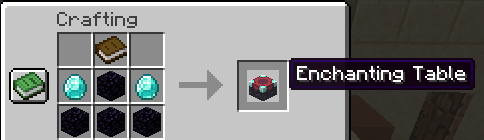
Before you can interact with this mystical block, you must first gather the necessary materials for its crafting recipe. After opening your crafting box, you will need to combine four obsidian blocks, two diamonds, and a single book, which is crafted using leather and paper.
Depending on the version of Minecraft you are running, the visual details on the interface might slightly change, but the core mechanic remains identical. Once placed, a floating book will open and turn to sign that it is ready to imbue your armor, weapons, and tools with powerful arcane abilities.
How to Craft an Enchanting Table
Before you can explore the magical ability of this block, you need to collect the right materials. To craft one, open your crafting area and place a book in the top center, two diamonds in the middle row slots flanking the center, and fill the bottom row with four obsidian blocks. If you are playing in creative mode, you can bypass this step and grab it directly from your inventory.
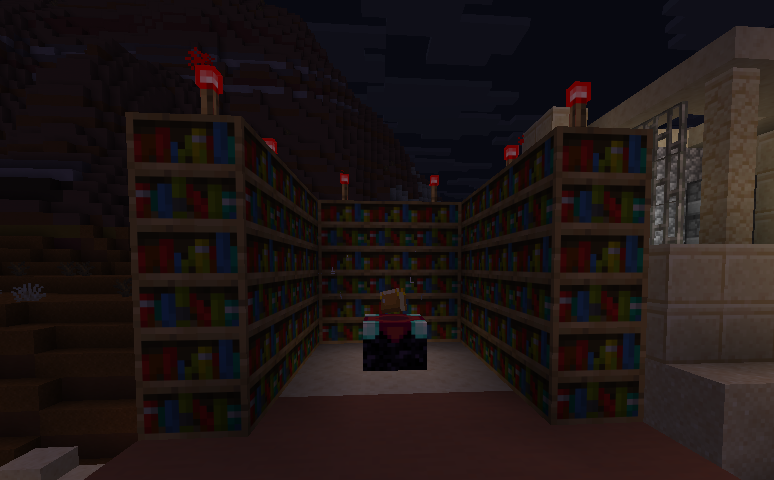
To unleash its full potential, make sure you leave enough space around the table to place bookshelves. Leaving a one-block gap filled with air, and ensuring no stray torches, carpets, or flowing lava break the connection, allows the table to reach its maximum level.
Place them on a crafting table like this:
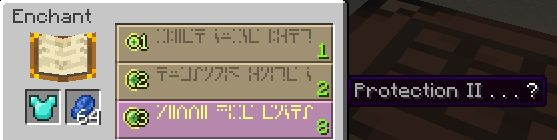
When you right-click the table, a unique interface appears on your screen. To begin, place the tool or armor piece you want to upgrade into the top slot, and place your lapis lazuli right next to it. Once both items are in place, three randomized options will be displayed on the right side of the page.
-
Top Row -> Option 1: Low Level Cost
-
Middle Row -> Option 2: Medium Level Cost
-
Bottom Row -> Option 3: High Level Cost (Requires Level 30)
Each option shows a cryptic word written in Standard Galactic Alphabet, but don't let that be confusing; simply hovering your mouse over an option reveals exactly what enchanted item you will receive. Each choice shows a specific experience cost, and selecting one will instantly consume your levels and lapis.
Whether you are playing Minecraft Pocket Edition, Java, or the cross-platform Bedrock Edition, the core mechanics remain on the same level. However, keep these tips in mind:
-
Enchanted Books -> If you don't want to risk random rolls on your favorite iron or diamond sword, you can place a regular book on the table instead. Combining these books with your gear at an anvil gives you a customized setup.
-
Resetting the Table -> The choices will stay there waiting for you until you roll. If you don't like the selections, enchanting a cheap tool will refresh the pool.
-
Grindstone -> If you accidentally accept an enchantment you don't want, you can use a grindstone to disenchant the item, which will decrease the penalty and return some XP.
Note -> that the maximum number of three enchantments shown on the screen represents your immediate choices, but an item can hold multiple buffs if combined correctly. This system was refined thanks to years of player feedback across the Minecraft community. We hope this article helps you master the arcane arts!
Setting Up Your Enchanting Station
To unlock higher-level enchantments, you need to surround your Enchanting Table with Bookshelves:
-
Place 15 Bookshelves one block away from the table (not directly touching it)
-
Leave a one-block gap between the bookshelves and the table
-
Make sure nothing is blocking the path between the table and the shelves (like torches or other blocks).