How to Use Dispensers with Sulfur Cubes in Minecraft
Learn how to effectively use dispensers with sulfur cubes in Minecraft to enhance your gameplay. Discover strategies and tips to maximize their potential!

Shahrukh Sial is a Gaming Content Strategist at Sparked Host. He identifies his own strategic outlines through deep research to cover game guides, tips, and updates that help players improve their skills and enjoy a better gaming experience.
The introduction of Sulfur Cubes in the Chaos Cubed update has opened up entirely new possibilities for automation, minigames, and redstone contraptions. These unique mobs can absorb blocks and take on their physical properties but manually feeding them is inefficient for complex builds. This guide explains how to use dispensers to automate Sulfur Cube interactions safely and effectively.
Quick Overview
Dispensers serve three primary roles when working with Sulfur Cubes:
-
Feeding: Automatically provide blocks for the Sulfur Cube to absorb
-
Automation: Create systems that swap archetypes or reset cubes without player intervention
-
Launching: Trigger knockback-based movement through controlled damage (note: this requires careful setup due to edition-specific physics)
Understanding these mechanics allows you to build everything from automated display cases to complex minigame launchers.
Required Items and Setup
Before building your dispenser system, gather the following:
-
Dispensers (as many as your design requires)
-
Blocks for testing absorption (start with safe options like wool or stone)
-
Redstone components (redstone dust, repeaters, comparators, levers)
-
A name tag (critical for preventing despawn)
-
Shears (for removing absorbed blocks safely)
-
Optional: buckets for transporting Sulfur Cubes
Preparing a Sulfur Cube
Step 1: Obtain a Sulfur Cube:
You can either spawn one using a Sulfur Cube Spawn Egg in creative mode or locate Sulfur Caves in survival mode. Remember that large Sulfur Cubes spawn in groups of 2-4 at any light level within Sulfur Caves.
Step 2: Apply a Name Tag:
This is essential for any automated system. Name your Sulfur Cube using a name tag before incorporating it into your build. Named Sulfur Cubes will not despawn, which is critical for permanent installations. Note the naming behavior difference between editions:
-
Bedrock Edition: Bucketed named cubes become "Bucket of [Name]"
-
Java Edition: Bucketed named cubes become only "[Name]"
Step 3: Understand Size Limitations:
Only large Sulfur Cubes can absorb blocks. Small Sulfur Cubes (which spawn when large ones die) cannot absorb blocks and must grow for 20 minutes before they can participate in your system. You can speed this process with slimeballs or prevent it entirely with golden dandelions.
Block Absorption Basics
Before automating, test the basic mechanics manually:
-
Drop a test block near the Sulfur Cube
-
Observe the cube moving toward and absorbing the block
-
Note how the cube becomes immobile after absorption
-
Test removing the block with shears (this drops the block as an item)
Remember that feeding a new block to an already-absorbed cube will drop the previous block as an item. This mechanic is useful for archetype swapping systems.
Sulfur Cube Archetypes
Understanding archetypes is crucial for effective automation. Each block category produces different physical properties:
Common Build Archetypes:
-
Bouncy: Bamboo products, logs, wood (high bounce, good for launchers)
-
Light: Wool (floaty behavior, useful for displays)
-
High Resistance: Soul Sand, Soul Soil (immobile, good for static displays)
-
Sticky: Honeycomb Block (no movement, maximum stability)
-
Fast Sliding: Ice products (maximum slide, no bounce)
-
Explosive: TNT (special case, requires extreme caution)
-
Hot: Magma Block (damages nearby entities)
Map your intended use case to the appropriate archetype before building your dispenser system.
Using Dispensers to Feed Sulfur Cubes
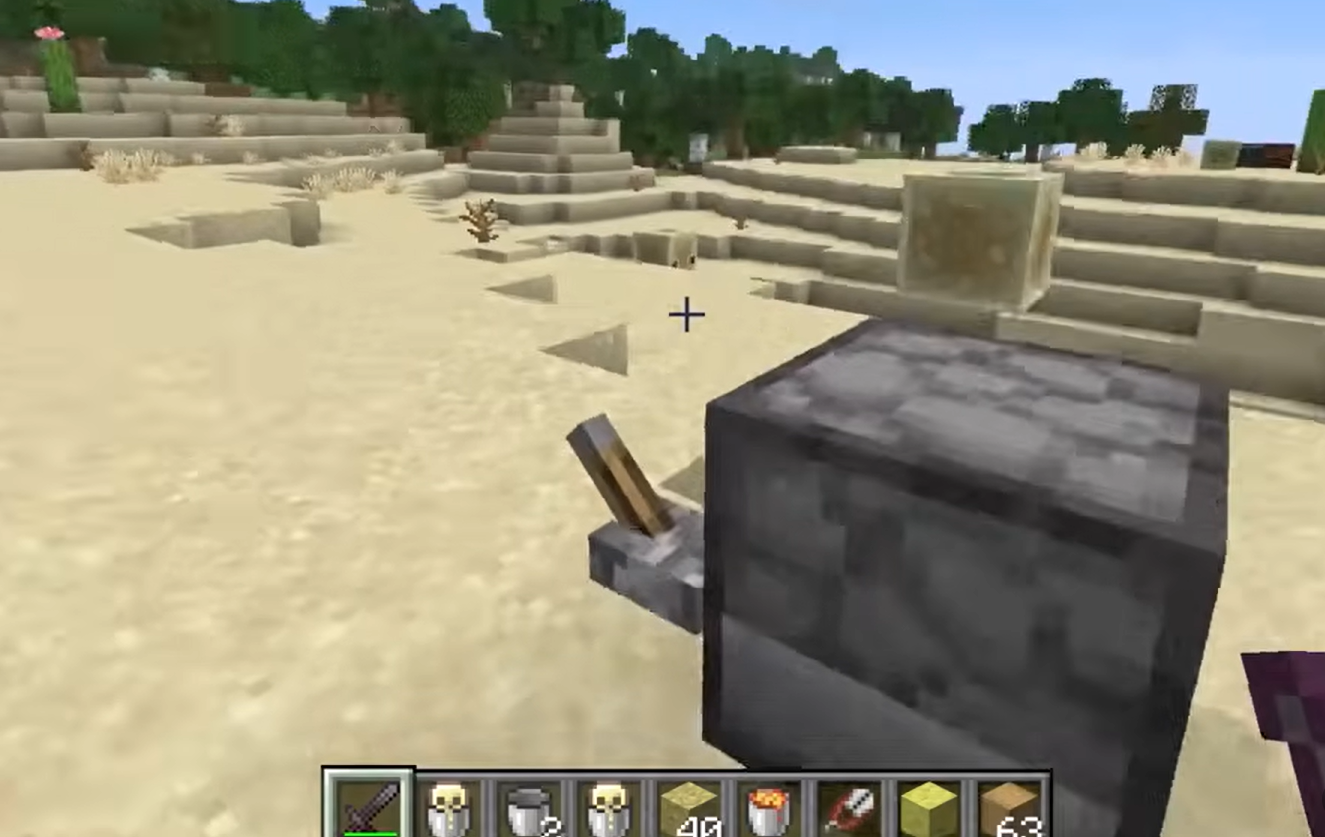
Basic Setup:
-
Place a dispenser facing the Sulfur Cube's location
-
Load the dispenser with the target block item
-
Connect the dispenser to a redstone circuit with a lever, button, or clock
-
Trigger a single redstone pulse
The Sulfur Cube will automatically absorb the dispensed block. This works because dispensers can "feed" blocks to Sulfur Cubes just as a player would by dropping items.
Important Timing Considerations:
-
Use single-pulse triggers to prevent multiple items from dropping
-
Allow sufficient time between dispenser activations for the cube to process each item
-
Test item pickup delays in your specific setup, as these can vary
Optimization Tips:
-
Position dispensers at optimal distance (typically 1 block away)
-
Ensure the Sulfur Cube has clear pathfinding to the dropped item
-
Use hopper systems to reload dispensers automatically from storage
Absorbing Blocks with Dispensers
When designing automated absorption systems:
Single-Pulse Timing: Use redstone repeaters set to create clean, single-tick pulses. Multiple pulses can cause the dispenser to fire repeatedly, dropping multiple items that the Sulfur Cube cannot process efficiently.
Item Pickup Delay: There is a brief delay between when an item is dispensed and when the Sulfur Cube can absorb it. Test your specific setup and adjust timing accordingly. In general, allow at least 2-3 ticks between dispenser activations.
Distance Optimization: Place dispensers close enough that items land within the Sulfur Cube's detection range but not so close that they interfere with the cube's hitbox. One block of separation typically works best.
Launching and Moving Sulfur Cubes With Redstone
While you cannot directly "launch" a Sulfur Cube with a dispenser, you can create systems that trigger knockback through other means:
Piston-Based Systems:
-
Use pistons to push Sulfur Cubes into specific positions
-
Combine with knockback-inducing mechanisms for controlled launches
-
Note: Pistons cannot push a Sulfur Cube that has absorbed a block (it becomes immobile)
Sequential Dispenser Activation:
-
Use redstone repeaters to create timed sequences
-
Activate multiple dispensers in specific orders for complex behaviors
-
Employ observers to detect cube movement and trigger subsequent actions
Trapdoor Launch Systems:
-
Create timed release mechanisms using trapdoors
-
Drop Sulfur Cubes onto knockback-triggering mechanisms
-
Combine with archetype swapping for varied launch behaviors
Critical Physics Warning: Remember the edition-specific difference: Bedrock Edition Sulfur Cubes receive significantly more knockback when airborne compared to Java Edition. Designs relying on precise launch distances will not work identically across both platforms.
Using Dispensers for Potion Effects and Invisibility
Dispensers can enhance your Sulfur Cube systems with potion effects:
Invisibility Automation:
-
Load dispensers with splash potions of Invisibility
-
Create a redstone clock to periodically activate the dispenser
-
This makes the absorbed block visible while hiding the Sulfur Cube itself
-
Useful for "floating block" displays and illusions
Effect Duration Testing: Before deploying any automated potion system:
-
Test effect duration in your specific setup
-
Account for the time needed for the Sulfur Cube to re-absorb blocks if needed
-
Ensure the invisibility does not interfere with your intended mechanics
Tipped Arrow Systems: While less common for Sulfur Cubes, dispensers loaded with tipped arrows can apply specific effects. However, remember that absorbed blocks provide significant damage resistance, so many potion effects may be ineffective.
Handling Dangerous Archetypes and Damage Resistance
TNT (Explosive Archetype):
-
Only test in designated safe areas with proper containment
-
Enable the tntExplodes game rule set to false for initial testing
-
Remember: Once ignited, the Sulfur Cube cannot be bucketed, damaged, or have its block removed
-
Explosions from TNT Sulfur Cubes do not spawn small Sulfur Cubes
Magma Block (Hot Archetype):
-
Creates a damage zone around the Sulfur Cube
-
Useful for mob traps or defense systems
-
Remember the Sulfur Cube itself is immune to magma damage when it has absorbed a block
Damage Resistance Awareness: Sulfur Cubes with absorbed blocks are resistant to:
-
Melee attacks and projectiles
-
Falling blocks and explosions (except their own)
-
Fall damage, freezing, poison, and contact damage
They remain vulnerable to:
-
Fire and suffocation
-
Cramming
-
Wither effect
-
Warden sonic booms
Design your systems with these vulnerabilities in mind, especially when incorporating dangerous archetypes.
Automation Examples and Builds
1. Automated Block Display System
-
Use a dispenser to feed a Sulfur Cube a specific block
-
Apply invisibility via potion dispenser
-
Create a "floating block" effect for decorative purposes
-
Include a reset mechanism with shears dispenser
2. Archetype Swap Minigame
-
Build multiple dispensers loaded with different archetype blocks
-
Create a control system that allows players to select archetypes
-
Implement a reset station that removes absorbed blocks safely
-
Add scoring based on successful launches or target hits
3. Redstone Clock Feeding System
-
Build a redstone clock with adjustable timing
-
Connect to dispensers that cycle through different blocks
-
Use for dynamic displays or testing environments
-
Include emergency stop mechanisms
4. Safe Reset Station
-
Position a dispenser loaded with shears
-
Trigger to remove absorbed blocks without killing the Sulfur Cube
-
Collect dropped items with hopper systems
-
Return Sulfur Cube to a holding area for reuse
Bedrock Edition Differences
When building for Bedrock Edition specifically:
Dispenser Timing: Test your dispenser timing carefully, as redstone behavior can differ slightly between editions. What works in Java may need adjustment for Bedrock.
Physics Discrepancies: The airborne knockback difference is critical:
-
Bedrock Edition: Sulfur Cubes are knocked much further when airborne
-
This affects any launcher or cannon design
-
Adjust your designs accordingly or restrict to one edition
Archetype Behavior: While the archetypes themselves are consistent, the physical outcomes may vary due to underlying physics engine differences. Always test your specific build in the target edition.
Troubleshooting and Tips
Common Issues and Solutions:
Problem: Sulfur Cube not absorbing dispensed blocks
-
Solution: Check that the cube is a large Sulfur Cube (small ones cannot absorb)
-
Solution: Ensure the block type is on the absorbable list
-
Solution: Verify the dispenser is close enough and items are landing in reachable areas
Problem: Multiple items dropping and not being absorbed
-
Solution: Adjust redstone timing to prevent rapid-fire dispensing
-
Solution: Add delays between dispenser activations
-
Solution: Use single-pulse circuits instead of sustained signals
Problem: Inconsistent launch distances
-
Solution: Remember the Java vs. Bedrock physics difference
-
Solution: Standardize on one edition for your project
-
Solution: Avoid designs requiring precise airborne knockback calculations
Testing Protocol:
-
Always test new designs in a creative world first
-
Log dispenser firing times if pickup fails
-
Swap blocks systematically to identify archetype-specific issues
-
Document what works for future reference
Safety Checklist Before Live Testing
Before activating any automated Sulfur Cube system:
For Explosive Archetypes:
-
Set tntExplodes game rule to false for initial testing
-
Build containment structures rated for TNT explosions
-
Maintain safe distances during testing
-
Have fire extinguishing tools ready
For Hot Archetypes:
-
Ensure no valuable mobs or items are in the damage zone
-
Test damage radius in a controlled environment
-
Wear appropriate protective gear if testing in survival mode
General Safety:
-
Backup your world before major automated experiments
-
Test all systems in creative mode first
-
Keep emergency stop mechanisms accessible
-
Document your build for troubleshooting and sharing
Conclusion
Dispenser-based Sulfur Cube automation opens up incredible possibilities for Minecraft builders, from decorative displays to complex minigames. By understanding the mechanics, respecting the edition-specific differences, and following proper safety protocols, you can create sophisticated systems that leverage these unique mob capabilities.
Remember to always test in controlled environments, name your Sulfur Cubes to prevent despawning, and account for the physics differences between Java and Bedrock Editions. With careful planning and execution, your dispenser-powered Sulfur Cube creations can become standout features in any Minecraft world.
The key to success is incremental testing: start with simple single-block absorption, verify your timing and positioning, then gradually add complexity. This methodical approach will help you avoid common pitfalls and create reliable, repeatable systems that work as intended.