Best Behavior Packs For Minecraft 2025
Behavior packs are the easy way to add exciting new features and change the game without needing complicated mods.

Shahrukh Sial is a Gaming Content Strategist at Sparked Host. He identifies his own strategic outlines through deep research to cover game guides, tips, and updates that help players improve their skills and enjoy a better gaming experience.
Are you playing Minecraft Bedrock Edition and feeling like something is missing from your gameplay? Behavior packs are the easy way to add exciting new features and change the game without needing complicated mods.
These add-ons, also called addons, fundamentally alter how Minecraft operates, introducing new behaviors, recipes, and game mechanics. They are ideal for players who want a fresh experience without losing the familiar feel of their Minecraft world.
We will explore some of the best behavior packs for Minecraft 2025 that significantly improve your quality of life, focusing on add-ons that are popular and regularly updated for the current version. It is the simplest way to add a new action to your world.
Ultimate Vein Miner & Tree Feller
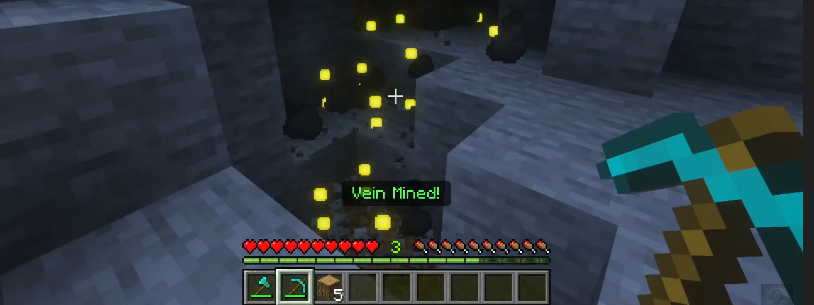
Tired of spending valuable time mining every single ore block in a huge vein? This dual behavior pack is the ultimate utility add-on for serious resource gatherers, saving you hours of repetitive action. It radically changes the behavior of your survival tools.
This pack is essential for players who want to focus on building and exploring rather than grinding resources. It is a fantastic way to add efficiency to your gameplay without making the game feel too simplified, especially for those who play with friends on a large server.
Key Characteristics
-
A dual pack that instantly mines an entire ore vein or chops down a whole tree.
-
Massive time saver for resource gathering, dramatically improving efficiency.
-
Respects vanilla tool tiers and durability, keeping the gameplay balanced.
How It Works
The core behavior pack script is activated when you sneak and break one block. This triggers a chain reaction that instructs the game to remove all connected blocks of the same type (like all iron ore or all oak logs), while still deducting the appropriate durability from your tool.
This script works by rapidly iterating through the connected blocks and simulating the mining action. The behavior pack ensures that drops are correctly generated and the tool's remaining durability is accurately reflected after the bulk action is completed.
Quick Mining Addon
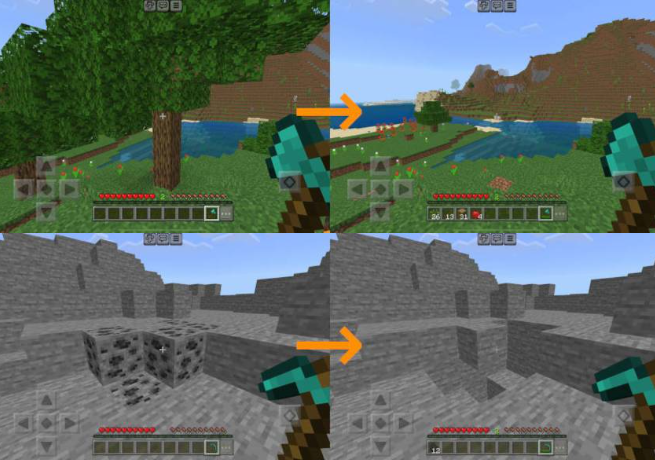
If you like the idea of Vein Miner but want more control over how your tools wear down, the Quick Mining Addon is a perfect, highly customizable, similar add-on. This pack offers a balanced behavior for rapid block breaking in your world.
It is highly popular because it allows players to create a powerful mining experience while ensuring fairness in survival worlds. This level of customization is unusual in a behavior pack, making it ideal for fine-tuning your gameplay.
Key Characteristics
-
A customizable alternative to Vein Miner with a configuration UI for fine-tuning.
-
Allows for rapid mining of connected natural blocks like logs, ore, or clay.
-
Consumes durability per block mined, making it less overpowered for survival worlds.
How It Works
The script in this behavior pack monitors when you mine a block while sneaking (or through customized settings). If the tool is correct for the job, the add-on automatically mines the connected blocks.
It correctly respects enchantments like Fortune and consumes one durability per block mined, ensuring fair gameplay. Players can often select which blocks are affected, giving them ultimate control over this action.
Durability Viewer
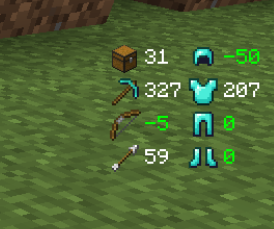
Stop constantly opening your inventory to check your tools and armor condition. This resource pack, paired with its behavior pack component, provides the essential visual information you need right on your HUD. It is an easy quality-of-life change.
This combination of resource packs and behavior packs is a major upgrade from the vanilla game, eliminating a major frustration point. It allows players to focus entirely on the action of the game without constantly interrupting the flow to view details.
Key Characteristics
-
Displays the remaining durability of your tools and armor directly on the HUD.
-
Eliminates the need to constantly check your inventory or miss a broken tool.
-
The behavior pack component is required to view armor and shield durability.
How It Works
The primary resource pack handles the visual texture of the HUD. The small but mighty behavior pack component adds the necessary logic to monitor the NBT data of your equipped items.
This data is then fed to the HUD interface to show the numerical or bar status of your armor and shield in the bottom left of the screen. This continuous monitoring ensures the information is the latest and most accurate at all times during gameplay.
Dynamic Lighting Addon
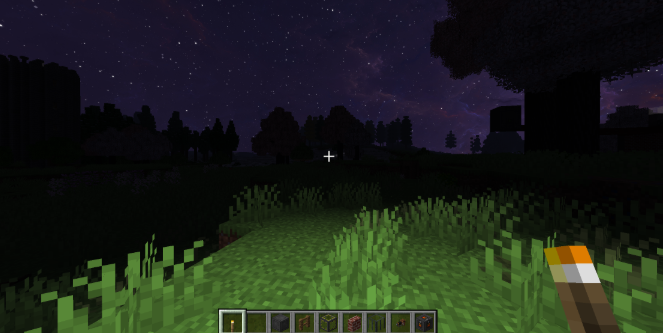
This add-on brings a long-requested feature from Java Edition to Bedrock Edition: light sources that create dynamic light simply by being held. This fundamentally changes the behavior of torches and allows for much safer exploring.
It solves the frustrating problem of needing to stop and place a torch every few steps just to see. This behavior pack makes night mining and deep cave exploration faster and more immersive, as the light moves with the player.
Key Characteristics
-
Light sources in your hand (like torches or glowstone) emit real, dynamic light.
-
Essential for safer and more immersive cave exploration and night mining.
-
Eliminates the need for constantly placing and removing torches to see.
How It Works
The behavior pack adds a script that continuously checks what item the player is holding. If the item is a light source, the add-on spawns an invisible light block at the player's location every tick.
This script rapidly removes the previous light block and creates a new one at the player's current position. This action makes the light appear to move with the player, giving the illusion of a true dynamic light source.
Waypoints Addon
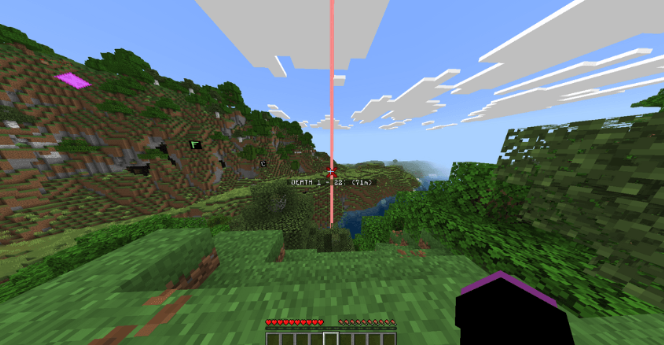
Never get lost in your vast Minecraft world again. The Waypoints Addon is an essential navigational tool, giving you the power to instantly mark and return to important places in your one world. This pack is great for friends playing together.
It is considered a crucial QoL add-on because it addresses the single largest frustration in large worlds: getting lost. The ability to set waypoints provides a sense of security and encourages players to confidently explore far and wide.
Key Characteristics
-
Allows players to set custom waypoints across the world for easy navigation.
-
Essential for guiding yourself back to saved locations like bases or mineshafts.
-
Often provides a craftable item or a simple command to create the waypoint.
How It Works
The behavior pack introduces a new entity or a block with a unique recipe. When a player interacts with this item or block, the add-on saves the player’s coordinates and name.
The saved data is then viewable on a list or displayed on the screen to guide the player back to that location or allow for instant teleportation. This is often controlled via commands built into the behavior pack file.
Backpacks Addon
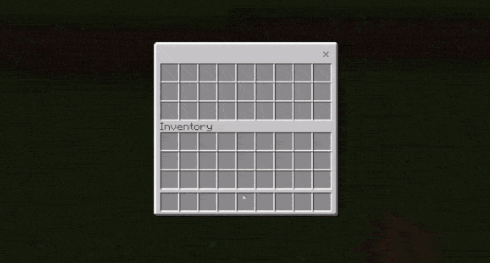
Running out of inventory space is a constant struggle in Minecraft, forcing you to remove things to carry more. The Backpacks Addon is a perfect utility add-on for explorers, effectively doubling your storage capacity in the world.
This simple behavior pack change is a massive help for players who want to avoid constant trips back to their base. It allows you to haul a large bunch of resources from a deep mine or distant biome in a single trip.
Key Characteristics
-
Adds craftable, portable storage solutions to increase inventory capacity.
-
Essential for long exploration trips or large mining sessions with friends.
-
Allows the player to store and transport a bunch of extra items.
How It Works
The behavior pack introduces a new recipe for a backpack item. This item is a custom entity that can be placed in the player’s armor slot or held.
When opened (via action), the script creates an additional inventory space linked to that item, giving the player significantly more carry room. The item's behavior is programmed to save its contents even when removed from the hotbar.
Gravestone Addon
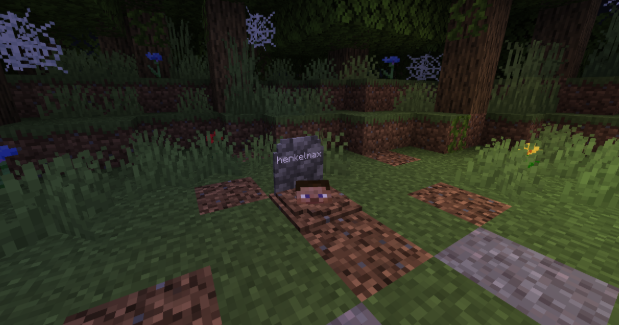
Losing all your items when you die is one of the most frustrating aspects of survival gameplay. This behavior pack solves that issue by changing the default death behavior, making the experience far less punitive.
This add-on is a major help to players who are constantly losing their valuable gear. It removes the stress of the inevitable scramble to return to your saved location before your items disappear.
Key Characteristics
-
Ensures players’ items are safely stored upon death in a single block.
-
Marks the location of death for easy retrieval, often with coordinates.
-
Removes the worry about items despawning before the player can return.
How It Works
When a player dies, the behavior pack script instantly creates a new gravestone block at the death location. The script takes all the items the player was carrying and places them inside the gravestone’s inventory file.
The player can then return to the saved location and interact with the gravestone to get their stuff back. The gravestone entity often includes a sign or text indicating who died and where to help friends find it.
Resource Packs That Enhance Behavior Feel
While these are primarily resource packs, they greatly change the feel and behavior of your gameplay and are often considered a key part of the modern add-ons experience.
Fresh Animations (Resource Pack)
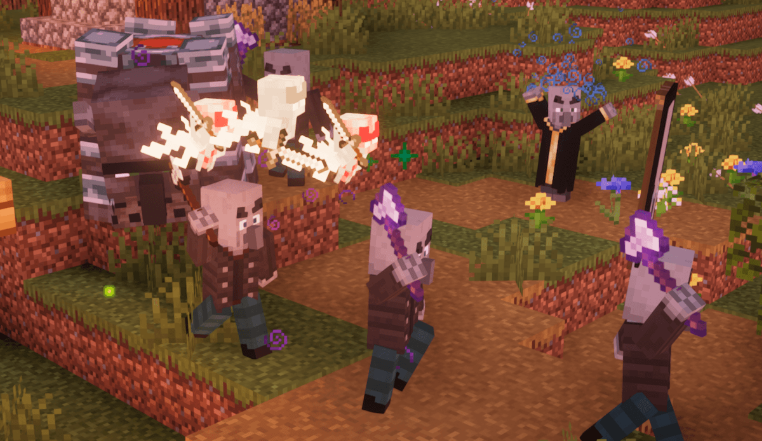
If your Minecraft world feels stiff, Fresh Animations injects hundreds of new, fluid animations into the mobs. This pack significantly changes the visual behavior of your world’s inhabitants, making them feel much more alive.
It is a crucial visual add-on for enhanced immersion, as it gives personality to everything from zombies to villagers. This level of detail in mob behavior is a huge upgrade over the default game feel.
Key Characteristics
-
Provides hundreds of new, smooth animations for villagers, zombies, animals, and more.
-
A crucial add-on for enhanced visual immersion that does not change gameplay behavior.
-
Makes mobs move and behave more realistically and dynamically.
How It Works
This pack replaces the default mob models and their animation files with highly detailed ones. The resource pack is often used with Optifine or a similar tool to enable the custom models and animations.
It uses the game's rendering engine to show the mobs with smoother walking, idle, and action animations. This results in a much more engaging visual experience without requiring any complex behavior scripting.
Xali's Enchanted Books (Resource Pack)
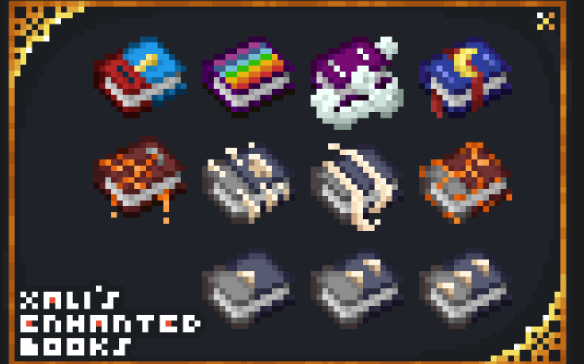
End the frustration of squinting at your chest full of generic glowing books. This quality-of-life resource pack adds the visual clarity you need to instantly select the right enchantment.
This simple resource pack is a massive time saver during the endgame when players have hundreds of enchanted books. It solves a major inventory management issue in a visually pleasing way.
Key Characteristics
-
Makes each enchanted book visually unique with distinct covers matching its enchantment.
-
Allows players to tell books apart at a glance in their inventory or chests.
-
A major quality-of-life improvement that removes time wasted checking details.
How It Works
The resource pack replaces the texture of the standard enchanted book with new textures that correspond to the specific enchantment data stored in the item file.
This provides immediate visual clarity without any need for a behavior pack to add logic. The game simply reads the enchantment data and applies the correct, customized resource texture.
Installation Essentials
To install behavior packs and texture packs on Minecraft, you need to locate the add-ons you want, typically via a download link from a reputable site like MCPEDL or CurseForge.
-
Standard Installation (MCpack): Most behavior packs come as an .mcpack file. To install, download the file and then open it. Minecraft should automatically start and import the add-on. Behavior packs and resource packs are installed in the same way on iOS devices.
-
Manual Installation (PC): When installing add-ons on Windows 10, you must rename the downloaded file from .mcpack to .zip before extracting it. You must place the extracted behavior pack in the behavior_packs folder and the resource pack in the resource_packs folder. Check the folder name before pasting.
-
Activation: After downloading an add-on, you should open it in Minecraft to ensure it is successfully imported. When creating or editing a world, you must go to the Behavior Packs section and manually select the pack to add it to the world.
-
Troubleshooting: Troubleshooting is a normal part of the process. If a pack does not work, check the link to ensure you downloaded the correct version for your Bedrock Edition. If there are still issues, remove all other add-ons and try to play with only the problematic pack to find the conflict. You can view the contents of a behavior pack file by selecting 'View as JSON' to learn more about its structure.
Conclusion
Choosing the Best Behavior Packs for Minecraft 2025 is the easy way to completely transform your Minecraft experience. Whether you install utility packs like Quick Mining Addon to enhance exploring, or combat addons to change fights, these powerful add-ons fundamentally change the behavior of your game.
Behavior packs are the future of Minecraft modding for Bedrock Edition, giving players the power to create and customize every aspect of their world. Download your favorite pack today and start playing Minecraft in a new and exciting way.