How To Play 7 Days To Die Cross Platform
Find out if 7 Days To Die supports cross-platform play! Learn how to play with friends across PC and console, plus upcoming updates on full crossplay support.

Shahrukh Sial is a Gaming Content Strategist at Sparked Host. He identifies his own strategic outlines through deep research to cover game guides, tips, and updates that help players improve their skills and enjoy a better gaming experience.
One of the first questions players ask when jumping into 7 Days to Die is, "Can I play with my friends on other platforms?" You might be on PC while your friend is on PlayStation, and you want to survive the zombies together. Playing together is the best way to survive and have fun.
For many years, the answer to crossplay was simple and negative. However, with the full release of the game in 2024 and the "Storm's Brewing" update in 2025, the developer has made huge strides to make the game compatible across different machines. Crossplay lets players on different platforms join the same server and play together.
This article will give you the most accurate information as of today. We will show you the exact steps to take to enable crossplay and the best tips for hosting a server that works for everyone. By the end, you will know how to enjoy cross-platform gameplay with your friends.
Is 7 Days To Die Even Cross Platform?
Yes, but with important restrictions. As of today, 7 Days to Die does support crossplay, but only for the modern PC and console versions that are running the official Version 2.0 "Storm's Brewing" update. The developer took a long time to get the new crossplay support working, but it is now a core feature of the game.
Here is what you need to know:
-
The New Version is Compatible: The official Version 2.0 is designed to allow players from different platforms to join the same server. This is the version you must have.
-
Legacy Console Versions are Blocked: If you or your friends are running the old, outdated console versions of the game that were released years ago (often referred to as the Telltale versions), you cannot connect to the new servers. Those old versions are completely blocked from the modern crossplay system.
-
The Key Requirement: To enjoy cross-platform gameplay, every player must be running the newest update of the game on a supported platform.
Is 7 Days To Die Cross-Platform On PS5 And PC?
Yes, 7 Days to Die is now cross-platform between PlayStation 5 and PC.
The PC version (Steam) is compatible with the new PlayStation release (PS5). Players on the PlayStation system can join a server hosted on Steam, and PC players can join a server hosted on PlayStation. The developer spent a long time making sure these two primary platforms work together perfectly, making this crossplay a reality. However, note that older PlayStation 4 consoles may be blocked from joining a newer server if they cannot update to the newest version.
Is 7 Days To Die Cross-Platform On Xbox And PC?
Yes, 7 Days to Die is now cross-platform between Xbox Series X/S and PC.
The PC version (Steam or Microsoft PC Store versions) is compatible with the new Xbox release (Xbox Series X/S). This crossplay is fully enabled. Players on Xbox can join a server hosted on Steam, and vice versa. It is very important to check that both the Xbox and PC players are running the same update. The process to join is the same for Xbox and PlayStation consoles.
Is 7 Days To Die Cross-Platform On Xbox And PS5?
Yes, crossplay is fully enabled between the new Xbox Series X/S and PlayStation 5 versions of the game.
This means friends on both main consoles can set up a server and join each other without issue. The major difference is that these platforms often use peer-to-peer hosting or official servers. For the best cross-platform gameplay, many players choose to use a dedicated server.
Enabling Cross Play Support For 7 Days To Die
To ensure that you can join your friends on other platforms, you must make sure your crossplay support is enabled in your game settings. The developer has made this a simple toggle option.
On PC
The PC version (especially Steam) has the easiest steps to enable crossplay.
-
Start the game and go to the main menu.
-
Select the Options tab.
-
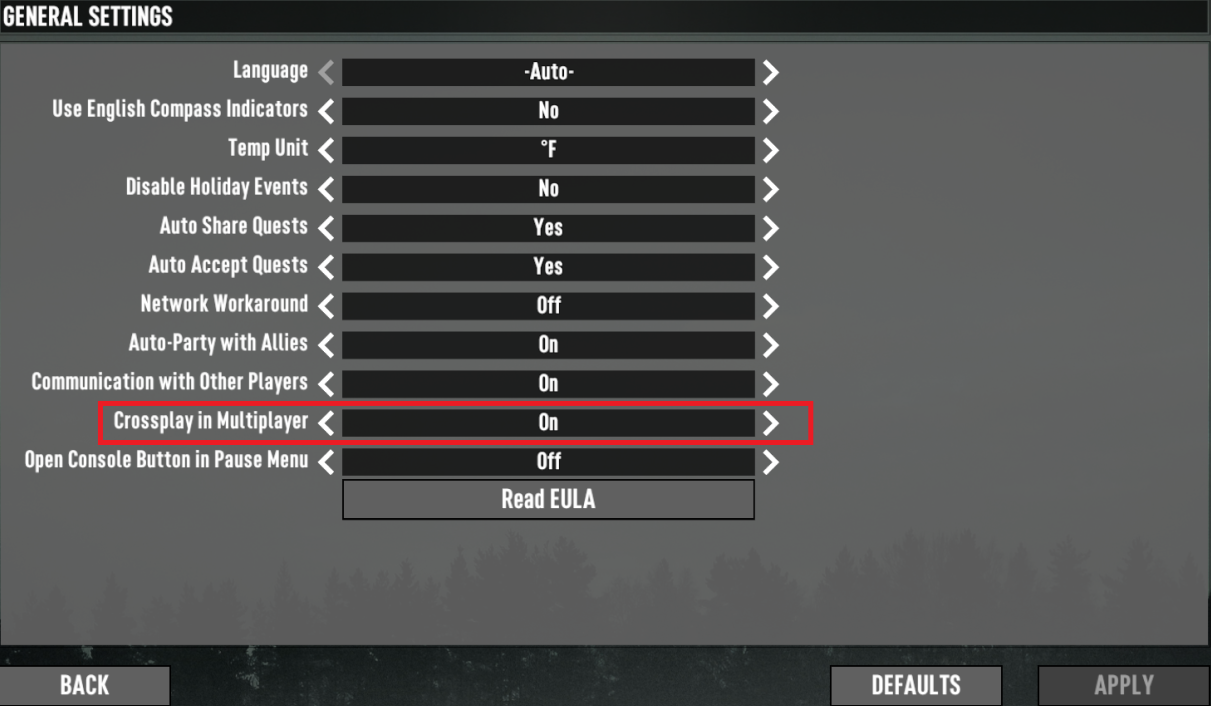
Search for the crossplay toggle option. It should be clearly labeled as "Enable Crossplay".
-
Ensure the toggle is turned to "On" or "Enabled".
-
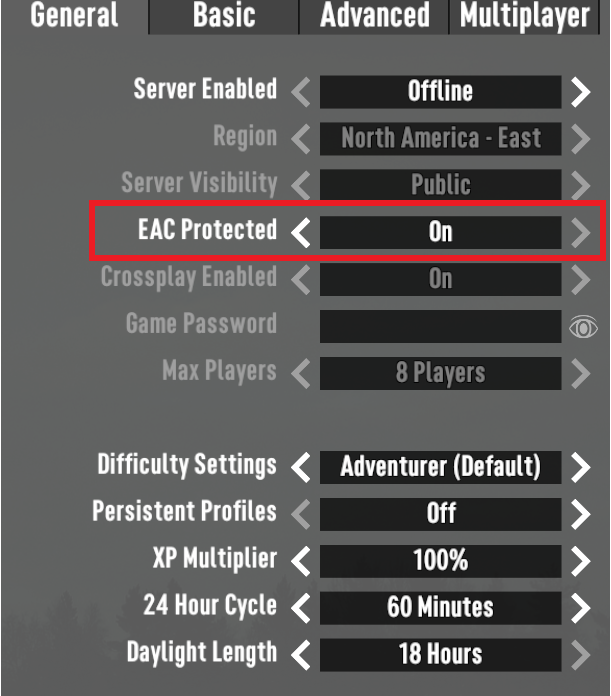
Check the box that says "Use EAC" (Easy Anti-Cheat). EAC is a common requirement for crossplay to work between platforms. If you disable EAC, your server will likely be blocked from joining console players.
-
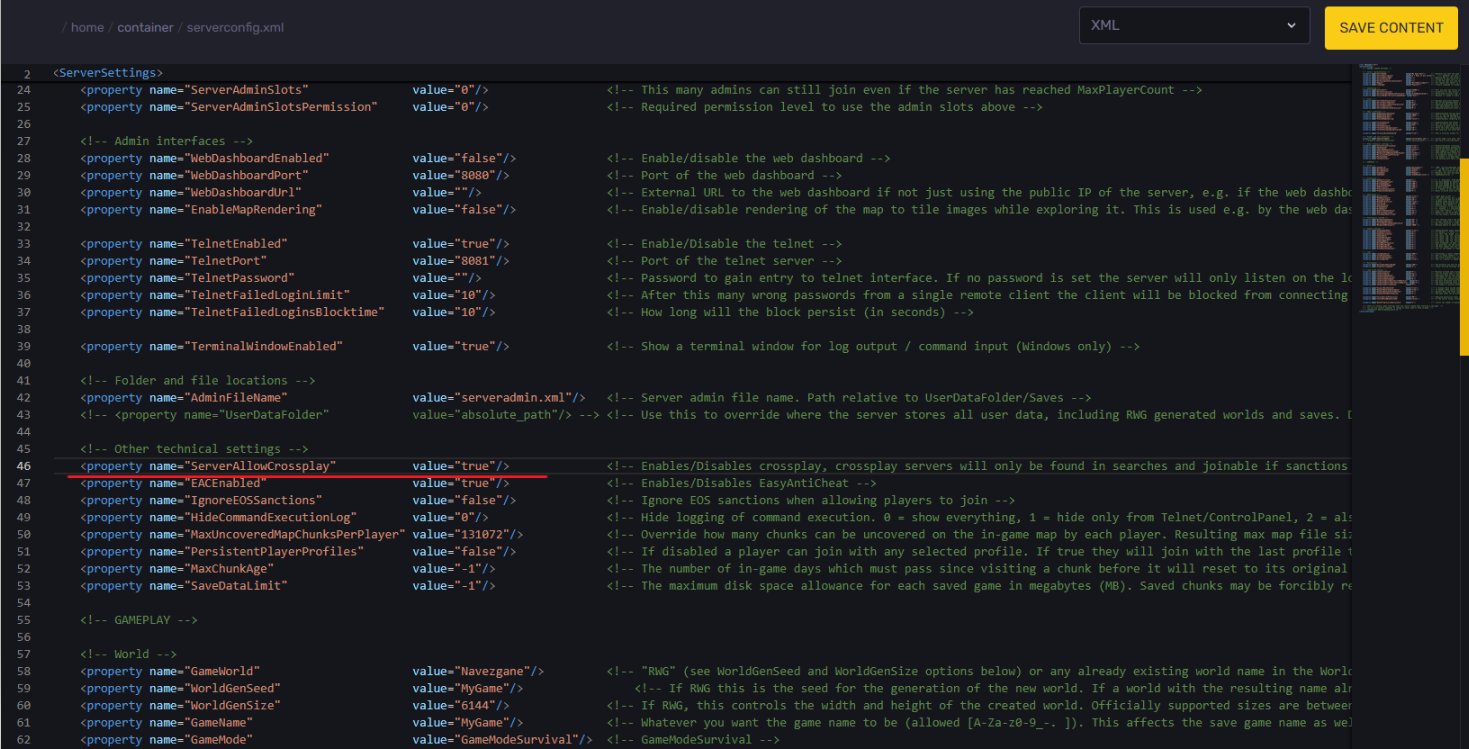
For a dedicated server, you'd need to adjust the `serverconfig.xml` file.
-
Find the line `ServerAllowCrossplay` and make sure to set it to `true`
-
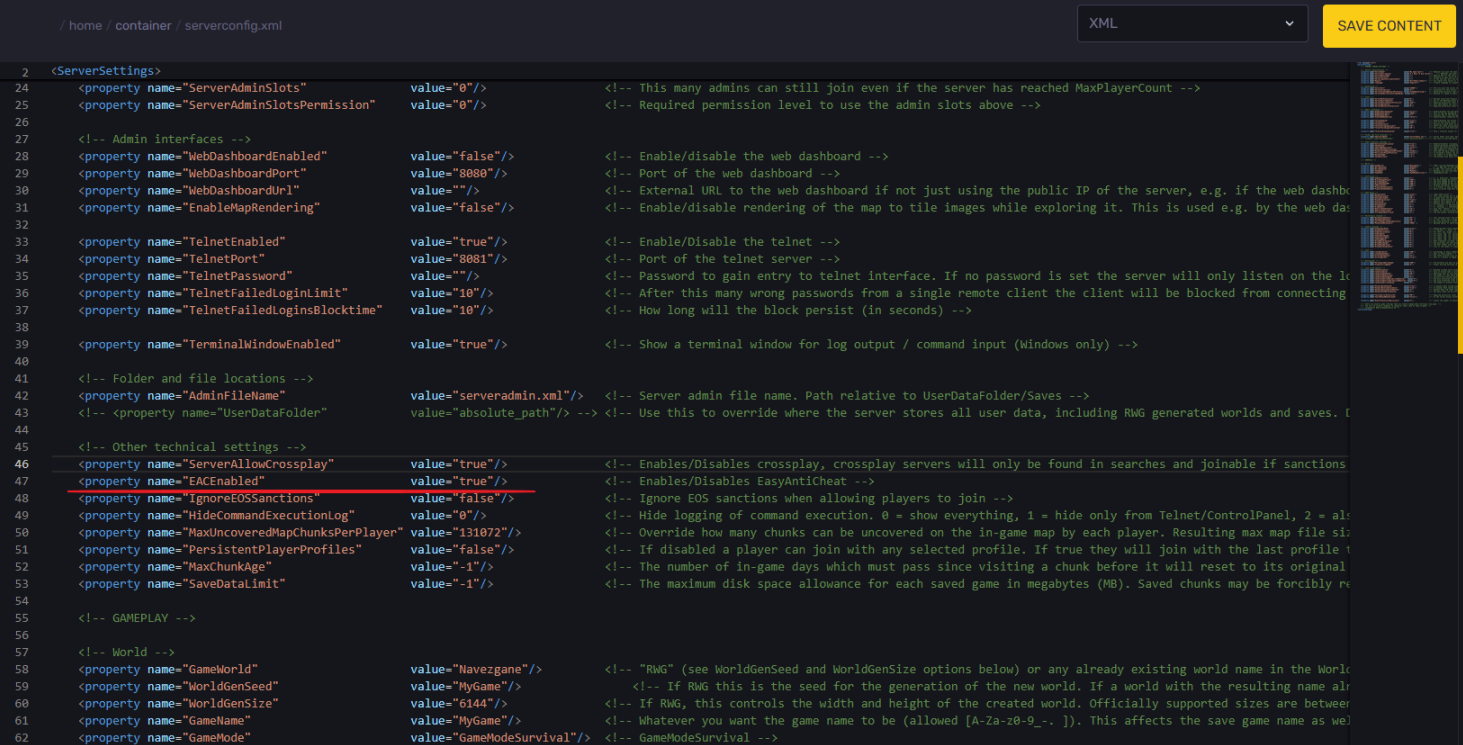
Locate the line `EACEnabled`, make sure it's set to `true`
On Playstation
PlayStation players must also enable crossplay to join PC or Xbox servers.
-
Start the game and go to the main menu.
-
Select Options.
-
Find the crossplay toggle option. It might be under "Network" or "Multiplayer Settings".
-
Set the toggle to "Enabled".
-
Choose the Option to use EAC if it appears. If it is not there, the PlayStation system often has it set by default.
On Xbox
Xbox players follow similar steps to enable crossplay.
-
Start the game and select the Options tab.
-
Search for the crossplay support toggle in the settings.
-
Set the toggle to "Enabled" to allow crossplay with PC and PlayStation.
-
You can then go to the server browser and search for a server name your friends are hosting.
-
Remember to check if a password is set on the server before you try to join.
Server Recommendations For Cross-Play Communities
While crossplay is enabled, players sometimes have issues when hosting a peer-to-peer server directly from their game. To have the best cross-platform gameplay experience, follow these tips when hosting a server that other players will join.
Use A Small Max Player Count
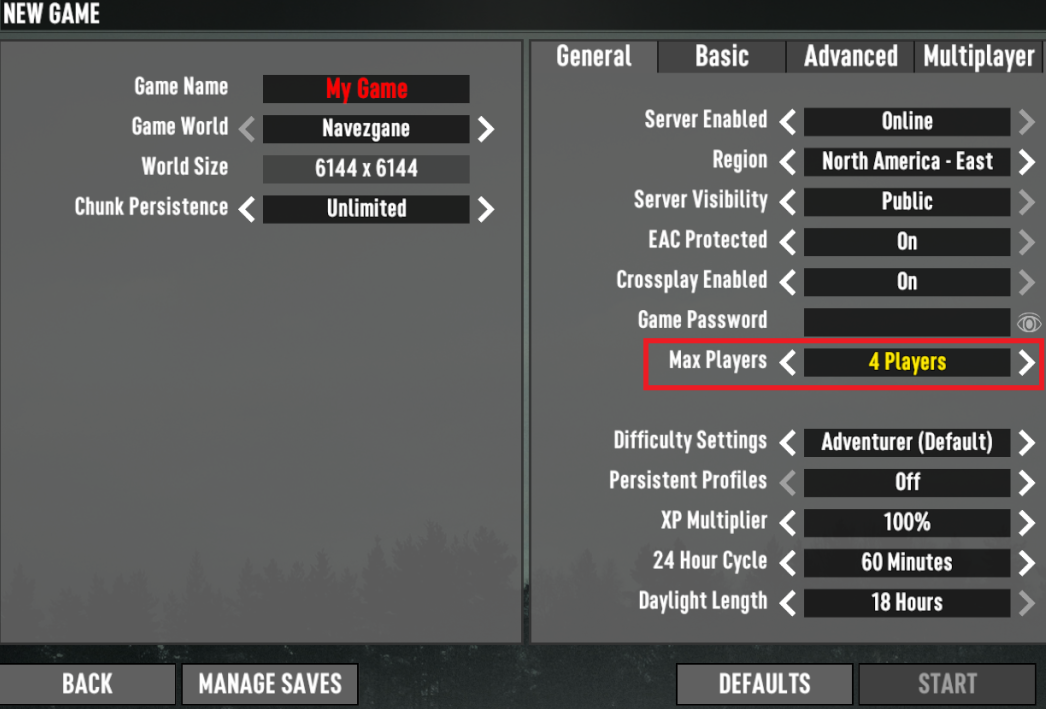
To reduce lag and errors, you should set a low maximum supported player count.
-
When you start a new server, you can set the maximum supported player count.
-
It is expected that crossplay will cause more strain on the server system.
-
For the best experience, set the maximum supported player count to eight players or fewer. You should continue this practice even if you are using a dedicated server.
-
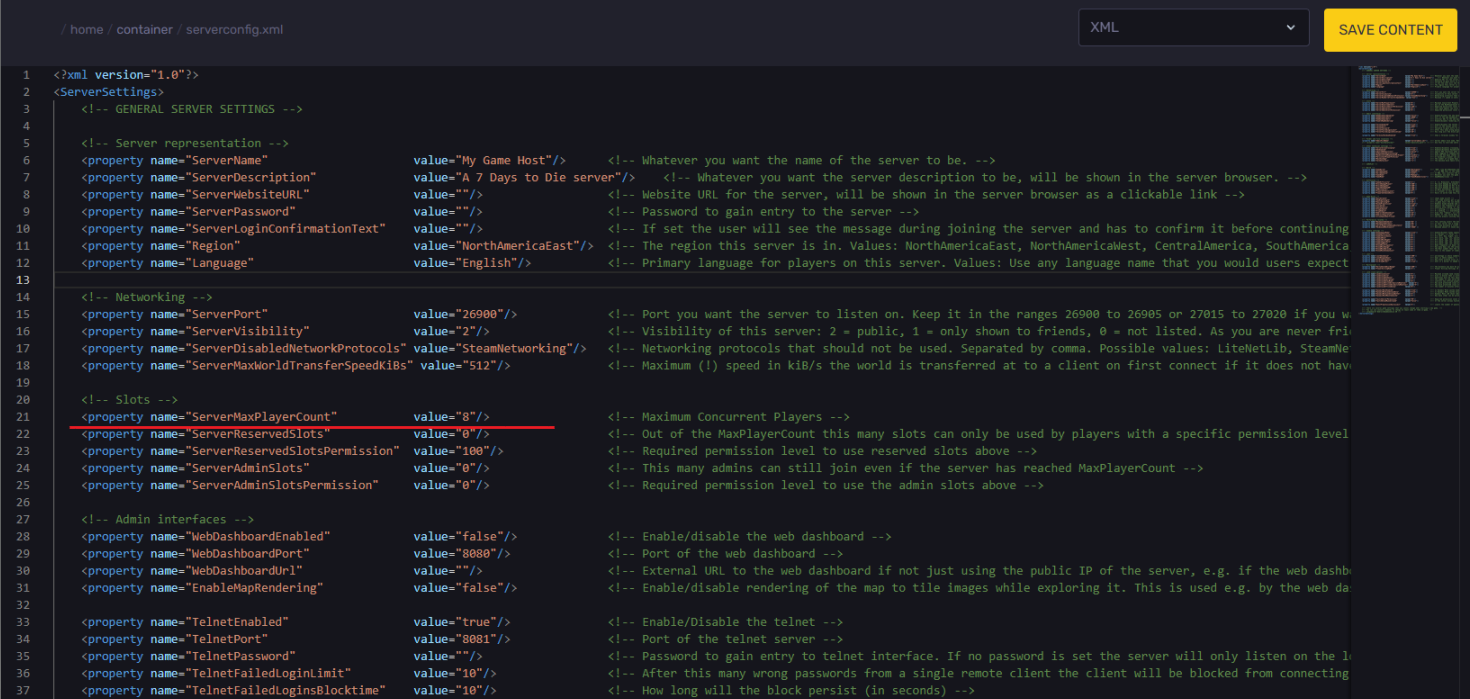
For a dedicated server, you'd need to adjust the `serverconfig.xml` file.
-
Find the line `ServerMaxPlayerCount` and set it to the desired value.
Keep World Sizes Small (Under 8192)
The world size greatly affects performance. A smaller world means less data needs to be run and sent between platforms.
-
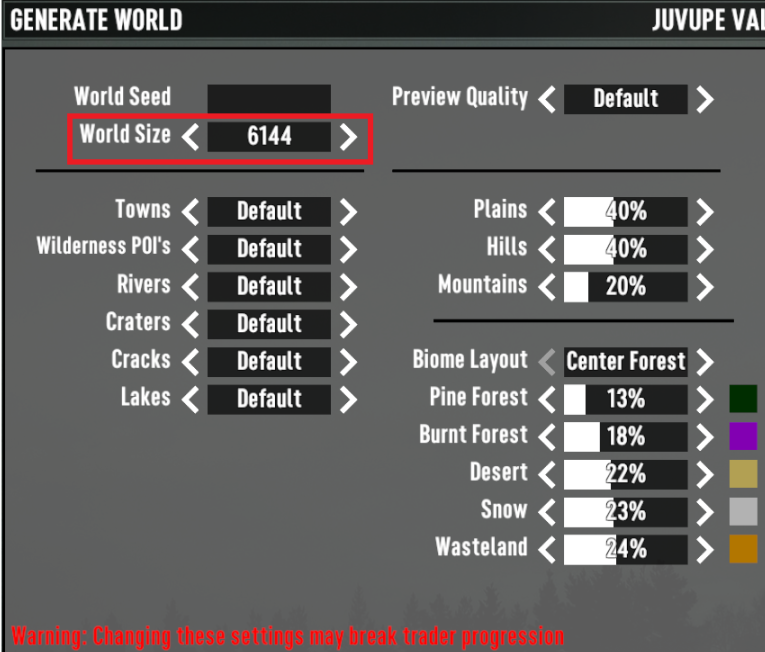
When creating a new random world, the game lets you set the size.
-
It is expected that large world sizes will cause performance issues, especially for older consoles.
-
Set the world size to 8192 or smaller. This will help ensure that all platforms are compatible and can connect without error.
-
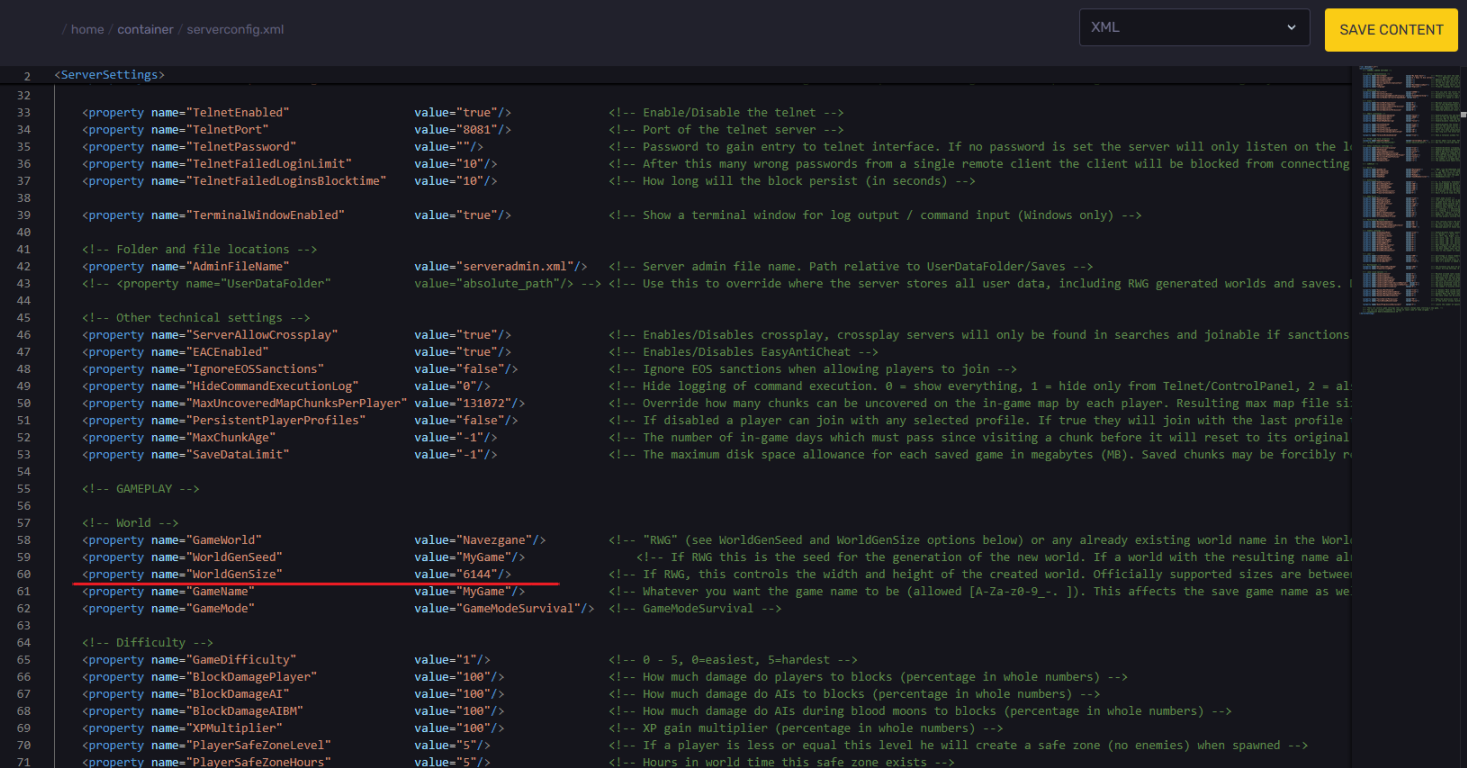
To change the world size on a dedicated server, access the `serverconfig.xml`
-
Adjust the `WorldGenSize` as desired.
Start With A New Save
Old saves can cause issues when introducing crossplay. It is always best to start fresh.
-
Old server saves were not created with crossplay support in mind.
-
To avoid unexpected errors and restrictions, you should choose the option to start a new save when hosting.
-
The new save will have all the correct settings set for crossplay enabled from the very beginning.
Conclusion
The great news is that crossplay is now a fully enabled feature in 7 Days to Die. You can absolutely play with friends across PC, PlayStation 5, and Xbox Series X/S. This crossplay ability is thanks to the official Version 2.0 "Storm's Brewing" update. Just be sure that everyone has bought the newest release of the game and is not running the longer-supported legacy console versions.
To ensure you can connect and join a server, you must go into the settings tab and select the option to enable crossplay. Also, make sure that EAC is enabled. When hosting a server, remember the tips to set a low maximum supported player count and use a smaller world size to avoid issues. By following these steps, you can immediately enjoy cross-platform gameplay and survive the dying world with all your friends.