How to Use Sulfur Cube Spawn Eggs in Minecraft
Learn how to effectively use sulfur cube spawn eggs in Minecraft to enhance your gameplay. Dive into the essential tips and tricks in our guide!

Shahrukh Sial is a Gaming Content Strategist at Sparked Host. He identifies his own strategic outlines through deep research to cover game guides, tips, and updates that help players improve their skills and enjoy a better gaming experience.
Are you looking for a Sulfur Cube Spawn Egg in Minecraft? Whether you want to test redstone contraptions, create unique minigames, or simply experiment with the new physics mechanics introduced in the Chaos Cubed update, this guide has you covered.
In this blog, we will explain exactly what the Sulfur Cube Spawn Egg is, how to obtain it in Java and Bedrock editions, and how to use it safely for your builds. We will also cover the critical differences between editions and provide expert tips for working with these unique mobs.
What Is a Sulfur Cube Spawn Egg?
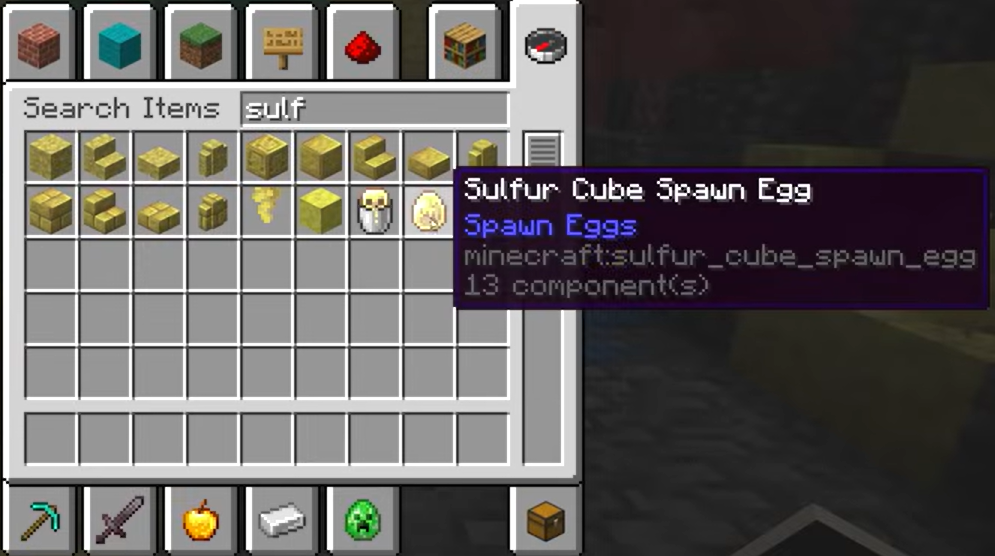
A Sulfur Cube Spawn Egg is a creative-mode item that allows players to instantly spawn a Sulfur Cube mob at any location. Unlike natural spawning, which requires specific biome conditions, spawn eggs give you full control over when and where these mobs appear.
Basic Function:
-
Instantly creates a large Sulfur Cube at the player's cursor location
-
Available only in Creative Mode or via commands
-
Does not exist in Survival Mode inventory without cheats
-
Stackable up to 64 in inventory
This tool is essential for builders, redstone engineers, and content creators who need to test mechanics without traveling to dangerous Sulfur Caves.
Overview: The Minecraft Sulfur Cube
Before using spawn eggs, it is important to understand what you are spawning.
What Is a Sulfur Cube?
A Sulfur Cube is a passive mob introduced in the Chaos Cubed update. It has the unique ability to absorb blocks, which changes its physical properties. For example, absorbing ice makes it slide, while absorbing wool makes it float.
Why Use Spawn Eggs for Testing?
-
Safety: Avoid the toxic hazards of Sulfur Caves
-
Efficiency: Instantly spawn multiple cubes for testing
-
Control: Place cubes in precise locations for builds
-
Experimentation: Test different block archetypes without risk
Sulfur Cave Biome, Sulfur Blocks, and the Chaos Cubed Update
The Sulfur Cube and its associated biome were added in the Chaos Cubed update, a major expansion that introduced new mechanics for physics-based gameplay.
Sulfur Cave Appearance
In natural generation, Sulfur Caves feature:
-
Yellow-tinted walls and sulfur deposits
-
Toxic water pools that inflict poison
-
Sulfur gas vents with visible particle effects
-
Unique vegetation like yellow mushrooms
Sulfur and Cinnabar Blocks
-
Sulfur Blocks: Decorative blocks found in the biome. They do not grant special archetypes when absorbed.
-
Cinnabar Blocks: Red-orange mineral blocks used for decoration. Like sulfur blocks, they fall into the "regular" archetype category when absorbed, providing standard bounce behavior.
These blocks are primarily aesthetic but can be used in builds to create themed environments for your Sulfur Cube experiments.
Where Sulfur Cubes Spawn Naturally
If you prefer natural spawning over spawn eggs, you must locate a Sulfur Cave.
Natural Spawn Requirements
-
Biome: Sulfur Caves only
-
Light Level: Any light level (they spawn in darkness or light)
-
Group Size: 2-4 cubes per spawn attempt
How to Find Sulfur Caves
-
Surface Clues: Look for yellow sulfur springs, gas vents, or cinnabar deposits on the surface.
-
Command Method: Use /locate biome minecraft:sulfur_caves to find the nearest location.
-
Digging: If you find surface indicators, dig carefully at an angle to reach underground caves (typically Y-level 20 to -40).
Pro Tip: For most players, using a spawn egg is safer and faster than searching for a natural cave.
Spawn Egg Basics for Java and Bedrock Editions
Before using spawn eggs, understand the following rules that apply to both editions:
Inventory Acquisition
-
Creative Mode: Available in the "Spawn Eggs" section of the creative inventory
-
Commands: Can be obtained via /give commands (detailed below)
-
Survival Mode: Not obtainable without cheats or mods
Stack Behavior
-
Spawn eggs stack up to 64 in your inventory
-
They do not have durability and can be used indefinitely
Creative Mode Spawning
-
Select the egg from your inventory
-
Right-click (or use the interact button) on a block to spawn the mob
-
The mob will spawn on the surface of the targeted block
Java Edition Usage
Summon Command with NBT Tags
In Java Edition, you can use the following command to spawn a Sulfur Cube:
/summon sulfur_cube ~ ~ ~ {Size:1}
Important Notes:
-
Size:1 creates a large cube. Use Size:0 for a small cube.
-
You can add NBT tags to set names or other properties.
-
Example with name: /summon sulfur_cube ~ ~ ~ {Size:1,CustomName:'"MyCube"'}
Dispenser Use
-
Dispensers cannot dispense spawn eggs to create mobs in Java Edition.
-
Spawn eggs only work when used by a player.
-
To automate spawning, you must use commands or command blocks.
Physics Differences
Java Edition has specific physics behaviors for Sulfur Cubes:
-
Airborne knockback is less severe than in Bedrock.
-
Certain redstone interactions may differ slightly.
Bedrock Edition Usage
Summon Command Variant
In Bedrock Edition, the command syntax is slightly different:
/summon sulfur_cube ~ ~ ~ minecraft:entity_born
Note: Bedrock Edition does not support the same level of NBT tagging in summon commands as Java. You may need to use additional commands or addons to set custom properties.
Behavior Differences
-
Airborne Knockback: Sulfur Cubes are knocked significantly further when launched while airborne.
-
Naming: Named bucketed cubes display "Bucket of [Name]" instead of just the name.
Dispenser Compatibility
-
Like Java, dispensers cannot use spawn eggs to create mobs in Bedrock Edition.
-
Automation requires command blocks or addons.
Capturing, Transporting, and Spawn Eggs
While spawn eggs are useful for creation, you may need to capture and transport existing cubes.
How to Capture a Sulfur Cube
-
Equip an empty bucket.
-
Approach a large Sulfur Cube (small ones cannot be captured).
-
Right-click (or use the interact button) on the cube.
-
You will receive a "Bucket of Sulfur Cube" item.
Placing Captured Cubes
-
Use the bucket on any block to release the cube.
-
This is the safest way to transport cubes across your world.
Preventing Despawning
-
Named cubes do not despawn naturally.
-
If you split a large cube (by killing it), the resulting small cubes can despawn unless named.
-
Use name tags to ensure your cubes remain permanent.
Absorbing Blocks: Archetypes and Uses
The core mechanic of Sulfur Cubes is their ability to absorb blocks, which grants them different properties.
How Block Absorption Works
-
Large Sulfur Cubes can absorb specific blocks dropped on the ground.
-
They can also be fed blocks by players holding them.
-
Once absorbed, the cube stops moving and displays the block inside.
Testing Archetypes Safely
We recommend testing different block types in a controlled environment:
-
Bouncy: Stone, wood, or most solid blocks.
-
Sliding: Ice, packed ice, or snow blocks.
-
Floating: Wool blocks (low gravity effect).
-
Heavy: Iron, gold, or other metal blocks (high gravity).
-
Explosive: TNT (can be ignited to explode).
-
Hot: Magma blocks (damage nearby entities).
Using Cinnabar Blocks
Cinnabar blocks can be absorbed but do not grant special archetypes. They fall into the "regular" category, providing standard bounce behavior. Use them for decorative purposes only.
Removing Absorbed Blocks
-
Use shears on the cube to extract the absorbed block.
-
The block will drop as an item you can collect.
-
Warning: Do not attempt to remove ignited TNT. It will explode.
Damage Resistance and Safety
When a Sulfur Cube absorbs a block, it gains significant damage resistance.
What They Are Resistant To
-
Melee attacks
-
Projectiles
-
Explosions (except their own)
-
Fall damage
-
Freezing
-
Poison
-
Magma block damage
What Can Still Harm Them
-
Fire: They are vulnerable to fire and lava.
-
Suffocation: They can be killed by suffocation or cramming.
-
Wither Effect: The Wither effect bypasses their resistance.
-
Warden Sonic Boom: Wardens can kill them with sonic attacks.
Safety Recommendations
-
Always test TNT archetypes in Creative Mode. The explosion can destroy your build and harm you.
-
Never test Magma archetypes near valuable items. The damage radius can be unpredictable.
-
Keep Fire Resistance potions handy when working with any Sulfur Cube.
Best Uses: Builds, Redstone, and Minigames
Sulfur Cubes offer unique opportunities for creative projects.
Monorail Designs
-
Use the Honeycomb Block archetype (sticky) to create cubes that stick to surfaces.
-
Combine with redstone to create moving platforms or elevators.
-
Note: Physics may differ between Java and Bedrock. Test thoroughly.
Pressure-Plate Puzzles
-
Use Sulfur Cubes as movable weights for pressure plates.
-
Create puzzles where players must guide the cube to specific locations.
-
Use different archetypes to add complexity (for example, sliding ice cubes vs. sticky honey cubes).
Invisibility Tricks
-
Throw a Splash Potion of Invisibility on a Sulfur Cube.
-
If the cube has absorbed a block, only the block will be visible.
-
Use this for off-grid displays or hidden mechanisms.
Minigame Ideas
-
Archetype Swap Challenges: Players must swap cube archetypes to solve puzzles.
-
Physics Arenas: Create safe zones for players to experiment with different block effects.
-
Capture the Cube: A multiplayer game where teams try to capture and transport cubes.
Differences Between Java and Bedrock Edition Mechanics
It is critical to understand the differences between editions before building.
Physics Differences
-
Airborne Knockback: Bedrock Edition knocks cubes much further when they are launched while airborne. Java Edition has less vertical displacement.
-
Monorail Behavior: Sticky archetypes may behave differently due to physics engine differences.
Exploit Differences
-
Some redstone timing mechanisms work differently between editions.
-
Command syntax and NBT tagging capabilities vary significantly.
Playtesting Recommendation
Always test your builds on the specific edition your players will use. What works in Java may not work in Bedrock, and vice versa.
Chaos Cubed Update Notes and Minecraft Live
The Sulfur Cube and Sulfur Cave biome were introduced in the Chaos Cubed update.
Official Announcements
-
Details about the update were announced during Minecraft Live events.
-
Check the official Minecraft website for historical announcements.
Patch Notes
-
Always check the latest patch notes after Minecraft Live events.
-
Mechanics may be adjusted or balanced in future updates.
-
Visit the official Minecraft feedback site to report bugs or suggest improvements.
Troubleshooting and FAQs
Spawn Egg Not Working
Problem: I clicked with the spawn egg, but nothing happened. Solution:
-
Ensure you are in Creative Mode. Spawn eggs do not work in Survival.
-
Verify you are using the correct item. Sulfur Cube Spawn Eggs are distinct from other spawn eggs.
-
Check if you are targeting a valid block. Some blocks may prevent spawning.
Missing Sulfur Caves in Old Worlds
Problem: I cannot find Sulfur Caves in my existing world. Solution:
-
Sulfur Caves only generate in newly generated chunks.
-
You must explore new areas of the world that have not been loaded before.
-
Alternatively, use spawn eggs to create Sulfur Cubes without needing the cave.
Duplicating Cubes via Splitting
Problem: Can I duplicate Sulfur Cubes? Solution:
-
When a large Sulfur Cube dies, it splits into two small cubes.
-
Small cubes grow into large cubes after 20 minutes (or faster with slimeballs).
-
This is the only way to "duplicate" cubes without spawn eggs.
-
Warning: If the large cube dies from its own explosion, no small cubes will spawn.
Small Cubes Not Growing
Problem: My small Sulfur Cube is not growing. Solution:
-
Small cubes take 20 minutes to grow naturally.
-
You can accelerate growth by feeding them slimeballs.
-
If you fed them a golden dandelion, growth is permanently stopped.
Conclusion
The Sulfur Cube Spawn Egg is a powerful tool for builders, redstone engineers, and content creators. By understanding how to use it safely and effectively, you can unlock unique gameplay mechanics and create innovative projects.
Remember to always test in Creative Mode first, respect the differences between Java and Bedrock editions, and prioritize safety when working with explosive or dangerous archetypes.
Ready to start experimenting? Grab your spawn egg and begin building.