How To Tame A Wolf In Minecraft
Whether you are building a massive castle or just trying to survive your first few days, these creatures provide a layer of security that no other mob can offer.

Shahrukh Sial is a Gaming Content Strategist at Sparked Host. He identifies his own strategic outlines through deep research to cover game guides, tips, and updates that help players improve their skills and enjoy a better gaming experience.
Minecraft is a world of endless adventure where finding a loyal friend can make your survival journey much more enjoyable. Many players seek out a tamed wolf to act as a protector and a companion while they explore dangerous caves or vast forests. The bond between a player and their pet is one of the most iconic experiences in gaming history, transforming a lonely survival trek into a shared story of bravery and friendship.
The process of learning how to tame a wolf in minecraft is a fundamental skill that every beginner should master early. Having a pack of minecraft wolves by your side ensures that you are never truly alone when facing the many threats of the night. Whether you are building a massive castle or just trying to survive your first few days, these creatures provide a layer of security that no other mob can offer.
A tamed wolf is more than just a pet; it is a fierce ally that will defend you from any hostile wolf or monster. By following the right steps, you can turn any untamed wolf you find in the wild into a devoted friend. This guide will walk you through the nuances of finding specific variants, the mechanics of taming, and how to utilize the latest features like wolf armor to keep your pack safe.
Introduction to Wolves
Minecraft wolves are iconic neutral mobs that add life and excitement to the various biomes of the overworld. These creatures are usually peaceful but can become an angry wolf if a player chooses to attack them or their pack. In their wild state, they spend their days roaming the woods, occasionally hunting sheep or rabbits to survive in the wilderness.
A wild wolves pack usually consists of four members, though you might occasionally spot a baby wolf wandering with the adults. These animals have remained a fan favorite for years because they offer both utility and emotional connection. They were one of the first animals added to the game that could truly interact with the player, setting the standard for all future pets like cats, parrots, and horses.
What are Wolves in Minecraft
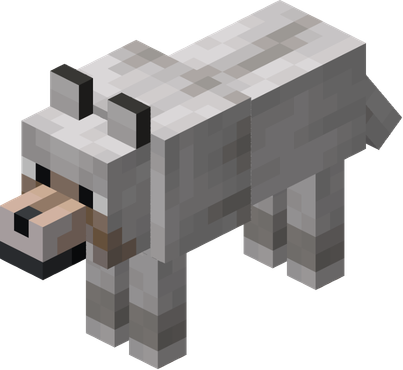
A wolf in minecraft is a mobile entity that exists in three distinct states: wild, hostile, or tamed. An adult wolf has a significant amount of health, and recent updates have boosted this to 40 hearts (80 health points) to ensure their survival. This change was a massive buff, as it doubled their previous survivability, making them much more viable for late-game combat scenarios.
Wolf Behavior and Role in Gameplay
The behavior of wolf wolves is quite complex as they interact with the world around them. When a player within 8 blocks holds meat or bones, the wolf tilts its head in a begging motion for several seconds. If a tamed wolf attacked a target, it would do so with great speed and strength to protect its owner. They also exhibit social behaviors, such as a wolf shakes animation when they exit the water or stop being in the rain, which clears their fur of moisture.
Wolf Variants
The most recent updates have introduced a massive variety of minecraft wolves to the game world. Instead of seeing the same white coat everywhere, players can now find a unique wolf variant depending on the specific biome they visit. This update, often called the "Wolf Armor and Variants" update, completely overhauled how players interact with these mobs by giving them regional identities.
These changes make hunting for a specific black wolf or chestnut wolf a fun challenge for explorers. Each wolf variant retains the same base mechanics but offers a completely different aesthetic to match the surrounding environment. This means that a pale wolf from the taiga behaves exactly like a rusty wolf from the jungle, but their appearances tell a story of where they came from.
All Wolf Variants in Minecraft
There are now nine distinct minecraft wolves types available for players to find and tame. These include the pale wolf, woods wolf, ashen wolf, black wolf, chestnut wolf, rusty wolf, spotted wolf, striped wolf, and the snowy wolf. Each one has a meticulously designed texture that reflects the lighting and foliage of its home biome.
Wolf Types and Breeds
Each type of wolf in minecraft is tied to a specific climate or forest type. For example, the pale wolf is the classic version found in the taiga, while the rusty wolf is a rarer sight found in jungle biomes. The diversity in these breeds allows players to collect a "rainbow" of pets, often leading to large kennels where every wolf variant is represented.
Rare Wolves: Black, Snowy, Striped, Spotted, Ashen, Chestnut
If you are looking for something unique, the black wolf is found in the old growth pine taiga. The snowy wolf lives in the groves, the striped wolf inhabits the wooded badlands, and the spotted wolf resides in savanna plateaus. These rare variants often require players to travel thousands of blocks, making a tamed wolf of this caliber a true trophy of exploration.
Wolf Colors and Biome Variants
-
Ashen Wolf: Found in the snowy taiga, sporting a cool gray coat.
-
Chestnut Wolf: Located in the old growth spruce taiga, featuring a deep reddish-brown fur.
-
Woods Wolf: The most common variant found in the standard forest biome.
-
Spotted Wolf: A unique look found in the savanna plateau areas with a multi-toned coat.
-
Striped Wolf: Found in the wooded badlands, this variant has dark markings across its back.
How to Tame Wolves
Learning how to tame a wolf in minecraft is a simple process that requires only one specific item: bones. You must approach an untamed wolf carefully and feed it until it decides to trust you and becomes a tamed wolf. This mechanic is based on a random chance, meaning you might get lucky with the first bone or have to use a whole stack.
Once the taming is successful, the wolf's collar will turn red, signaling that it is now part of your team. It is important to remember that you cannot tame an angry wolf that is already trying to attack you. If you accidentally hit a wolf, you must either flee until it loses interest or wait for its aggression to reset before you can attempt to befriend it.
Step‑by‑Step Guide to Taming
-
Collect several bones by defeating skeletons or finding them in desert temples and dungeon chests.
-
Find a pack of wild wolves in a forest biome or taiga region by listening for their distinct barking sounds.
-
Hold the bone in your hand and right-click on the untamed wolf while standing still.
-
Each bone has a 1/3 chance of working, so keep feeding it until you see red hearts and a collar.
-
Once you see the red collar, the animal is officially a tamed wolf and will sit down automatically.
How to Befriend a Wolf
To befriend a wolf in minecraft, you should always carry at least 10 to 12 bones just in case. Taming a baby wolf is also possible, and it will grow into a loyal tamed wolf that follows you everywhere. If you find a pack with a baby wolf, taming the parents is usually the easiest way to ensure the whole family stays with you.
How to Find Wolf in Minecraft
Finding minecraft wolves is easiest if you look in the right biomes like the forest biome, taiga, or grove. They spawn in packs of four on top of grass or snow blocks in areas with a light level of 7 or higher. If you are having trouble, try searching during the day when they are most visible and not obscured by hostile wolf variants like zombies or skeletons.
Feeding and Caring for Wolves
Caring for your tamed wolf is essential to keep it healthy and ready for combat. You can determine the health of your pet by looking at its tail; a high tail means it is healthy, while a low tail means the wolf dies risk is high. This visual indicator is one of the most useful features for a pet owner, as it lets you know exactly when to pull your friend out of a fight.
Feeding your tamed wolf meat is the primary way to restore its health after a tough battle. They will accept almost any kind of meat, including rotten flesh, which does not give them food poisoning like it does to players. This makes rotten flesh a valuable resource for maintaining a large army of minecraft wolves without wasting your own food supply.
How to Feed a Wolf in Minecraft
To feed a tamed wolf, simply hold a piece of meat and right-click on the animal. This will heal them and can even lead to wolf pups if you feed two standing wolves that are at full health. You will know they are being healed when you see red heart particles, similar to the taming process.
Healing and Breeding Wolves
-
Use rotten flesh, raw beef, raw porkchops, or even cooked chicken to heal a tamed wolf.
-
When two tamed wolves are fed meat at full health, they will enter love mode and produce a baby wolf.
-
Wolf pups are born already tamed and will follow the owner of the parents immediately.
-
The breeding cooldown is one minute in Bedrock Edition and five minutes in Java Edition.
-
You can also feed them phantom membranes if you want to be fancy, though standard meat is much easier to find.
Naming and Customizing Wolves
You can use a name tag on an anvil to give tamed wolves named identities so they do not get lost in a crowd. Additionally, you can change the tamed wolf's collar color by using any of the 16 available dyes. This is a great way to tell the difference between your "combat" wolves and your "home" wolves.
Wolf Armor
A recent and highly anticipated update has added wolf armor to the game to help protect your friends. This wolf armor absorbs a massive amount of damage, allowing your tamed wolf to survive much longer in dangerous areas. Before this update, wolves were often considered too fragile for serious combat, but now they can stand toe-to-toe with some of the toughest mobs.
This equipment is vital for players who take their standing tamed wolves into raids or deep underground. The wolf armor absorbs all damage until it finally breaks, providing a shield for your loyal companion. If the armor takes too much damage, you can even repair it while the wolf is wearing it by using armadillo scutes.
Wolf Armor in Minecraft
Wolf armor is a specialized item that can only be worn by a tamed wolf. It looks great and provides a layer of defense that was previously missing for minecraft wolves in earlier versions of the game. It covers the wolf's back and sides, giving them a rugged, armored appearance that matches the player's own gear.
How to Make Wolf Armor
To craft this protection, you will need to collect armadillo scutes. You can find armadillos in savanna and badlands biomes. Once you have enough scutes, you can use a crafting table to create the wolf armor using a specific pattern. The recipe is relatively cheap, ensuring you can gear up an entire pack without too much trouble.
Master the art of crafting Wolf Armor and protecting your pet by following our comprehensive step-by-step guide.
Everything you need to know about materials and crafting is right here: How to make a Wolf Armor.
How to Get Wolf Armor
You can obtain the necessary materials by using a brush on an armadillo. This is the only way to get the items needed for wolf armor, making the armadillo a very important neighbor for tamed wolf owners. Interestingly, you can brush an armadillo multiple times to get all the scutes you need, as they do not have a limit on how many they can provide.
Dyeing and Customizing Wolf Armor
Just like leather armor for players, wolf armor can be dyed various colors in a crafting table or cauldron. This allows you to match the armor to the tamed wolf's collar color or create a unique look for every member of your pack. Customizing your wolves has never been more detailed, allowing for true personalization of your survival team.
Wolves as Companions
Having tamed wolves sitting around your base provides a sense of security and home. However, standing wolves are even better because they will follow you and wolves attack anything that tries to hurt you during your travels. They are the only mob that will actively seek out enemies to protect you without needing a specific command.
If you move too far away, the wolf teleports to a nearby block so it does not get left behind. Tamed wolves are the ultimate survival partners because they are always ready to jump into the fray. Whether you are raiding a woodland mansion or just clearing a small cave, their presence makes every task feel safer.
Wolves in Combat and Defense
In battle, tamed wolves will automatically target any mob that harms the player or any mob the player attacks. They are especially useful against skeletons because skeletons will try to run away from them, giving you an opening to strike. However, you should be careful because wolves attack can lead to them getting hurt by explosions. They will not attack creepers, which is a programmed safety feature to prevent your pets from blowing up your house.
Wolves as Loyal Companions in Survival Mode
Whether you have wolves standing guard or wolves sitting by the fire, they are a core part of the experience. A tamed wolf shaking off water after a swim or a wolf shakes after a rainstorm is a small detail that makes them feel real. They also have a "begging" animation when you hold food, and they will tilt their heads curiously if you are looking at them with a bone in hand.
Managing Large Packs of Wolves
For many players, one tamed wolf is not enough. You can lead an entire army of minecraft wolves into battle, but this requires management. Keeping them in wolves sitting mode when you are at home prevents them from getting in the way of your building projects. When it is time for a journey, simply right-click to get them into wolves standing mode, and they will follow your every move.
Technical Mechanics: Teleportation and Pathfinding
The way a wolf teleports is based on the player's distance. If you are more than 12 blocks away and there is a suitable flat block near you, the wolf will instantly appear by your side. This ensures that even if you are using an elytra or a fast horse, your tamed wolf will eventually catch up. However, they cannot teleport if they are sitting or if you are in a different dimension, so always remember to stand them up before traveling through a nether portal.
Advanced Tips for Wolf Owners
-
Tail Position: Always check the tail. If it is pointing straight down, feed them immediately to prevent the wolf dies message in your chat.
-
Splash Potions: You can use splash potions of healing to heal an entire pack of minecraft wolves at once during a raid.
-
Fire Resistance: If you are taking your wolves to the nether, giving them a splash potion of fire resistance is mandatory to keep them safe from lava and blazes.
-
Avoiding Creepers: Since wolves attack almost everything else, keep a bow handy to take out creepers before they get close to your pack.
-
Armor Maintenance: Keep a few extra armadillo scutes in your inventory to repair wolf armor on the fly during long expeditions.
Conclusion
Mastering the art of taming and caring for minecraft wolves is a highlight of the game. From choosing the perfect black wolf variant to equipping them with protective wolf armor, these loyal creatures are the best friends a player can have. They offer protection, companionship, and a reason to explore the furthest reaches of the overworld. Whether you are leading a pack of standing tamed wolves or raising wolf pups in your backyard, your journey will always be better with a companion by your side.
To ensure your world is always online for you and your pack, consider using SparkedHost Minecraft hosting for a reliable and high-performance server experience that keeps your adventures running smoothly.