How to Make a Daylight Sensor in Minecraft
As we dive into the mechanics of light and signals, you will see how easy it is to upgrade your base. Let us look at what this block actually does and why every modern Minecraft base needs at least one.

Shahrukh Sial is a Gaming Content Strategist at Sparked Host. He identifies his own strategic outlines through deep research to cover game guides, tips, and updates that help players improve their skills and enjoy a better gaming experience.
Minecraft is a game that truly shines when you start automating your world with redstone. If you are tired of manually turning on your lights or closing your doors, you need to learn how to use a sensor.
This incredible tool allows you to track the sun and the moon throughout the game cycle. It is a vital component for any player who wants to create a smart house or a self-running farm without constant effort.
You will find that knowing how to make daylight sensor in minecraft opens up many creative doors. Once you understand the basics of this block, you can master the timing of your entire base like a pro.
The beauty of redstone is that it allows for infinite creativity, but it can be intimidating for beginners. Starting with a sensor is the best way to bridge the gap between simple blocks and complex machinery in your world.
Whether you are playing on a solo world or a large server, automation is the key to efficiency. Using these sensors means you can spend less time on chores and more time exploring the vast landscapes of your seed.
As we dive into the mechanics of light and signals, you will see how easy it is to upgrade your base. Let us look at what this block actually does and why every modern Minecraft base needs at least one.
What is a Daylight Sensor in Minecraft
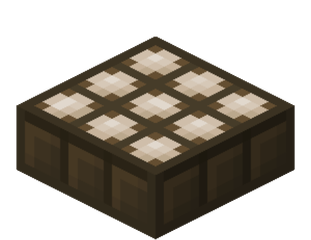
A daylight sensor is a unique block that detects the presence of sky light. It functions as a specialized redstone component that provides a variable signal depending on the time of day and current weather.
When the sun rises, this device begins to produce redstone power. It is the perfect tool for players who want to build machines that only function during the day or systems that lights turn on at night.
Think of it as a solar panel for your redstone circuits that converts the position of the sun into a measurable pulse. It is the only block in the game that interacts directly with the sky light level naturally.
Because it is a block entity, it is constantly checking the environment to see how much light is hitting its surface. The daylight sensor's block entity stores only its entity ID and position, which is the minimum data required for it to function and update every game tick. This block data is lightweight, as only its entity information is stored, and the block entity ensures the daylight sensor updates properly and behaves accurately in response to changes in sky light. This makes it incredibly reliable for timing events that happen every single day in your survival world.
How to Craft a Daylight Sensor
Crafting this item is a milestone for any survival player because it requires a trip to the Nether. You cannot build this sensor with just surface materials, so you must be prepared for a small adventure first.
The process involves combining natural resources with minerals found deep in the dangerous Nether dimension. Once you have the right items, you can use any crafting table to assemble this useful daylight detector for your base.
Before you start, make sure you have a diamond pickaxe to mine the obsidian needed for a Nether portal. Finding quartz is relatively easy once you are inside, as it generates in large white veins across the Netherrack.
You will also need to smelt some sand to get glass and chop down trees for your wooden slabs. Having all these ingredients ready beforehand will make the crafting process much faster once you return to the Overworld.
Crafting Recipe for Daylight Sensor
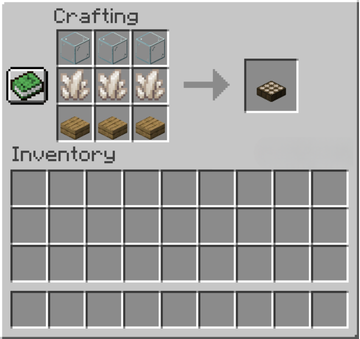
To build this item, you need three pieces of glass, three pieces of nether quartz, and three wooden slabs. Open your crafting grid and place a daylight sensor's materials in three rows. Put the glass in the top row, the quartz in the middle, and the slabs along the bottom to finish. This configuration produces one sensor that is ready to be placed anywhere in your world that has exposure to the sky.
How to Make Daylight Sensor in Minecraft PC
On the PC version, also known as Java Edition, you follow the standard 3x3 crafting recipe. Simply drag your materials from your inventory into the table. This version allows you to use the sensor to get a maximum signal strength of 15 when placed in the End dimension. Because Java Edition is highly technical, many players use these sensors to trigger massive community projects or server-wide events.
How to Make Daylight Sensor in Minecraft PE / Pocket Edition
Making this sensor in the Pocket Edition is the same as the desktop version. You will need to gather your glass, quartz, and slabs. Because the interface is touch-based, just tap the recipe in your crafting book to quickly implement daylight sensors into your inventory. It is very convenient for mobile players who want to automate their farms while playing on the go or during a break.
How to Make a Daylight Sensor on Console (Xbox, PlayStation)
Console players can find the daylight sensor in the redstone tab of the crafting menu. As long as you have the required items, the game will highlight the recipe for you. It is a very simple process that works the same across all modern consoles. This makes it easy for friends playing on different systems to share designs and build automated cities together using the same redstone logic.
How to Use a Daylight Sensor in Minecraft
Using a daylight sensor is all about placement and understanding the power level it provides. You must place it in a spot where it has a clear view of the sky, or the sky light level will be too low.
This block is highly versatile because you can toggle its mode with a simple right-click. This allows it to act as either a regular daylight detector or an inverted daylight detector, giving you complete control over your redstone circuits.
If you place a block directly on top of the sensor, it will stop working as intended during the day. However, this “shading” technique can actually be used to create specific signal strengths if you are building a custom timer. Shade increases the signal strength of a daylight detector by reducing the amount of sky light it receives, and so shade is accounted for before inverting the daylight detector, which affects its output.
The sensor is only 0.375 blocks high, so you can walk over it easily without jumping. This low profile makes it easy to hide in gardens or on rooftops where it will not interfere with the look of your house.
How Does a Daylight Sensor Work
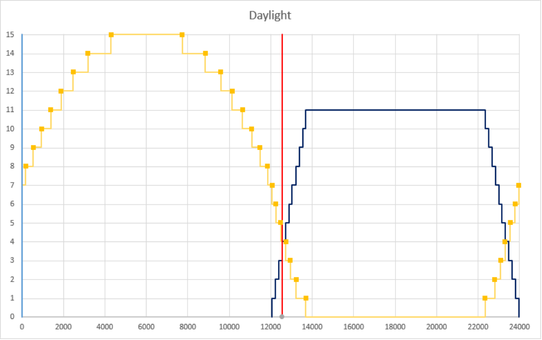
The sensor measures the current redstone power level based on the light hitting it. In clear weather, the daylight detector output is strongest at noon. If it rains or thunders, the redstone signal will drop because the clouds block the sun. This change in signal is not an error; it is a feature that allows you to detect weather changes and trigger rain-shielding systems for your crops or animals.
How to Activate and Set Up a Daylight Sensor
To activate the sensor, simply place it on the ground. It will immediately begin to powers adjacent blocks if there is sufficient daylight. You do not need to provide external power; the sun does all the work for you. It is important to remember that it only sends a signal to the blocks it is touching, so you may need redstone dust to move the power further away.
How to Invert a Daylight Sensor (Inverted Daylight Detector)
You can perform a simple inversion by right-clicking the sensor. This turns it into an inverted detector, which often looks blue or dark purple. In this mode, the daylight detector inverts its signal, meaning it will produce redstone power only when it gets dark. This is the most common setting for players who want to build automatic porch lights that turn on at sunset.
How to Use Daylight Sensors with Redstone
You can connect the sensor to redstone dust to carry a redstone pulse to other parts of your base. By using a not gate, you can create even more complex logic. It powers adjacent facing blocks, making it easy to trigger pistons or dispensers. For example, you could have a sensor on your roof that sends a signal down a long wire to close your castle gates at night.
How to Use a Daylight Sensor as a Timer
Because the daylight detector power levels change slowly throughout the day, you can use it as a long-term timer. Every thousand game ticks, the signal strength shifts, allowing you to trigger events at specific times like sunrise or sunset. You can also visualize the daylight detector's state at the nearest quarter of a thousand game ticks for more precise timing. This is much more efficient than building a massive loop of redstone repeaters that could cause lag on your server or take up too much physical space.
How to Use Daylight Sensors in Farms (e.g., Kelp Farm)
In automated farms, a sensor can act as a reset switch. For example, in a kelp farm, the sensor can trigger a redstone signal once per day to harvest all the plants. This ensures your farm stays efficient without any manual clicking. You can even set it to harvest at noon when the signal is strongest, ensuring that all your pistons fire with maximum power and consistency.
How to Use Daylight Sensors for Lamps and Lights
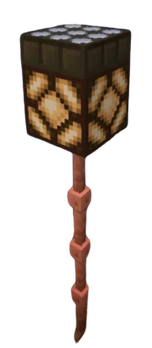
This is the most popular use for the daylight sensor. By connecting it to a redstone lamp, you can ensure your base is always lit when the sun rises or sets. It is a great way to keep mobs away from your front door. Since mobs spawn in low light levels, having your lights turn on the moment the sun begins to dip is a vital safety feature for survival.
How to Make a Daylight Sensor Redstone Lamp
To make a simple lamp, place a redstone lamp on the ground and place a daylight sensor directly on top of it. Right-click the sensor to turn it into an inverted daylight detector. Now, the lamp will automatically turn on at night. This is a compact and efficient design that requires zero extra wiring, making it perfect for small houses or narrow hallways.
How to Make a Daylight Sensor Light Post
For a street light, place a fence post and put a lamp on top. Place the sensor on the lamp and set it to inverted mode. This setup creates a beautiful light post that keeps your paths safe once the sun goes down. You can use different types of wood or stone for the post to match the aesthetic of your town or forest village.
How to Make a Daylight Sensor Door
You can automate your front door by connecting a sensor to a door or gate. This setup will daylight detector activates the door to stay open during the day and close automatically at night, keeping your home safe from zombies. This is especially helpful if you often forget to close your door after a long day of mining or exploring the nearby biomes.
Daylight Sensor Mechanics
The mechanics of this block are deeper than they appear. It is officially a block entity, which means it holds additional data to track the time. It is only 0.375 blocks high, making it shorter than a regular slab.
Even if you are in creative mode, you will notice the daylight detector activates differently based on your surroundings. If the sensor is sufficiently shaded or fully encased, it might turn on even during the day because it thinks it is dark.
It is interesting to note that the sensor does not produce a signal in the Nether because there is no sun or sky light. However, in the End, the sky light level is always at its maximum, which results in a constant signal of 15.
The sensor is also a transparent block, meaning it will not cut off redstone lines that run underneath it. This allows for very compact wiring where you can hide your logic gates directly beneath the sensor without needing extra space.
What Does a Daylight Sensor Output Signal Do in Minecraft
Its primary job is to provide an output signal based on the environment. It can be used as a fuel in a furnace in an emergency, smelting 1.5 items. It also functions as a fall damage block since it is not a full cube. It is very versatile, acting as a detection tool, a power source, and even a decorative piece for modern or industrial builds.
How Daylight Sensors Work in Different Versions (Java, Bedrock, PE, Console)
In the Bedrock Edition, daylight detectors can be moved by pistons, which is great for hidden machines. In Bedrock Edition, inverted daylight detectors cannot be obtained through standard gameplay, but can be acquired in creative mode using the pick block feature through a glitch, or by using inventory editing or add-ons. In Java Edition, they are stationary. Regardless of the version, an inverted daylight detector drops a regular one when it is a broken block. This consistency ensures that no matter where you play, the basic logic of crafting and gathering remains the same for everyone.
Can Daylight Sensors Be Pushed with Pistons
As mentioned, this depends on your version. In Bedrock and Pocket Edition, you can push them to hide your sensors. In Java Edition, they act like other adjacent blocks that cannot be moved, so you must plan your layout carefully. If you are on Bedrock, you can create a floor that swaps between sensors and normal carpet to hide your base's automation.
How to Disable or Deactivate a Daylight Sensor
To stop the signal, you can cover the sensor with normal blocks to block the sky light. If it is in inverted mode, you would need to light up the area with block light like torches to make it longer emit signal. You can also break the block with an axe to pick it up and move it, which is the fastest way to deactivate it permanently.
Creative Uses for Daylight Sensors
Beyond simple lights, there are many cool things to build with these sensors. You can use them to create note blocks that play a morning chime or systems that launch fireworks when the sun rises to celebrate a new day.
Technical players use them to automate bases in ways that feel like magic. Because the signal based on light is so precise, you can create complex security systems that change their behavior based on the time.
Imagine a base where the walls move to reveal windows during the day but seal up tight with stone at night. This level of automation is possible with a few sensors and a series of pistons connected to a redstone clock.
You can also use sensors to monitor your inventory or farm storage. By using a daylight sensor as a pulse generator, you can trigger a sorting system to run once a day, keeping your chests organized without constant player input.
Cool Things to Build with Daylight Sensors
One fun project is a "Time Bomb" that triggers TNT exactly at midnight. You can also build a clock tower that uses inverted daylight sensors to show the time to everyone on your Sparked Host server using different colored lamps. Another idea is an automatic pool cover that slides into place when the sun goes down to prevent mobs from falling into the water.
Using Daylight Sensors to Automate Bases
You can use sensors to trigger a redstone pulse that refills your furnace fuel every morning. This kind of automation makes your survival experience much smoother. It ensures your resources are always ready when you return from an adventure. You can even set up a system that prepares a "daily kit" of food and tools for you to pick up every morning.
Fireworks, Teleporters, and Traps with Daylight Sensors
For a grand entrance, set up a sensor to trigger fireworks as soon as you step out of your house at dawn. You can also build traps that only activate at night, catching players or mobs when they think they are safe in the dark. For example, a hidden pitfall trap that only opens when the light level is zero can be a very effective defense.
Reliable Redstone Performance with Sparked Host
When you are building a base full of automated daylight sensors, you need a server that can handle the constant game tick updates. If your server lags, your sensors might not trigger on time, which can ruin your farms or traps. A delay of even a few ticks can cause a piston to fire at the wrong time, potentially breaking a delicate machine or letting a creeper into your home.
Sparked Host provides the high-performance hardware needed to keep your redstone running perfectly. Whether you have dozens of inverted daylight sensors or complex piston doors, their servers ensure every redstone signal is processed without delay. This makes Sparked Host the best choice for players who love technical builds and automation. Their systems are optimized for the latest versions of Minecraft, ensuring that your 2026 builds run as smoothly as possible.
Furthermore, running multiple sensors can sometimes put a strain on a low-end server because they are constantly checking for light changes. With Sparked Host, you do not have to worry about these calculations slowing down your gameplay. You can build as many sensors as your heart desires, knowing that the Minecraft server has the power to keep up with your creativity. This is especially important for community servers where many players might be building their own automated systems simultaneously.
Conclusion: Best Uses for Daylight Sensors in Minecraft
The daylight sensor is a powerful tool that every beginner should learn to use. It bridges the gap between simple manual switches and fully automated bases. From simple lamps to complex timers, it is a block that offers endless utility.
By mastering the difference between a regular daylight detector and an inverted daylight detector, you can control every aspect of your world. It is the best way to make your Minecraft home feel alive and responsive to the environment.
Experiment with these sensors in your next build to see how they can improve your gameplay. As you get more comfortable with redstone, you will find even more creative ways to use the sun and moon to your advantage.
Whether you are building a small garden light or a massive server-wide clock, the daylight sensor is your best friend. It is reliable, cheap to craft once you reach the Nether, and incredibly fun to work with.
Take your time to understand the signal strengths and how they change with the hours. Once you do, you will be the master of time and light in your Minecraft world, and your base will be the envy of all your friends.
Automation is not just about making things easier; it is about seeing what is possible in the world of blocks. So go out there, gather some quartz, and start building your first sensor today.