Key Minecraft Server Hardware Requirements for Best Performance
Discover the essential hardware requirements for running a high-performance Minecraft server. Optimize your setup for the best gaming experience—read more!

Shahrukh Sial is a Gaming Content Strategist at Sparked Host. He identifies his own strategic outlines through deep research to cover game guides, tips, and updates that help players improve their skills and enjoy a better gaming experience.
Running a Minecraft server puts a unique strain on computer hardware. Unlike most games where the player's computer handles the heavy lifting, the server must calculate every block update, mob movement, and redstone circuit in real time. If the hardware cannot keep up, the entire world slows down. This guide covers the exact specifications needed to run a stable server in 2026, based on current hardware capabilities and the latest game requirements.
Minecraft's server logic runs primarily on a single thread. This means having a processor with 64 cores provides no benefit if those cores are slow. The game needs fast individual cores, high-speed memory, and storage that can load world data instantly. Using outdated hardware or incorrect configurations leads to lag, crashes, and a poor experience for players. Whether you are hosting a private world for friends or managing a public community, understanding these requirements is essential for stability.
The following sections detail the specific components needed for different server sizes, explain why certain hardware choices cause performance issues, and provide up-to-date recommendations for 2026. We will look at why modern CPUs like the Ryzen 9 9950X3D are changing the hosting landscape, how to allocate RAM correctly to avoid crashes, and why professional hosting is often safer than running a server from home.
What Hardware Does a Minecraft Server Need?
A Minecraft server requires a specific set of hardware characteristics to function properly. The game engine is not designed to utilize multiple CPU cores for its main logic loop. Instead, it relies heavily on the speed of a single core. This architectural quirk means that standard server hardware, which often prioritizes core count over clock speed, performs poorly for Minecraft.
The server must process world ticks 20 times per second. Each tick involves calculating physics, entity AI, and player actions. If the CPU cannot complete these calculations within 50 milliseconds, the server falls behind. This delay manifests as lag for all connected players. Therefore, the primary requirement is a processor with high single-core performance.
Memory is the second critical component. The server uses RAM to store active world chunks, entity data, and player information. Insufficient RAM causes the system to swap data to the hard drive, which is significantly slower. This results in severe lag spikes. However, allocating too much RAM can also cause issues due to how Java handles garbage collection. Finding the correct balance is necessary for stability.
Storage speed directly impacts how quickly the server can load and save world data. When players move through the world, the server must read new chunk data from the disk. Slow storage creates a bottleneck, causing delays in terrain generation. Modern servers require fast solid-state storage to handle these requests efficiently.
Network connectivity is the final piece of the puzzle. The server must send and receive data packets to and from players constantly. High latency or low bandwidth results in delayed actions and disconnections. For public servers, protection against DDoS attacks is also mandatory, as these attacks can overwhelm a network connection and shut down the server.
Minecraft Server CPU Requirements
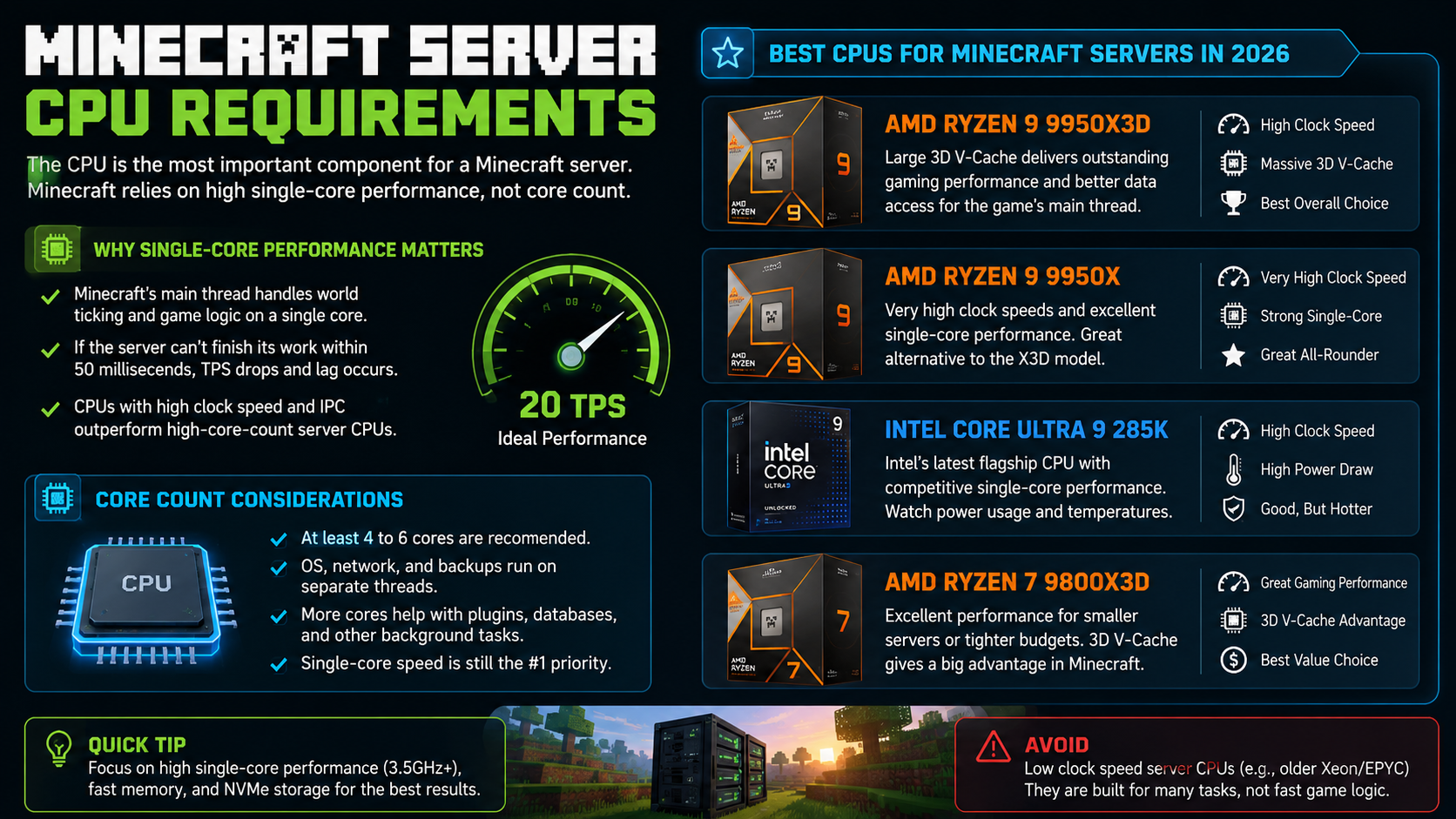
The CPU is the most important component for a Minecraft server. The game's main thread, which handles world ticking and logic, runs on a single core. This means the clock speed and instructions per clock (IPC) of the processor are far more important than the number of cores.
Why Single-Core Performance Matters
Minecraft's server software is not fully multi-threaded. While some tasks like network handling and chunk loading can be offloaded to other threads, the core game logic remains on a single thread. If this thread cannot complete its work within the 50-millisecond window, the server's TPS (ticks per second) drops. A drop in TPS causes the game to slow down for everyone.
Processors designed for server workloads, such as older Intel Xeon or AMD EPYC models, often have many cores but low clock speeds. These CPUs are excellent for web hosting or database management but perform poorly for Minecraft. A consumer-grade processor with fewer cores but higher clock speeds will always outperform a high-core-count server CPU for this specific use case.
Best CPUs for Minecraft Servers in 2026
As of mid-2026, the following processors offer the best performance for Minecraft servers. These CPUs combine high clock speeds with large cache sizes, which significantly benefit gaming workloads.
-
AMD Ryzen 9 9950X3D: This processor features a large 3D V-Cache, which provides a significant boost in gaming performance. The extra cache helps store frequently accessed data, reducing the need to fetch information from slower memory.
-
AMD Ryzen 9 9950X: While it lacks the 3D V-Cache, this CPU offers extremely high clock speeds and strong single-core performance. It is a viable alternative if the X3D model is unavailable.
-
Intel Core Ultra 9 285K: Intel's latest offering provides competitive single-core performance. However, users should be aware of power consumption and thermal requirements.
-
AMD Ryzen 7 9800X3D: For smaller servers or those on a tighter budget, this CPU offers excellent performance at a lower price point. The 3D V-Cache still provides a significant advantage over non-X3D models.
During testing, servers running on modern Ryzen X3D processors maintained stable TPS even during intensive world generation tasks. In contrast, older low-clock Xeon processors experienced noticeable slowdowns when handling complex redstone circuits or large numbers of entities.
Core Count Considerations
While single-core performance is paramount, a minimum number of cores is still necessary. The operating system, network stack, and backup processes run on separate threads. A processor with at least 4 to 6 cores is recommended to ensure these background tasks do not interfere with the server's main thread. For larger servers, additional cores can help handle plugin processing, database queries, and other auxiliary tasks.
How Much RAM Does a Minecraft Server Need?
Allocating the correct amount of RAM is critical for server stability. Too little RAM causes crashes and lag, while too much RAM can lead to severe performance issues due to Java's garbage collection mechanisms.
Understanding RAM Allocation
Minecraft servers run on the Java Virtual Machine (JVM). The JVM uses a process called garbage collection to free up memory that is no longer in use. When a large amount of RAM is allocated, the garbage collector may wait until the memory is nearly full before running. When it finally does run, it has to process a massive amount of data, which can freeze the server for several seconds. This is known as a "GC pause" and appears as a lag spike to players.
For most servers, allocating 2 to 8 GB of RAM is sufficient. Larger communities or heavily modded servers may require more, but it is rare to need more than 16 GB. If a server requires more than 16 GB to function, it is often a sign of a memory leak or poor optimization rather than a legitimate need for resources.
Recommended RAM by Server Type
The following table provides general guidelines for RAM allocation. These numbers assume a standard vanilla or lightly modded server with optimized software like Paper or Purpur.
| Server Type | Player Count | Recommended RAM | Notes |
|---|---|---|---|
| Private Server | 1-5 | 2-4 GB | Sufficient for small groups and families. |
| Small Community | 5-20 | 4-8 GB | Requires careful monitoring of usage. |
| Medium Community | 20-50 | 8-12 GB | Optimized software is mandatory, and pairing it with extreme-performance Minecraft hosting plans can help maintain smooth gameplay. |
| Large Public Server | 50+ | 12-32 GB | May require multiple servers or specialized hardware. |
| It is important to note that these are general guidelines. The actual requirement depends on view distance, simulation distance, plugins, world size, and mods. A heavily modded server with ten players may require more RAM than a vanilla server with thirty players. Always monitor your server's memory usage and adjust accordingly. |
The Danger of Over-Allocation
Many server owners mistakenly believe that allocating more RAM will improve performance. In reality, this often makes things worse. As mentioned earlier, large RAM allocations lead to long garbage collection pauses. Additionally, if the server does not need the extra memory, it sits unused, wasting resources that could be better used by the operating system or other processes.
If you notice your server experiencing periodic freezes or lag spikes, check your RAM allocation. Reducing the amount of allocated memory can sometimes resolve these issues by forcing the garbage collector to run more frequently and for shorter durations.
SSD vs NVMe for Minecraft Servers
Storage speed plays a crucial role in server performance, particularly when it comes to loading world data. When players move through the world, the server must read chunk data from the storage device. Slow storage can create a bottleneck, causing delays in terrain generation and world saving.
The Problem with HDDs
Hard disk drives (HDDs) use mechanical parts to read and write data. This makes them significantly slower than solid-state drives. For a Minecraft server, an HDD can cause noticeable lag when players move quickly or when the server is generating new chunks. While an HDD might work for a small private server with one or two players who stay in a single area, it is not suitable for any server with multiple players or public access.
SSDs: The Minimum Standard
Solid-state drives (SSDs) do not have moving parts and can access data much faster than HDDs. For most small to medium servers, a standard SATA SSD is sufficient. It provides a significant improvement over HDDs and ensures that chunk loading does not become a bottleneck.
NVMe: The Preferred Choice
NVMe drives connect directly to the motherboard via the PCIe interface, offering much higher speeds than SATA SSDs. For public servers, modded servers, or any server where performance is critical, NVMe storage is highly recommended. The faster read and write speeds reduce chunk loading times and improve the overall responsiveness of the server.
Many large public Minecraft communities use NVMe storage to ensure a smooth experience for their players. The cost difference between SSDs and NVMe drives has decreased significantly, making NVMe a viable option for most server setups.
Minecraft Server Requirements by Player Count
The hardware requirements for a Minecraft server vary significantly based on the number of players and the type of server being run. The following sections provide specific recommendations for different server sizes.
Private Server (1-5 Players)
For a small private server used by friends or family, the requirements are relatively low. A modern 4-core processor with a clock speed of at least 3.5 GHz is sufficient. 4 GB of RAM is usually enough, and a standard SSD is acceptable.
-
CPU: 4-core 3.5 GHz+ (e.g., Intel i5, AMD Ryzen 5)
-
RAM: 4 GB
-
Storage: SSD
-
Network: Standard home internet (for private use only)
Small Community (10-20 Players)
As the number of players increases, so do the hardware requirements. A 6-core processor with high single-core performance is recommended. 8 GB of RAM is necessary to handle the increased load, and NVMe storage should be used to ensure fast chunk loading.
-
CPU: 6-core modern CPU (e.g., Intel i7, AMD Ryzen 7)
-
RAM: 8 GB
-
Storage: NVMe
Medium Community (20-50 Players)
For medium-sized communities, high-performance hardware is essential. A processor like the AMD Ryzen 7 or equivalent is required. 12 GB of RAM and enterprise-grade NVMe storage are necessary to maintain stability.
-
CPU: Ryzen 7 or equivalent
-
RAM: 12 GB
-
Storage: Enterprise NVMe
-
Network: Dedicated server hosting with advanced DDoS protection
Large Public Server (50+ Players)
Large public servers require top-of-the-line hardware. A processor like the AMD Ryzen 9 X3D or equivalent is recommended to handle the intense single-threaded load. 16-32 GB of RAM and enterprise NVMe storage in a RAID configuration are necessary for reliability and performance.
-
CPU: Ryzen 9 X3D or equivalent
-
RAM: 16-32 GB
-
Storage: Enterprise NVMe RAID
-
Network: Dedicated fiber connection with specialized anti-DDoS game protection
Why Minecraft Servers Lag
Lag is the most common issue faced by Minecraft server owners. Understanding the root causes of lag is the first step in resolving it. There are several common reasons why a server might experience performance issues.
Low Single-Core Performance
As mentioned earlier, Minecraft relies heavily on single-core performance. If the CPU cannot handle the game's logic on a single thread, the server will lag. This is the most common cause of TPS drops. Upgrading to a processor with higher single-core performance is often the only solution.
Excessive Entity Counts
Entities such as mobs, items, and minecarts require significant CPU resources to process. Large farms or areas with high entity counts can overwhelm a server, even one with powerful hardware. Implementing entity limits or using plugins to manage entity counts can help mitigate this issue.
Slow Storage
Chunk loading and world saving require fast storage. If the server is running on an HDD or a slow SSD, players may experience lag when moving through the world or when the server is saving data. Upgrading to NVMe storage can resolve these issues.
Poor Plugin Management
Plugins can add significant overhead to a server. Poorly optimized plugins or too many plugins can cause TPS drops and memory leaks. It is important to regularly review and remove unnecessary plugins and to ensure that all plugins are up to date and compatible with the server software.
Incorrect RAM Allocation
Allocating too little or too much RAM can cause performance problems. As discussed in the RAM section, finding the correct balance is crucial. Monitoring server performance and adjusting RAM allocation as needed is essential for stability.
Home Hosting vs Professional Hosting
Deciding whether to host a server at home or use a professional hosting service is a critical decision. Each option has its pros and cons.
Home Hosting
Hosting a server from home can be a cost-effective solution for small private servers. However, it comes with significant risks and limitations.
-
Security: Home internet connections are not designed to handle public server traffic. Exposing your home IP address to the internet can make you a target for DDoS attacks.
-
Bandwidth: Most home internet plans have limited upload bandwidth. This can cause lag for players, especially if multiple people are using the internet connection.
-
Reliability: Home power and internet connections are not as reliable as those in professional data centers. Power outages or internet downtime can disrupt the server.
-
DDoS Protection: Home networks lack professional DDoS protection. A simple attack can knock your server and entire home network offline.
Professional Hosting
Professional hosting services offer several advantages over home hosting.
-
Security: Hosting providers have robust security measures in place to protect against DDoS attacks and other threats.
-
Bandwidth: Professional hosts have high-speed, dedicated bandwidth that can handle large numbers of players without issues.
-
Reliability: Data centers have redundant power and internet connections, ensuring high uptime.
-
Support: Many hosting providers offer 24/7 contact and support channels to help resolve issues quickly.
For any server that is accessible to the public, specialized Minecraft server hosting is highly recommended. The cost is usually low compared to the risks and limitations of home hosting.
Minecraft Server Hardware Trends for 2026 and Beyond
The landscape of Minecraft server hosting is constantly evolving. Several trends are emerging that will shape the future of server hardware and management.
More Hosts Are Moving to X3D CPUs
Processors with large cache sizes, particularly AMD's X3D chips, perform exceptionally well in gaming workloads. The extra cache helps reduce latency and improve performance in single-threaded applications like Minecraft. As a result, more hosting providers are beginning to offer X3D-based server hardware across multiple locations.
DDR5 Has Become Standard
DDR5 memory provides higher bandwidth and better efficiency than DDR4. Most new server builds now use DDR5 memory to ensure optimal performance, and you can often find dedicated server hardware deals featuring modern CPUs and DDR5. While DDR4 is still functional, it is becoming increasingly obsolete for high-performance applications.
Faster Storage Is Becoming the Norm
Premium hosts are increasingly using PCIe Gen 5 NVMe drives. These drives offer significantly faster read and write speeds than previous generations, reducing chunk-generation delays and improving backup speeds, especially when paired with high-performance global hardware and locations. As the cost of this technology decreases, it is expected to become the standard for all server setups.
AI-Assisted Server Management
Some full-service dedicated hosting providers are introducing AI-powered monitoring systems. These systems can automatically detect performance issues, restart crashed servers, and suggest optimizations. While still in the early stages, this technology has the potential to significantly improve server stability and reduce the workload for administrators.
Frequently Asked Questions
How much RAM does a Minecraft server need?
Most private servers run well with 2-8 GB of RAM. Larger or modded servers often require 12 GB or more. The exact amount depends on the number of players, plugins, and mods. It is important to monitor server usage and adjust allocation as needed. Allocating too much RAM can cause performance issues due to garbage collection.
Is SSD necessary for a Minecraft server?
No, but SSDs significantly improve chunk loading and save performance. Public servers, modded servers, and servers with many players should use NVMe storage because chunk generation and world saves occur much faster. HDDs can still work for small private servers with one or two players, but they are not recommended for any serious setup.
What CPU is best for Minecraft servers?
Processors with strong single-core performance, such as modern Ryzen X3D and high-end Intel chips, generally provide the best results. Specifically, the AMD Ryzen 9 9950X3D, AMD Ryzen 9 9950X, and Intel Core Ultra 9 285K are top choices in 2026. Avoid older server CPUs with low clock speeds.
Can I host a Minecraft server on my PC?
Yes. Small private servers can run on a home computer. However, public servers often benefit from professional hosting and DDoS protection. Home internet connections typically lack the upload bandwidth and security measures required for a public server. Additionally, running a server can impact the performance of your personal computer.
Why is my server lagging even with good hardware?
Lag can be caused by many factors, including poor plugin optimization, excessive entity counts, or incorrect configuration. Check your server logs for errors, review your plugin list, and ensure that your server software is up to date. Using optimized server software like Paper or Purpur can also help resolve performance issues.